
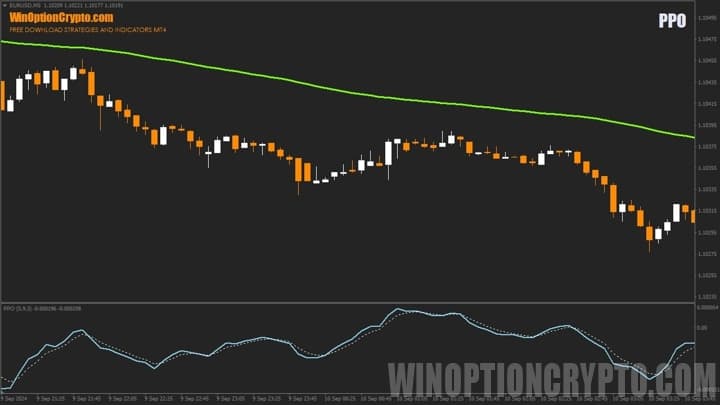
The PPO (Percent Price Oscillator) binary options indicator is a MACD-derived technical tool widely used by traders. Both indicators can identify divergences and potential market reversals. The key difference with PPO, however, is that it expresses the relationship between two moving averages as a percentage, which allows for a more accurate assessment of the strength of a price impulse.
In this review, we will look in detail at how the PPO indicator works, compare it with MACD signals, and discuss how to make it a reliable tool for trading decisions in the binary options market.
Contents:
- Key Features
- Installation
- Overview and Settings
- PPO Trading Rules
- Opening a Call Option
- Opening a Put Option
- Conclusion
- Download PPO
Key Features of the PPO Indicator
- Terminal: MetaTrader 4
- Timeframe: M5
- Expiration: 3 candles
- Option Types: Call/Put
- Indicators: PPO.ex4
- Trading instruments: currency pairs, commodities, cryptocurrencies, stocks
- Trading hours: 08:00–21:00 UTC
- Recommended brokers: Quotex, Pocket Option, Binarium
Installing the PPO Binary Options Indicator
The PPO indicator is installed on the MetaTrader 4 platform using the standard method. Add it to the terminal's root folder by opening the "File" menu in MetaTrader 4 and selecting "Open Data Folder." In the folder that opens, navigate to "MQL4" → "Indicators" and move all files there. Templates are installed in the same way, but must be placed in the "templates" folder instead. For a full walkthrough, watch our video:
PPO Indicator: Overview and Settings
The PPO indicator is an interesting alternative to the standard MACD oscillator. Like MACD, PPO is displayed below the price chart, keeping the main area clear for technical analysis.
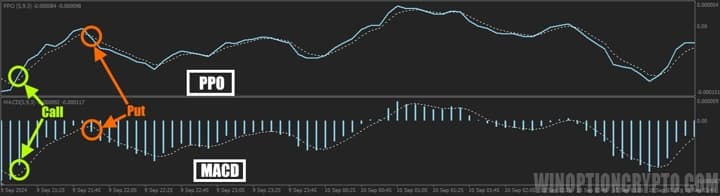
The image above illustrates the symmetry between signals generated by the classic MACD and its PPO counterpart. When a MACD histogram bar exceeds the dotted signal line, the PPO's main and signal lines cross simultaneously. A crossover from below signals a potential call option entry, while a crossover from above signals a potential put option entry.
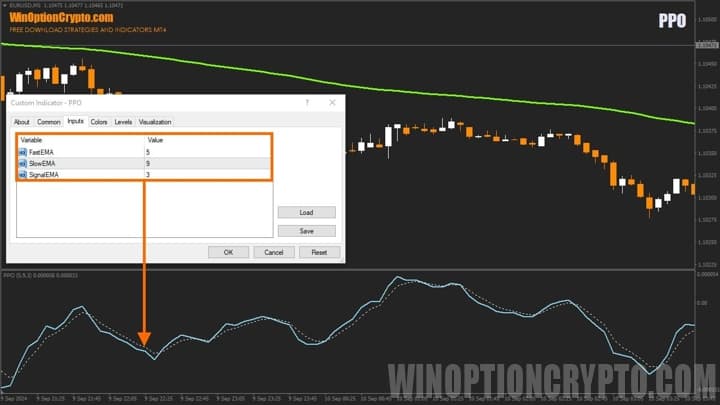
The PPO indicator has very few settings. The user can configure the periods for the fast EMA, the slow EMA, and the signal line. We recommend starting with the parameters shown in the screenshot above and only adjusting them after testing the signals against historical data.
Trading Rules for the PPO Indicator
The PPO indicator works well for trend trading on pullbacks. The moment the oscillator's lines cross typically coincides with the end of a short-term counter-trend move on a lower timeframe.
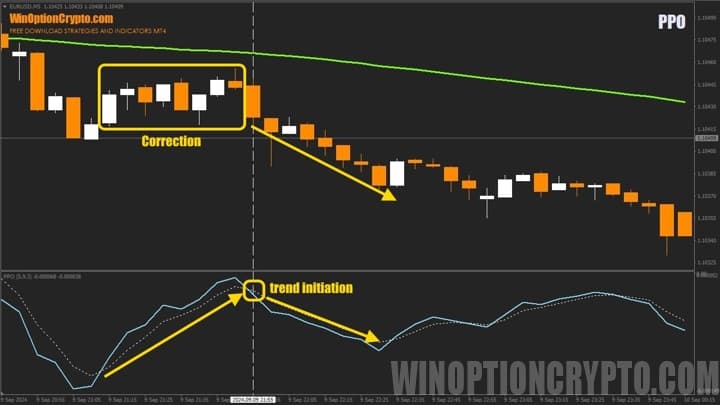
The image above shows how a sustained price move in the direction of the main trend often follows a crossover of the PPO's base and signal lines. Trading PPO signals in the direction of the prevailing trend is therefore the core approach. This raises a natural question: how do you identify the trend?
There are many approaches, including graphical analysis tools and various trend indicators. You can find the best of them in our selection of articles:
- Best Trend Indicators
- PZ Trend Trading Indicator
- Trend Lines Indicator for MT4
- Indicator TJ10X Forex Indicator
- Fxaccurate Larna MT4 Indicator
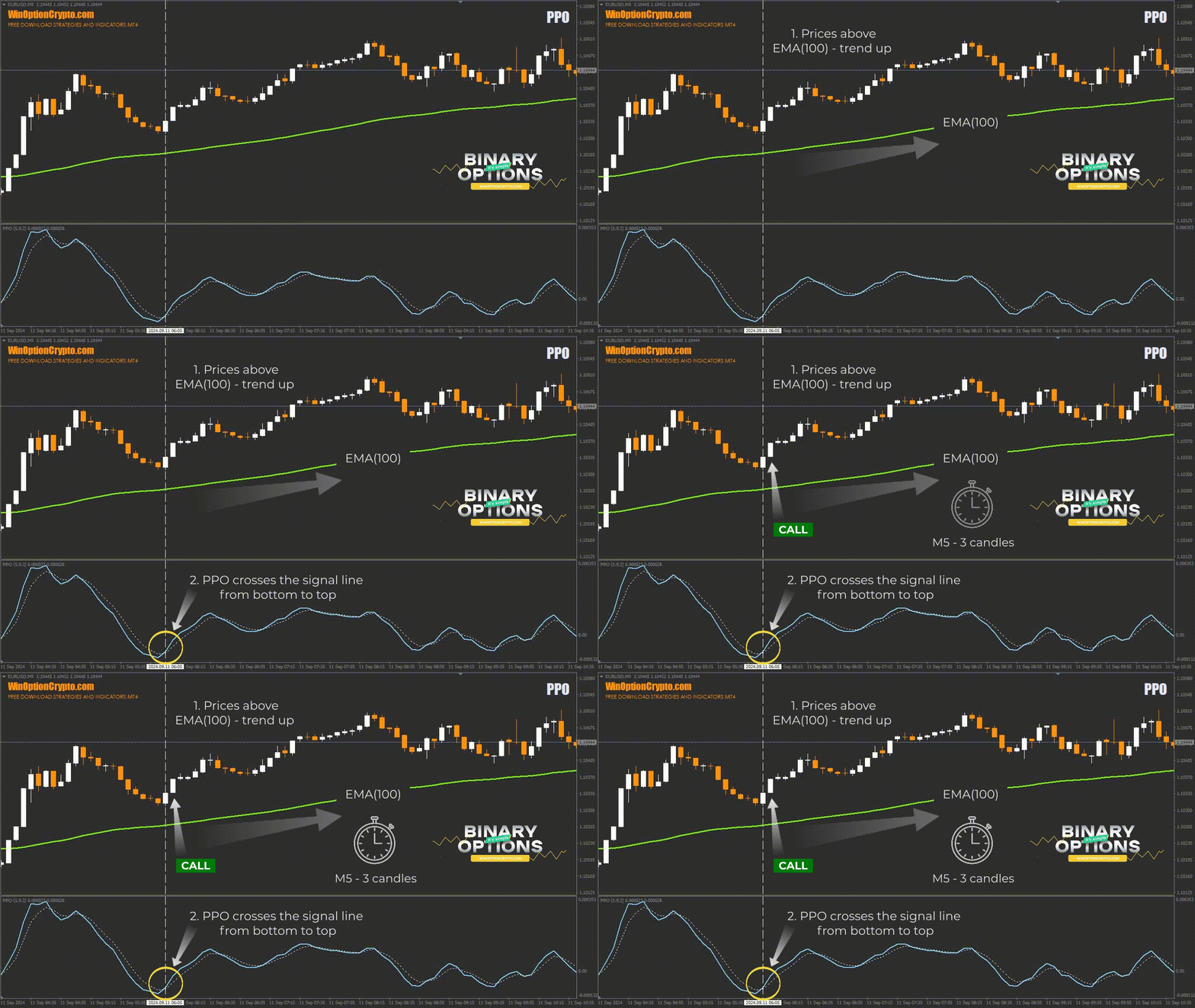
In this strategy, we use a standard exponential moving average with a period of 100 candles as the trend filter. Call options are opened only when candles are above EMA(100) and the PPO oscillator signals a crossover from below. For put options, candles must be below EMA(100) and the PPO must signal a crossover from above.
Opening a Call Option
- Confirm a bullish trend — candles are above EMA(100).
- The PPO oscillator crosses the signal line from below.
- At the opening of the next candle, buy a call option.
Opening a Put Option
- Confirm a bearish trend — candles are below EMA(100).
- The PPO oscillator crosses the signal line from above.
- At the opening of the next candle, buy a put option.
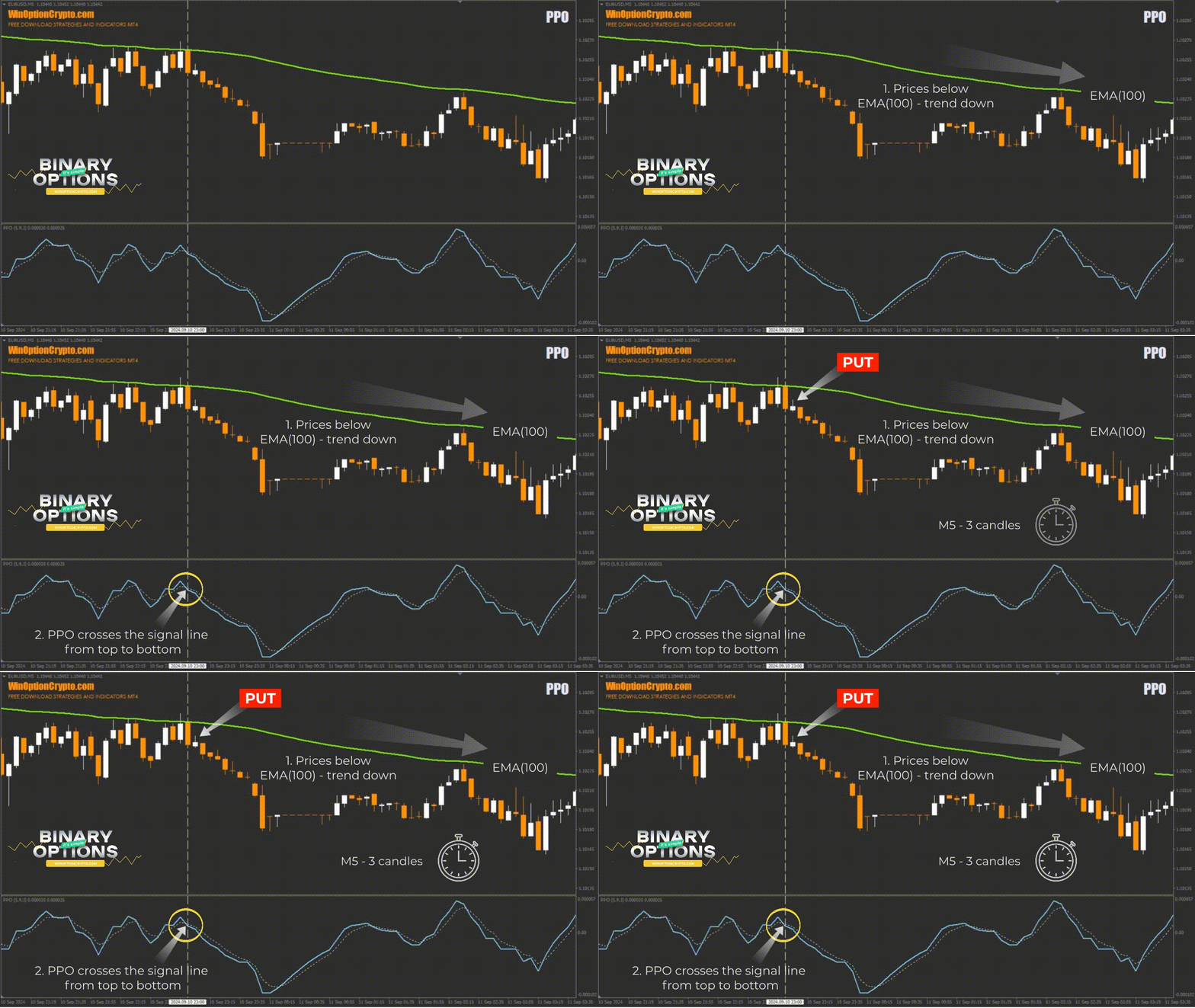
We recommend setting the expiration time to 3 candles. The optimal holding period should be determined based on backtesting results.
How to Use the PPO Indicator Effectively
One notable characteristic of the PPO indicator is its sensitivity to market volatility. During periods of ranging price action and consolidation near key support and resistance levels, false trading signals can occur. Avoiding trades during low-activity market hours will help reduce these situations.
It is also worth noting that the EMA(100) described above is just one of many possible trend filters. Beyond classic moving averages, there are numerous other effective methods for identifying the prevailing market trend.
Pros of the PPO Indicator
The PPO indicator generates accurate entry signals, does not repaint them, and maintains consistent signal placement when switching between timeframes. Its straightforward settings and clear rules make it easy for beginners to integrate into their trading strategies.
Cons of the PPO Indicator
One of the main drawbacks of this tool is the absence of a built-in alert system. The indicator would be considerably more practical if the developers added configurable alerts for key events, such as a PPO line crossover from below or from above.
Conclusion
The PPO indicator is a useful addition to any trader's toolkit. Even beginners can use it to improve their ratio of profitable trades, provided they select an appropriate trend filter and asset.
Despite some limitations in the free version of this indicator, these do not undermine its value as a tool for identifying accurate trade entries. Combined with other trend analysis indicators, it can form the basis of a solid trading strategy. Before using it with real funds, we recommend practising on a demo account with a reliable binary options broker. Always apply sound risk and capital management principles. We wish you successful trading!
Download the PPO Indicator

To leave a comment, you must register or log in to your account.