
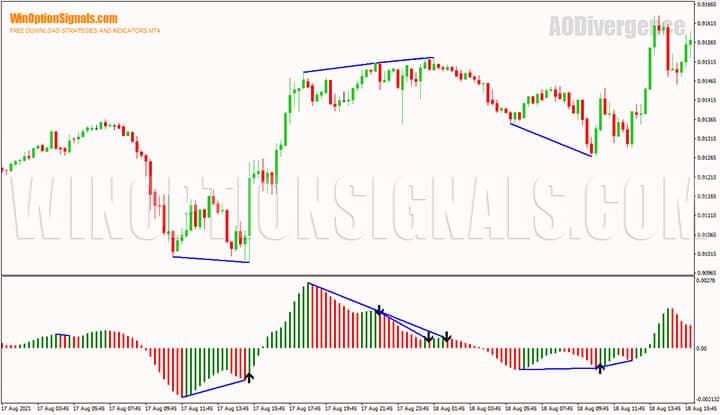
The Awesome Oscillator Divergence indicator for binary options is a modified version of the standard Awesome Oscillator with additional alerts and visual enhancements. In addition to the information provided by the original indicator, the AODivergence version identifies divergence between price and the indicator histogram, and generates signals when divergence occurs.
Key Features of the Awesome Oscillator Divergence Indicator
- Terminal: MetaTrader 4.
- Timeframe: H1 recommended.
- Expiration: 3–5 candles.
- Option types: Call/Put.
- Indicators: aodivergence.ex4.
- Trading instruments: currency pairs, stocks, cryptocurrencies, commodities.
- Trading hours: around the clock.
- Recommended brokers: Quotex, PocketOption, Binarium.
Installing the Awesome Oscillator Divergence Indicator in MT4
The indicator is installed using the standard procedure in MetaTrader 4.
MetaTrader 4 instructions for installing indicators:
Overview and Settings of the Awesome Oscillator Divergence Indicator for Binary Options
As noted above, the modified version differs from the classic Awesome Oscillator in that it includes built-in signals, so the basic operating principles of the original indicator will not be covered here.
The indicator includes the following settings:
- “fastma” – fast moving average period (default: 5).
- “slowma” – slow moving average period (default: 34).
- “isshowsignaltype1” – type and number of signals for Call options (default: 1).
- “isshowsignaltype2” – type and number of signals for Put options (default: 1).
- “divergencebars” – the minimum number of bars over which the indicator calculates divergence (default: 4).
- “mode” – indicator mode (default: 0).
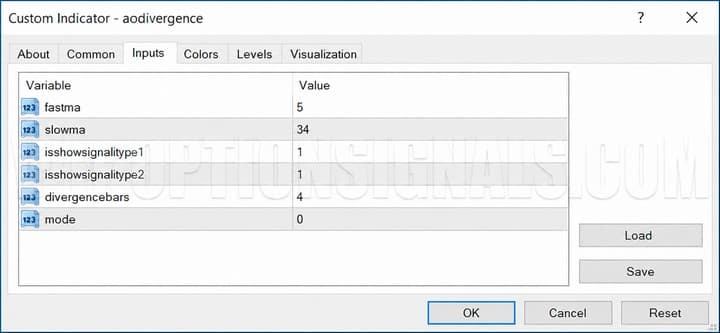
The “fastma” and “slowma” parameters control the moving average periods and determine the appearance of the histogram. The standard values across all MetaTrader 4 platforms are "5" for the fast moving average and "34" for the slow moving average.
The “isshowsignaltype1” and “isshowsignaltype2” parameters control the type and number of signals generated by the indicator. The default value for both is 1.
The “divergencebars” parameter sets the minimum number of bars over which the indicator calculates divergence. Across all timeframes, the indicator requires at least four bars to calculate divergence.
The “mode” parameter is unique to this version and determines the indicator’s operating mode. Three modes are available:
- AODivergence – mode 0.
- AODivergenceNormilized – mode 1.
- RSIDivergence – mode 2.
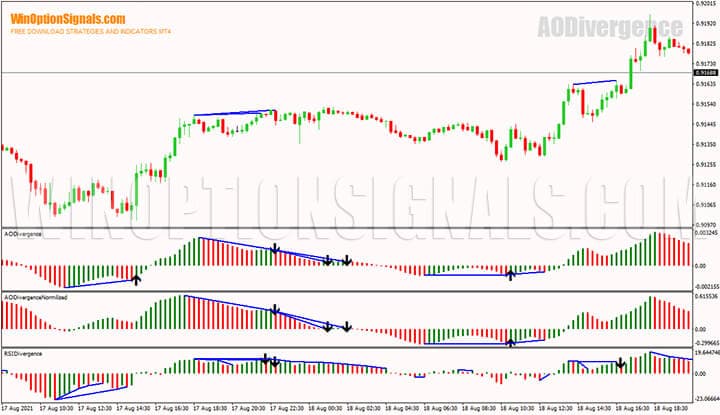
“AODivergence” is the default mode. The histogram is identical to the classic Awesome Oscillator, with the addition of up/down arrow signals and lines marking divergence between price highs/lows and the indicator readings.
“AODivergenceNormilized” mode produces a histogram identical to “AODivergence”, but with increased signal sensitivity.
Unlike "AODivergence" and "AODivergenceNormilized", the "RSIDivergence" mode tracks divergence based on the RSI indicator. As shown in the chart above, this mode generates a significantly higher number of signals.
It is also worth noting that a newer AO-based divergence indicator is available: the Red Wave Oscillator.
Signals and Trading with the Awesome Oscillator Divergence Indicator
Before looking at the indicator’s signals, it is worth revisiting the basics of technical analysis and recalling what divergence is, when it occurs, and how it can be applied to binary options trading.
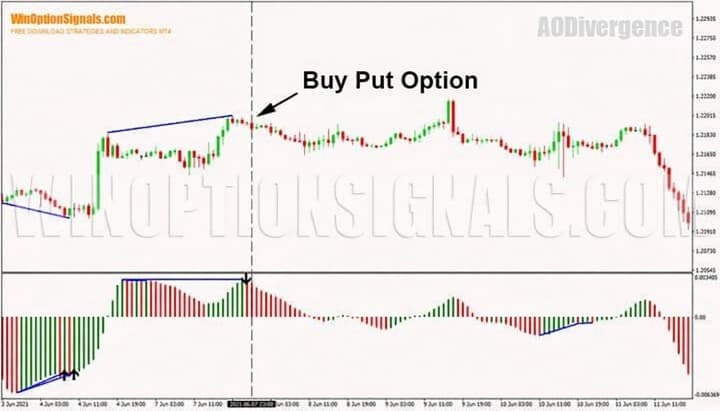
Typically, an indicator moves in line with price: when price reaches new highs, the indicator sets a new high; when price reaches new lows, the indicator sets a new low. When price movement and indicator readings diverge, a “divergence” occurs.
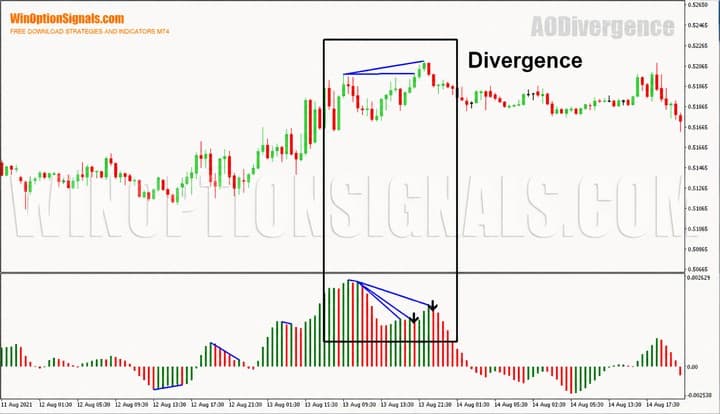
Divergence allows traders to anticipate a potential price reversal. It signals a possible shift in market conditions, pointing to a slowdown in momentum that could lead to a reversal in the opposite direction of the prevailing trend.
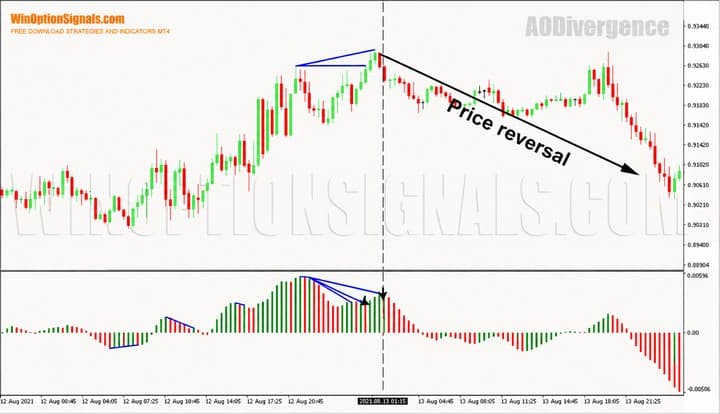
Signals and Trading with the Awesome Oscillator Divergence Indicator for Binary Options
Divergence identified on a higher timeframe is more likely to play out, so AODivergence is recommended for use on H1 and above.
Divergence typically precedes a price reversal, making it a potential setup for buying Put or Call options.
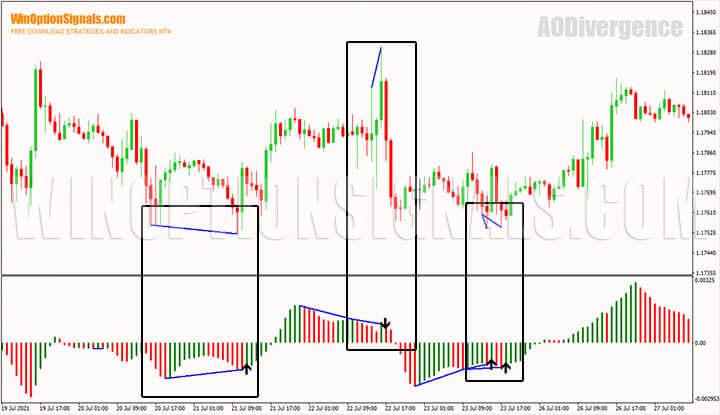
How to Trade Signals from the Awesome Oscillator Divergence Indicator
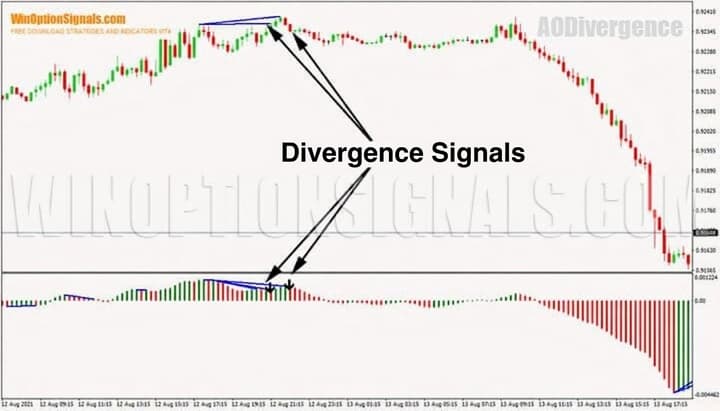
The indicator’s built-in signals make it much easier to identify divergences on the chart. To use the indicator, simply wait for an upward or downward arrow to appear.
A Call option is entered when divergence appears during a downtrend and an upward signal arrow forms:
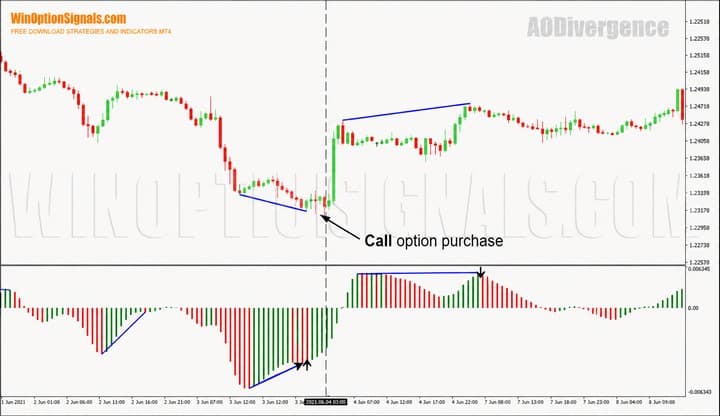
To find Put option entry points, wait for divergence during an uptrend and a downward signal arrow. The option is entered on the second candle and set to expire after 3 or 5 candles.
Conclusion
The Awesome Oscillator Divergence indicator is a strong alternative to the standard Awesome Oscillator. The idea of streamlining the trading process is not new, but new tools for more comfortable market analysis continue to emerge. The indicator offers enough configurable parameters to make it worth testing as a binary options tool. Be sure to try it on a demo account before trading with real funds.
The indicator is capable of generating signals on its own, but we strongly recommend using additional tools to filter them. There is no holy grail in binary options trading. That is why careful attention to money management and supplementary market analysis is essential.
Download the Awesome Oscillator Divergence Indicator for Free
Not sure how a particular strategy or indicator works? Leave a comment on this article, and subscribe to our YouTube channel WinOptionCrypto — we answer questions in our videos.

See Also:
- How to install an indicator in MT4
- Minimum account size for binary options trading
- How do binary options brokers make money
- Rating of binary options brokers
To leave a comment, you must register or log in to your account.