
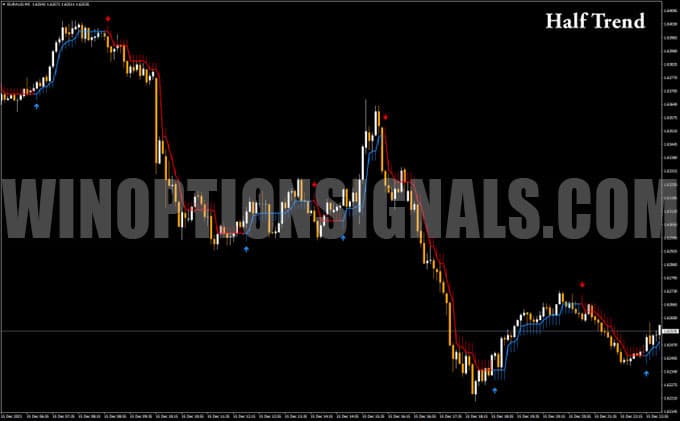
We would like to introduce the Half Trend binary options indicator. This versatile tool will become an invaluable aid in identifying trends for both beginners and experienced traders alike. Half Trend belongs to the category of classic technical analysis tools, as it is based on moving averages, which the indicator uses to detect trend reversals and generate entry points in the form of arrows on the chart.
The main advantage of the Half Trend binary options indicator is that it accurately identifies market reversals and does not repaint signals. This means you will not clutter your trading terminal with unreliable alerts based on incorrect forecasts.
Content:
- Key features
- Installation
- How it works and settings
- Trading rules
- Buying a Call option
- Buying a Put option
- Conclusion
- Download Half Trend
Key Features of the Half Trend Indicator
- Platform: MetaTrader 4
- Instruments: highly volatile currency pairs, oil, metals, indices, cryptocurrencies
- Timeframe: M5 and higher
- Expiration: 3–5 candles
- Trading hours: 08:00–21:00 UTC
- Recommended brokers: PocketOption, Quotex, Binarium
Installing the Half Trend Binary Options Indicator
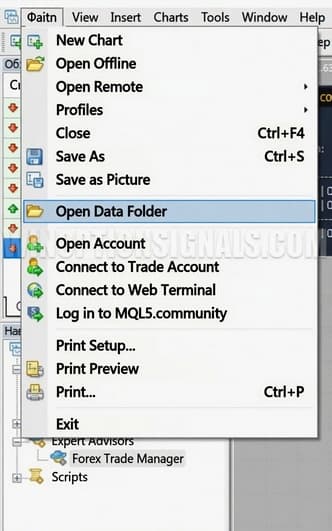
Installing Half Trend follows the standard procedure for adding indicators to the MetaTrader 4 trading terminal. After downloading and unpacking the archive from our website, move the files from the Indicators folder to the appropriate directory in your trading terminal. You can find the path to this directory by opening the File → Open Data Folder menu.
If you have any difficulties with the installation, we recommend watching the video on our YouTube channel, where we walk through the process in detail.
We also recommend installing the template alongside the indicator to avoid spending extra time on manual configuration. By default, the indicator is set up for the EUR/AUD currency pair on the M5 timeframe.
How the Half Trend Binary Options Indicator Works and Its Settings
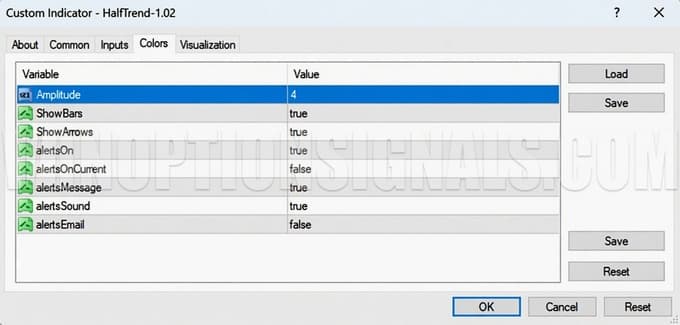
The indicator has very few adjustable parameters. Its signals depend on a single value — Amplitude — which represents the range of the last n bars. If the price moves beyond this range by a set threshold, the indicator reverses its reading.
The remaining settings control how the various Half Trend components are displayed (Show Bars, Show Arrows): lines that indicate consolidation or a pullback to the main trend, and signal arrows. The parameter list concludes with the standard alert options: on-screen pop-ups, sound signals, and email notifications.
The indicator itself consists of two main components: a trend line that changes color depending on the direction of the current trend, and an arrow indicator that clearly marks trend changes on the price chart.
The indicator's signals do not repaint and can be relied upon. The trend line is based on moving averages, which track the price dynamics of the traded instrument in real time. A red Half Trend line indicates a bearish trend — traders should prepare to buy Put options — while a blue line signals bullish dominance, making it the right time to consider Call options.
Half Trend tracks shifts in market sentiment and signals changes immediately with an arrow: red means sellers are in control and Put options should be considered; blue means buyers are dominant and Call options are worth buying.
Overall, the Half Trend binary options indicator is straightforward to use even for beginners. It has clear, logical operation and is highly useful for determining trading direction. In addition to direction, Half Trend provides entry points with a high probability of a favorable outcome. For those using it in the Forex market, it can also serve as a tool for identifying take-profit levels on the opposite signal.
For consistently positive results, we recommend using only volatile instruments and avoiding low-activity market hours. As an additional filter, you can apply indicators that track local overbought and oversold conditions. This approach helps avoid entering a position at the very end of a bullish or bearish move.
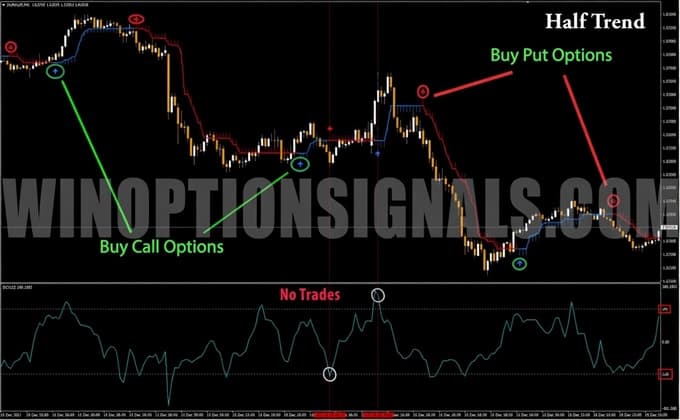
The chart shows that when the Half Trend arrow signal coincides with an oversold reading (−180) or overbought reading (180) on the Commodity Channel Index (CCI) with a period of 12, this tends to result in losing trades. You can apply the same logic using the Stochastic Oscillator or any other indicator you find reliable.
Trading Rules for the Half Trend Binary Options Indicator
Trading with the Half Trend indicator is based on following the trend. All positions are opened strictly in line with the dominant trend. As the best time to enter a trend-following trade is at the very start of the trend, you should wait for a break in the previously established trend. This is signaled by a change in the moving average color and the appearance of an arrow in the direction of the new price move.
Buying a Call Option
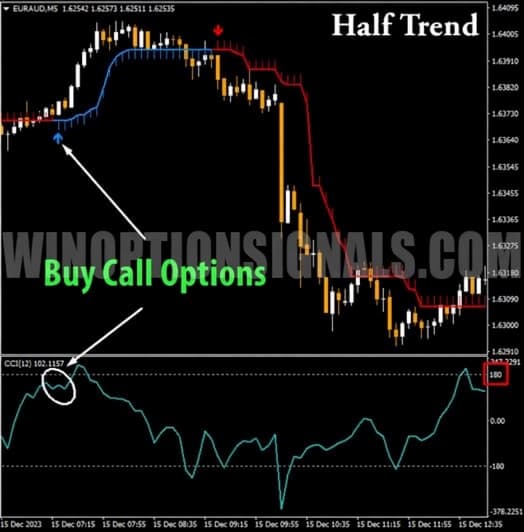
- The trend line color has changed to blue
- A blue arrow appears below the price chart
- The CCI(12) value is not in the overbought zone (below 180)
Buying a Put Option
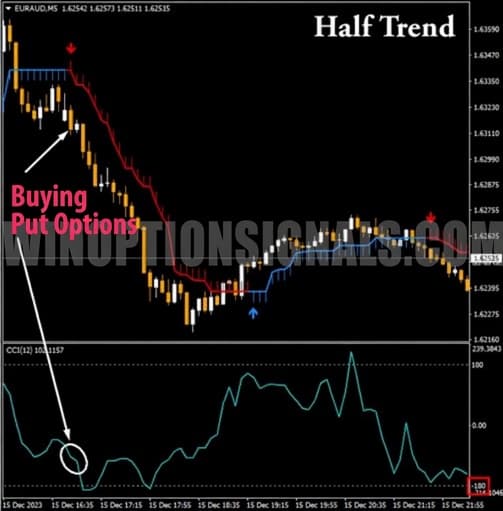
- The trend line color has changed to red
- A red arrow appears above the price chart
- The CCI(12) value is not in the oversold zone (above −180)
Expiration time depends on the chosen instrument — 3 to 5 candles.
Buying a Call Option
In the chart example, the trader waits for a flat section in a fading bearish trend to give way to a new bullish move, marked by the appearance of a blue moving average. Immediately after the trend line turns blue, a blue buy arrow appears. The final step is to check the CCI filter with a period of 12. If the CCI is not in the overbought zone (below 180), buy a Call option with an expiration of 3 candles.
Buying a Put Option
To profit from a price decline, wait for the Half Trend line to turn red. A red arrow will appear at the same time, signaling that conditions for opening a trade have formed. Check the CCI filter: if the CCI(12) is above the oversold level (above −180), buy a Put option with an expiration of 3 candles.
Conclusion
The Half Trend binary options indicator genuinely deserves your attention. Even if you choose not to use it as a primary signal tool, it works very well as a trend filter and can complement any trend-following trading system.
We do not recommend relying on the indicator's signals alone when trading binary options. Always combine it with an overbought/oversold filter to reduce the likelihood of false signals during fading trends.
Download the Half Trend Indicator for Free

To leave a comment, you must register or log in to your account.