
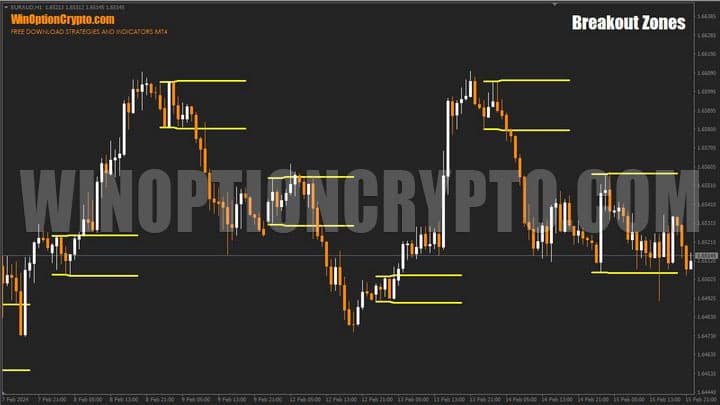
The Breakout Zones binary options indicator belongs to the category of reliable tools that can clearly indicate the current trend direction. It identifies breakout zones and signals the optimal moment to enter a trade.
This tool automatically plots support and resistance lines on the price chart. Designed to define the range of price fluctuations, it identifies bullish and bearish trends with ease — which is fundamental to successful trading in the binary options and Forex markets. The developers charge $97 for this indicator. In this review we assess whether it is worth the price, but in the meantime you can download Breakout Zones from our website free of charge for evaluation purposes.
Contents:
- Key Features
- Installation
- Overview and Settings
- Trading rules for Breakout Zones
- Buying a Call Option
- Buying a Put Option
- Conclusion
- Download Breakout Zones
Key Features of the Breakout Zones Indicator
- Terminal: MetaTrader 4;
- Timeframe: H1;
- Expiration: 2 candles;
- Option types: Call/Put;
- Indicators: breakout-zones.ex4;
- Trading instruments: currency pairs, commodities, cryptocurrencies, stocks;
- Trading hours: European and American trading sessions;
- Recommended brokers: Quotex, Pocket Option, Binarium.
Installing the Breakout Zones Binary Options Indicator
The Breakout Zones indicator is installed using the standard procedure in MetaTrader 4. Copy the indicator files to the terminal's root folder by selecting “File” in MT4, then “Open Data Folder”. In the folder that opens, navigate to “MQL4” and then “Indicators”, and place all the files there. Templates are installed in the same way, but go into the “Templates” folder. For a full step-by-step walkthrough, see our video:
Overview and Settings of the Breakout Zones Indicator for Binary Options
The core idea behind the Breakout Zones indicator is to track price position relative to the support and resistance levels it generates. When price breaks above the resistance line, this signals the beginning of a bullish trend; a break below support signals the start of a bearish move. This allows traders to make informed decisions about opening trades and adjusting existing positions based on where price sits relative to those levels.
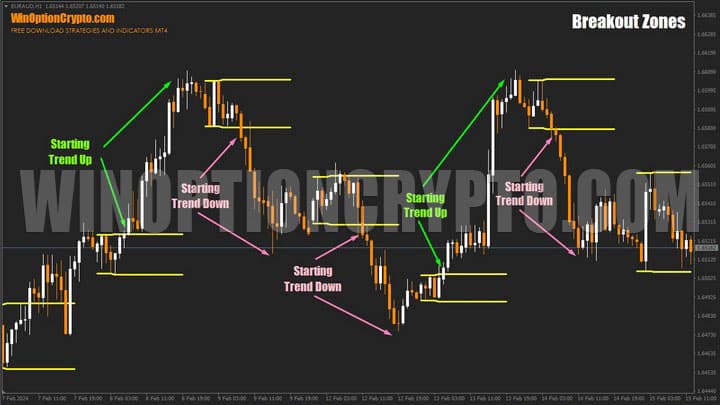
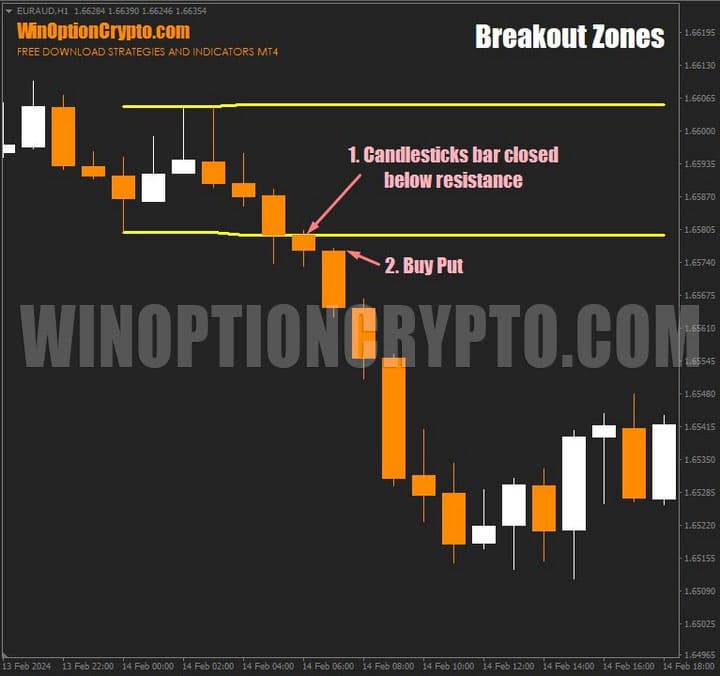
As shown in the chart above, once a candle closes above the resistance level, price typically moves sharply higher without pulling back. Conversely, when price breaks below support — confirmed by a candle closing beneath that level — it tends to drop quickly, marking the start of a bearish trend.
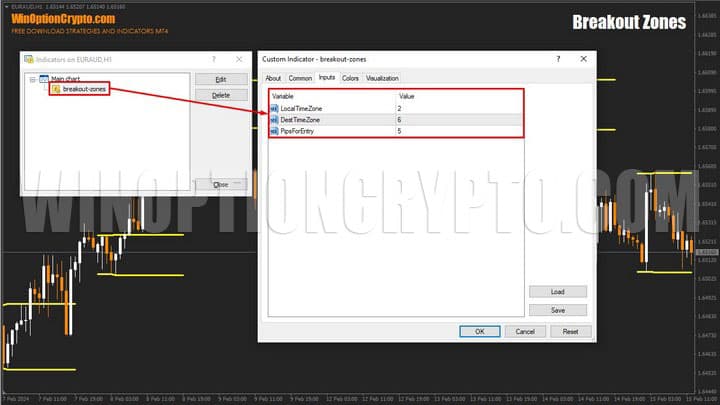
The indicator has a minimal set of settings, consisting of just three variables:
- Local Time Zone – your local UTC time zone;
- Dest Time Zone – the time zone used to start drawing range boundaries;
- Pips for Entry – adjustment of range boundaries.
What makes Breakout Zones especially valuable is its ability to detect significant shifts in price behaviour. The zones it defines often mark the start of a new trend or a major price move, creating opportunities to trade breakouts. The approach involves entering a trade immediately after price moves beyond the established range. You can also explore other momentum indicators for binary options on our website.
To improve the proportion of winning trades, we recommend combining Breakout Zones with one of the trend indicators and opening positions on channel boundary breakouts in the direction of the trend. This approach tends to result in a higher rate of profitable trades.
Breakout Zones is suitable for both beginners and experienced traders. Beginners can use it to recognise market trends, build simple trading strategies, and forecast price movements. Experienced traders can apply it to develop more advanced breakout strategies based on support and resistance zones.
Trading Rules for Binary Options with Breakout Zones
The Breakout Zones binary options indicator generates a solid number of accurate signals and is a genuinely useful tool. It gives the trader all the information and analytical data needed for successful trading in the financial markets.
To better understand trend trading, we recommend reading the following articles on this topic:
- How does a trend work in markets?
- Identifying and using bullish and bearish trends.
- Market phase changes.
- How to identify a ranging market.
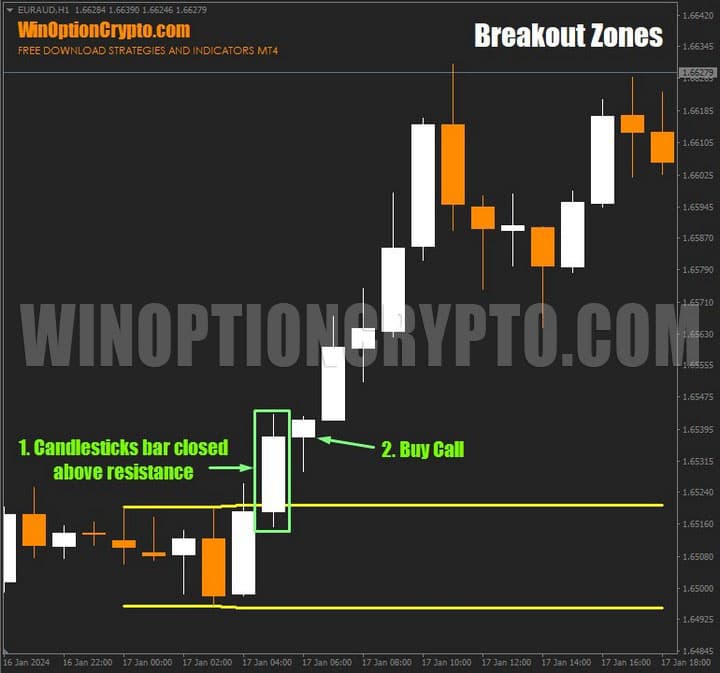
Conditions for buying a Call option using the Breakout Zones indicator:
- The trend is upward.
- A candle has closed above the upper boundary of the range.
- Open a Call option at the start of the next candle.
Conditions for buying a Put option:
- The trend is downward.
- A candle has closed below the lower boundary of the range.
- Open a Put option at the start of the next candle.
Any timeframe can be used. The recommended expiration time is 2 candles.
Buying a Call Option
When a candle closes above the upper boundary of the price range, this signals a new bullish impulse. Open a Call option at the start of the next candle.
Buying a Put Option
When a candle closes below the lower boundary of the price range, this signals a new bearish impulse. Open a Put option at the start of the next candle.
Conclusion
Analysing price behaviour around key level breakouts is critical. To distinguish genuine breakout signals from market noise, pay close attention to volume, the speed of the move, and how the market reacts to new price levels. This will support more informed decision-making in binary options trading and help reduce losses.
Given the accuracy of the signals this indicator provides, its price can be considered reasonable. That said, while Breakout Zones is a powerful tool for technical analysis, achieving consistent results will require a broader approach. This means not only analysing support and resistance levels, but also monitoring price behaviour closely — giving binary options traders the context needed to make sound decisions and reach their trading goals.
Download Breakout Zones

See Also:
- Books on trading
- How do binary options brokers make money
- Live chart for binary options online
- When is it time to switch from a demo account to a real one?
To leave a comment, you must register or log in to your account.