
The Supertrend Fakeout binary options strategy is based on a popular technical analysis tool used by traders to determine trend direction and key support and resistance levels. The Supertrend indicator itself is displayed on the chart as a line that changes color depending on the current trend. However, a question often arises: when is the best time to open binary options trades? The Supertrend Fakeout strategy, which we'll discuss in this review, provides the answer.
Contents:
- Key Features
- Installation
- Supertrend Fakeout: Overview and Settings
- Supertrend Fakeout Trading Rules
- Specifics of Application
- Conclusion
- Download Supertrend Fakeout
Key Features of the Supertrend Fakeout Binary Options Strategy
- Terminal: MetaTrader 4
- Timeframe: M5
- Expiration: 4 candles
- Option Types: Call/Put
- Built-in indicators: #P4L CandleTime .ex4, IVT Bull Bear Fight.ex4
- Trading instruments: currency pairs, commodities, cryptocurrencies, stocks
- Trading hours: 08:00–21:00 UTC
- Recommended brokers: Quotex, Pocket Option, Binarium
Installing the Supertrend Fakeout Binary Options Strategy
The Supertrend Fakeout strategy indicators are installed in MetaTrader 4 using the standard method. First, open the terminal and select "File" → "Open Data Folder" from the top menu. In the window that appears, navigate to the MQL4 → Indicators folder and copy all indicator files there.
If the package contains templates, they need to be moved to the templates folder in the root directory of the terminal.
After this, restart the platform for the new indicators and templates to appear in the list. For more detailed instructions, watch our video:
Supertrend Fakeout Indicators: Overview and Settings
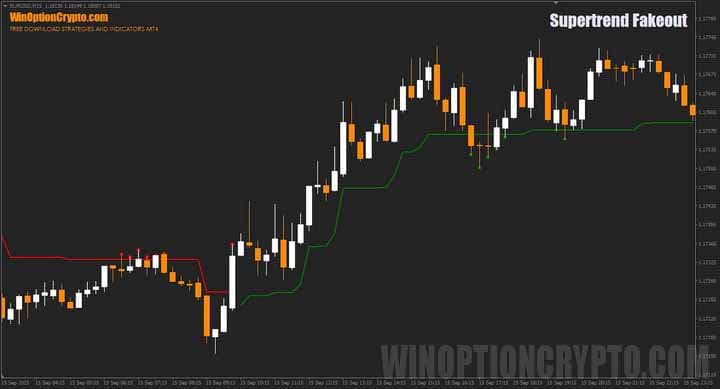
The Supertrend Fakeout strategy draws a solid line on the chart that changes color depending on the trend direction of the asset being analyzed:
- the green line indicates an upward movement;
- the red line signals a downward trend.
In addition to defining the current trend, the Supertrend line also acts as a dynamic support and resistance level.
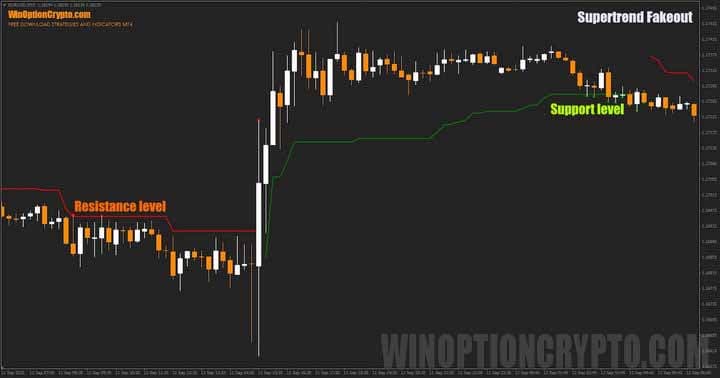
The image above clearly shows how the price consolidates around the indicator lines, confirming their role as support and resistance levels. It is in these zones that the Supertrend Fakeout strategy signals most often form — after false breakouts of these levels.
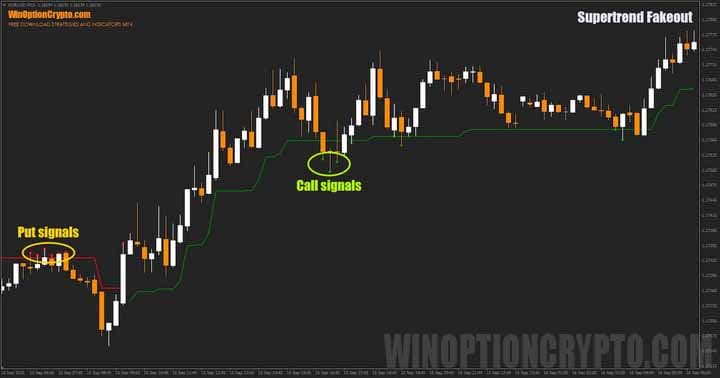
Trade entry points are marked on the chart with dots: red dots indicate the opening of put options, and green dots indicate call options. The strategy has few settings, and all of them are intuitive.
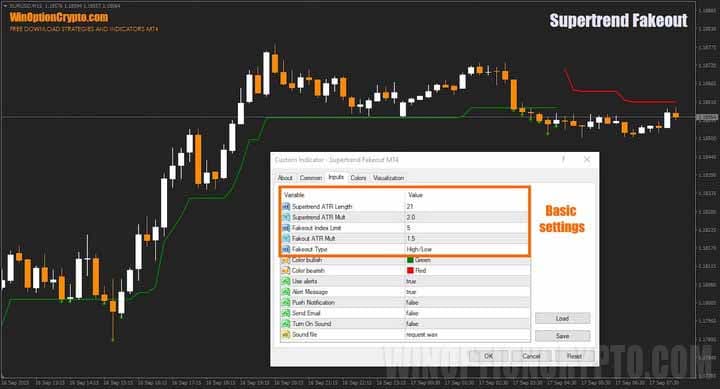
The Supertrend Fakeout trading system's signals are generated based on the ATR indicator's period and multiplier, as well as the selected price type for calculation — High/Low or Close. It's important to note that with a shorter period and a higher multiplier, the indicator becomes more sensitive to market fluctuations and will generate signals more frequently.
If you'd like to delve deeper into trend-following trades and learn how to properly apply this strategy to binary options trading, check out our selection of articles on the topic:
- How does a trend work in the markets?
- Identifying and using bullish and bearish trends.
- Market phase changes.
- How to identify a flat market?
These resources will help you better understand the techniques and improve your trading skills.
Supertrend Fakeout Trading Rules
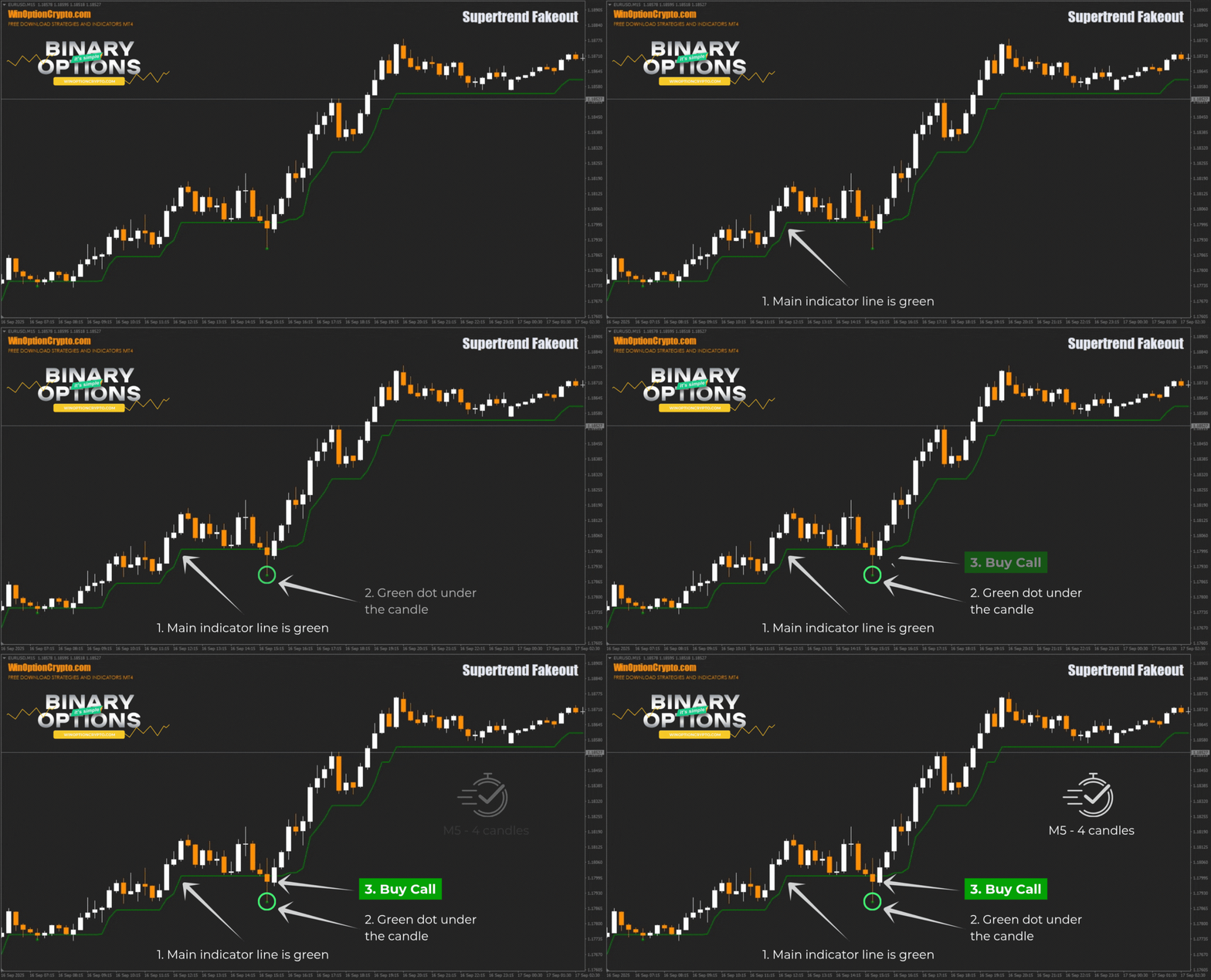
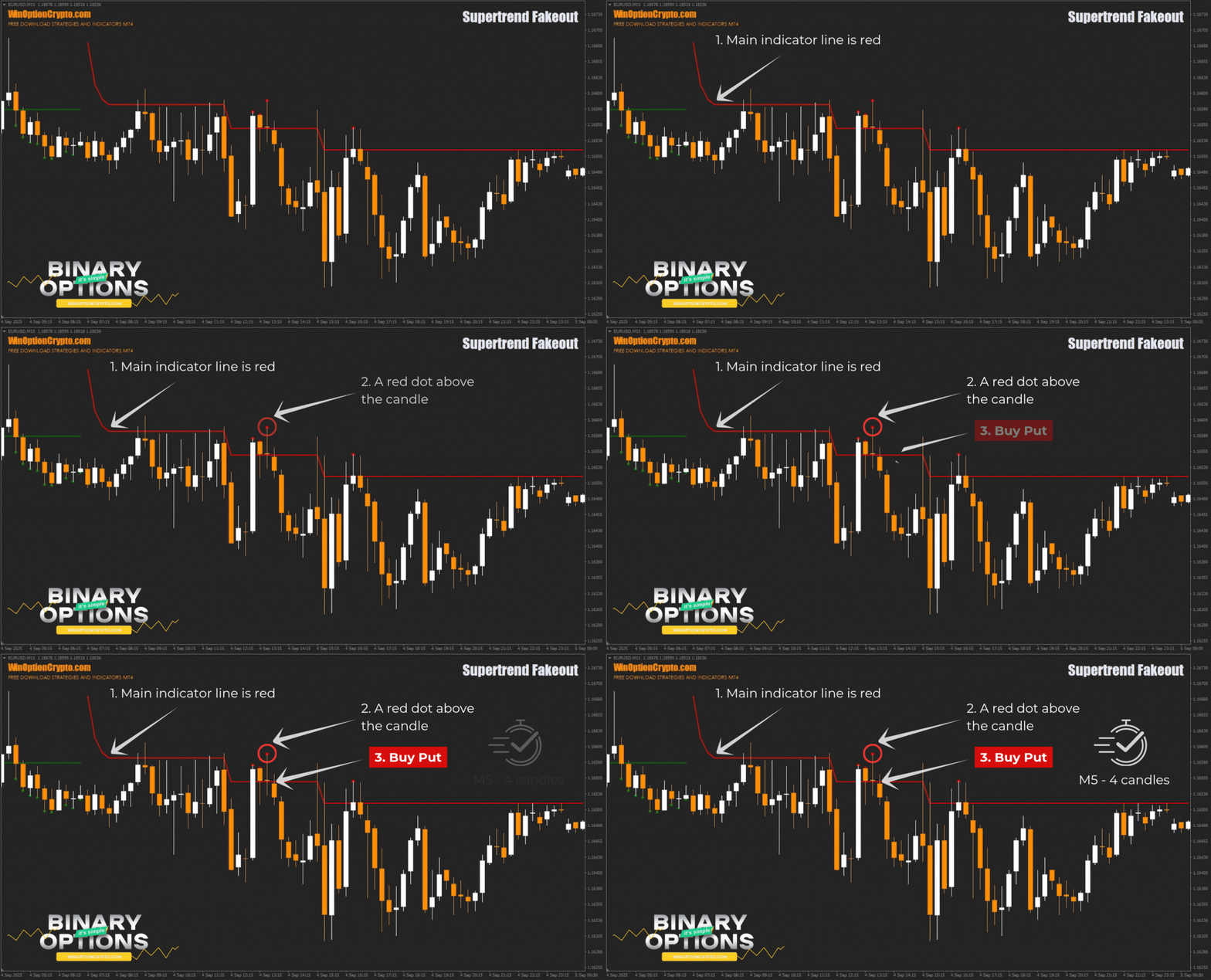
To open a trade using this system, a trader needs to wait for a dot to appear in the direction of the indicator line and then enter the market.
Opening a Call Option
- The main line of the indicator is green.
- A green dot appeared under the candle.
- At the opening of a new candle, we buy a Call option.
Opening a Put Option
- The main line of the indicator is red.
- A red dot appeared above the candle.
- At the opening of a new candle, we buy a Put option.
We recommend setting the expiration time to four candles. However, the optimal position holding period depends on the specific asset and should be selected individually based on backtesting. This approach allows you to tailor the strategy to the specifics of the instrument and improve its overall effectiveness.
Specifics of Using the Supertrend Fakeout Binary Options Strategy
The Supertrend Fakeout strategy is built on a popular trend indicator that takes market volatility into account. In addition to its primary function of determining the direction of movement, this tool also helps find entry points during pullbacks. The strategy thus implements the classic concept of trend trading after a correction, based on the Supertrend indicator.
The Pros of the Supertrend Fakeout Strategy
The advantages of this trading strategy include the simplicity and clarity of its signals. They are impossible to confuse: you'll always know when to open Call and Put options. The system is universal and works well across various assets — stocks, currency pairs, and cryptocurrencies. Furthermore, it operates on any timeframe and automatically adjusts to current market volatility thanks to the built-in ATR indicator.
Cons of the Supertrend Fakeout Strategy
The disadvantages of this system include the occurrence of false signals during flat markets and the lag typical of most trend indicators, as they only respond to established movements. To improve accuracy, you can use additional technical tools or candlestick patterns, which we discussed in the article "Candlestick Analysis and Binary Options."
Conclusion
The Supertrend Fakeout binary options strategy generates infrequent but trend-following signals. A built-in volatility filter helps reduce minor market noise, ensuring the system responds only to significant price movements and improving overall trading reliability. Before using the strategy in live binary options trading, we recommend testing it on a demo account with a broker with a minimum deposit. It's also important to follow risk and money management rules. Happy trading!
Download Supertrend Fakeout

To leave a comment, you must register or log in to your account.