
The Schaff Trend Cycle binary options indicator was developed by renowned currency trader Doug Schaff in 1999 to improve on trading with the popular MACD oscillator. It has gained wide recognition among traders for its ability to provide accurate buy and sell signals and timely warnings about trend changes.
The Schaff Trend Cycle is a strong complement to traditional moving averages, adding cyclical analysis for a deeper understanding of market trends. You can download this free oscillator at the end of the review — but first, let's look at why the Schaff Trend Cycle has become so popular.
Contents:
- Key Features
- Installation
- Schaff Trend Cycle: Overview and Settings
- Trading Rules
- Opening a Call Option
- Opening a Put Option
- Conclusion
- Download Schaff Trend Cycle
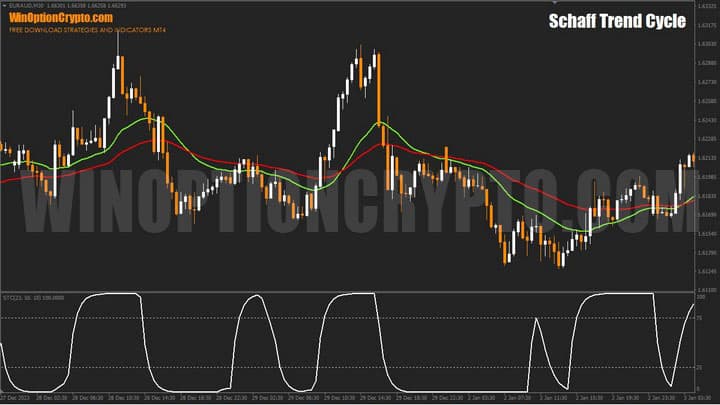
Key Features of the Schaff Trend Cycle Indicator
- Terminal: MetaTrader 4
- Timeframe: M30
- Expiration: 3 candles
- Option types: Call/Put
- Indicators: SchaffTrendCycle.ex4
- Trading instruments: currency pairs, commodities, cryptocurrencies, stocks
- Trading hours: 08:00–21:00 UTC
- Recommended brokers: Quotex, Pocket Option, Binarium
Installing the Schaff Trend Cycle Binary Options Indicator
The Schaff Trend Cycle indicator is installed using the standard procedure in MetaTrader 4. Copy the indicator files to the terminal's root folder by selecting "File" in MT4, then "Open Data Folder". In the folder that opens, navigate to "MQL4" and then "Indicators", and place all the files there. Templates are installed in the same way, but go into the "Templates" folder. For a full step-by-step walkthrough, see our video:
Schaff Trend Cycle Indicators: Overview and Settings
The Schaff Trend Cycle (STC) indicator helps traders identify the direction of the trend at an early stage. The sooner the first signs of a new price impulse are recognized, the more favorable the risk-to-reward ratio of an entry in that direction. One way to achieve this is to use a trend indicator capable of identifying trends early. The balance between signal quality and signal speed is critical here.
This is precisely the balance the STC indicator is designed to strike — alerting the trader to a trend change earlier than classic MACD. The oscillator is calculated using the Moving Average Convergence/Divergence line, which represents the difference between two exponential moving averages, processed through a modified stochastic algorithm.
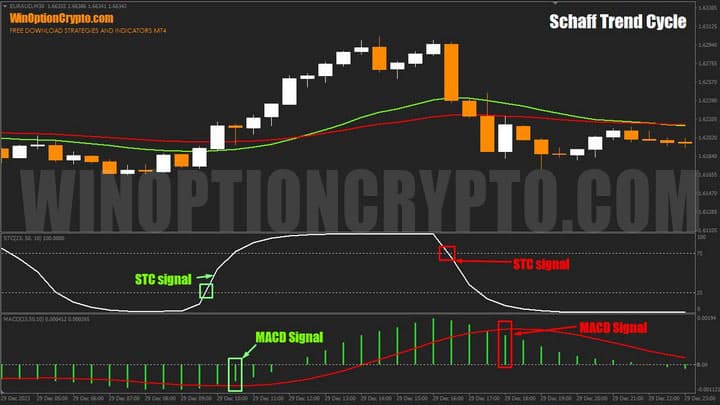
As shown in the chart above, STC signals arrive significantly earlier than those from standard MACD. For a clean comparison, the same calculation periods were used for both indicators. The STC signal is generated when the oscillator crosses levels 75 and 25, while for the MACD (Appel indicator), the signal is the crossover of the histogram and the signal line.
STC handles the identification of trend cycle highs and lows well and is particularly effective at recognizing price waves. It excels at identifying cycles within a trend — and can help spot the end of a correction and the resumption of the main trend at an early stage.
The settings are straightforward. Only three parameters need to be configured:
- MAShort — period of the fast exponential moving average
- MALong — period of the slow exponential moving average
- Cycle — smoothing factor
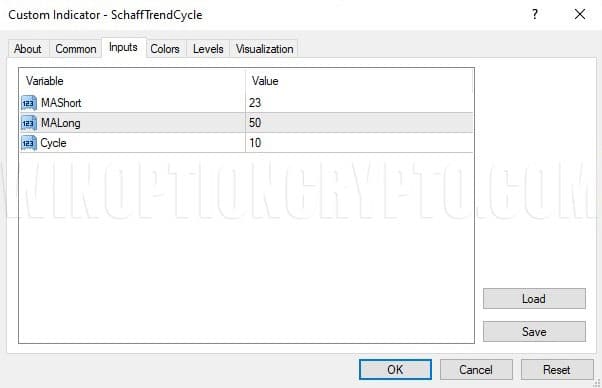
The Schaff Trend Cycle oscillates between 0 and 100. Level 25 is considered the lower boundary of the buy zone, and level 75 the upper boundary of the sell zone. Default settings: (23, 50, 10).
While the oscillator remains below 25, selling pressure dominates. As it crosses above that level, a potential trend reversal is worth considering. Conversely, readings above 75 indicate buyer activity — which fades if the level is broken from above. Note that these levels are not fixed rules; they may need to be adjusted depending on the instrument and timeframe.
By default, EMAs with periods of 23 and 50 bars are used. These values should be selected based on personal preference and the moving averages you are familiar with, though they have proven effective across most instruments and timeframes. As a general rule, the higher the working timeframe, the shorter the EMA periods should be, and vice versa.
For example, on a weekly chart, values of 12 and 26 (as used in MACD) or 8 and 13 (Fibonacci numbers) have performed well. For short-term trading on M15, EMA periods of 115 and 240 can be used.
For the "Cycle" parameter, it is recommended to use half the expected trading cycle length. Before setting this value, it helps to understand what the trading cycle represents in this context.
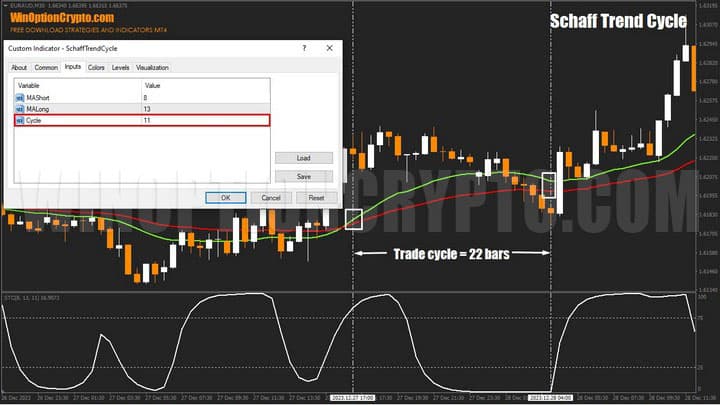
According to the developer, the "trading cycle" is the average number of bars from the start of a trend impulse (moving average crossover) to the first correction within that trend. In the chart above, this interval is marked by vertical dotted lines. The distance between them is 22 bars, so the optimal "Cycle" value for this instrument and timeframe is 22 / 2 = 11.
In general, the Schaff Trend Cycle is best used in combination with other indicators and Price Action models, such as those used in the Precise Entry or Secret Grail strategies. These demonstrate how STC can be effectively combined with other analytical methods to achieve consistent results.
One limitation of this tool is the absence of built-in alerts, which makes monitoring it less convenient.
Schaff Trend Cycle Trading Rules
The Schaff Trend Cycle can be applied to any financial instrument — from indices and metals to cryptocurrencies. However, using its signals without trend confirmation from other indicators or methods is not recommended. If you are not yet confident in identifying trends, the following articles on our website provide a solid foundation:
- How does a trend work in the markets?
- Identifying and using bullish and bearish trends.
- Market phase changes.
- How to identify a flat market.
In the examples below, two exponential moving averages (EMA) with periods of 23 and 50 bars are used to confirm the trend. When EMA(23) is above EMA(50), only Call entries are taken; when EMA(23) is below EMA(50), only Put entries are taken.
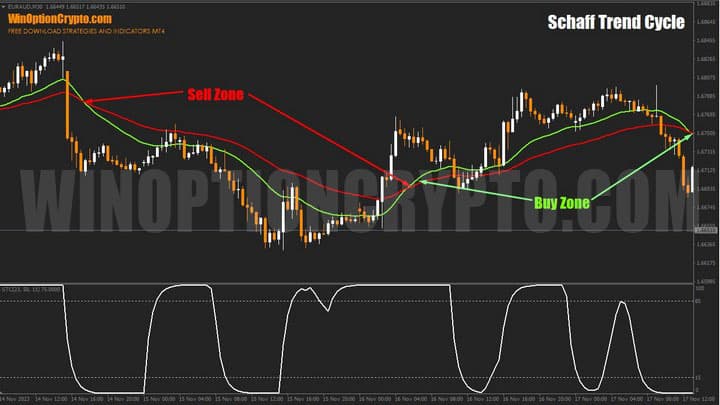
These rules act as a filter, preventing trades against the main trend or during wide-ranging conditions when the price direction is continually reversing.
Call option entry rules:
- Confirm an uptrend by checking the relative position of the two EMAs.
- The Trend Cycle oscillator crosses level 15 from below.
- Buy a Call option at the opening of the next candle.
Put option entry rules:
- Confirm a downtrend by checking the relative position of the two EMAs.
- The Trend Cycle oscillator crosses level 85 from above.
- Buy a Put option at the opening of the next candle.
The recommended expiration time is 3 candles. For any specific instrument, the holding period should be determined through backtesting on historical data for the relevant timeframe.
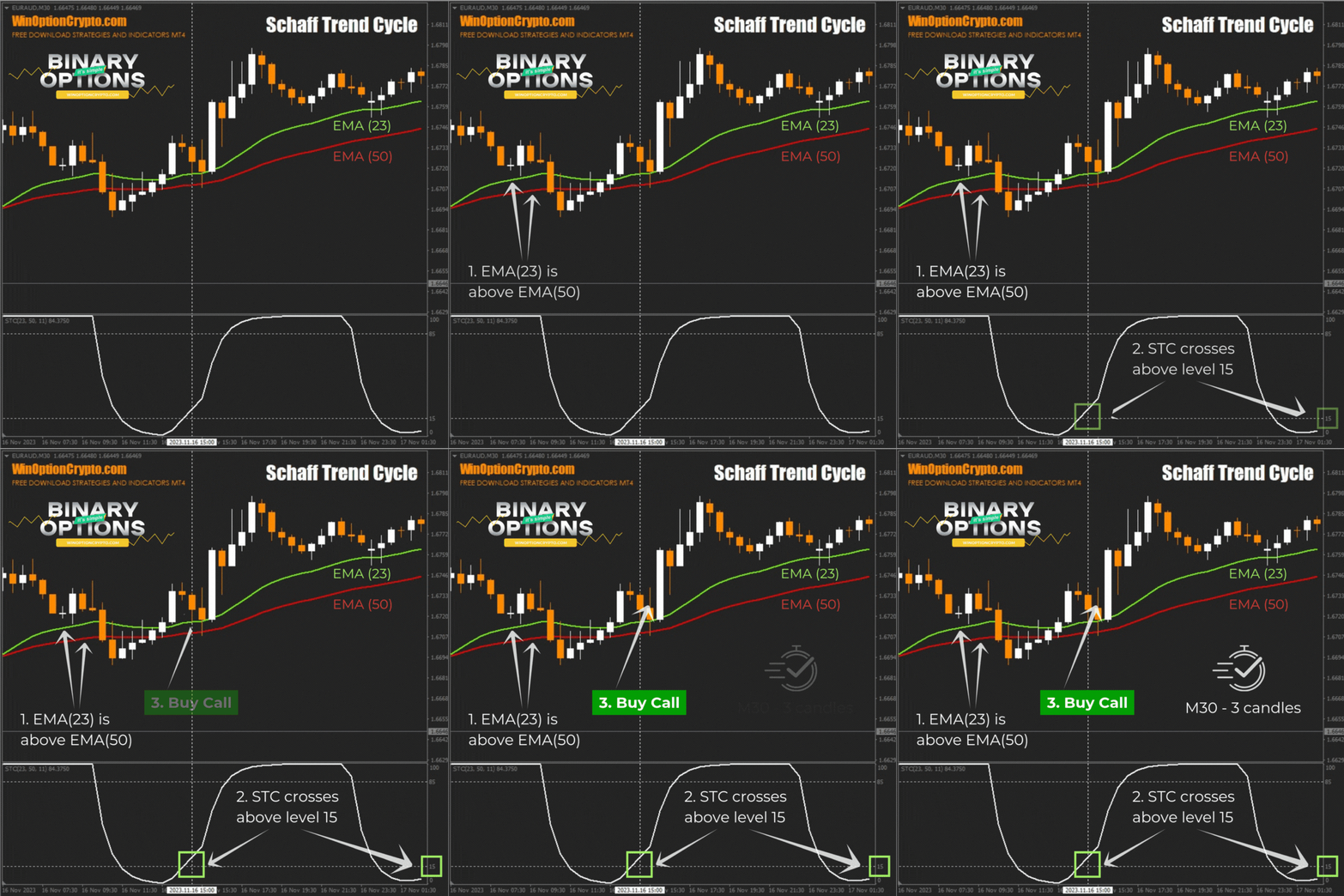
Opening a Call Option
- EMA(23) is above EMA(50).
- The STC oscillator crosses level 15 from below.
- Buy a Call option at the opening of the next candle.
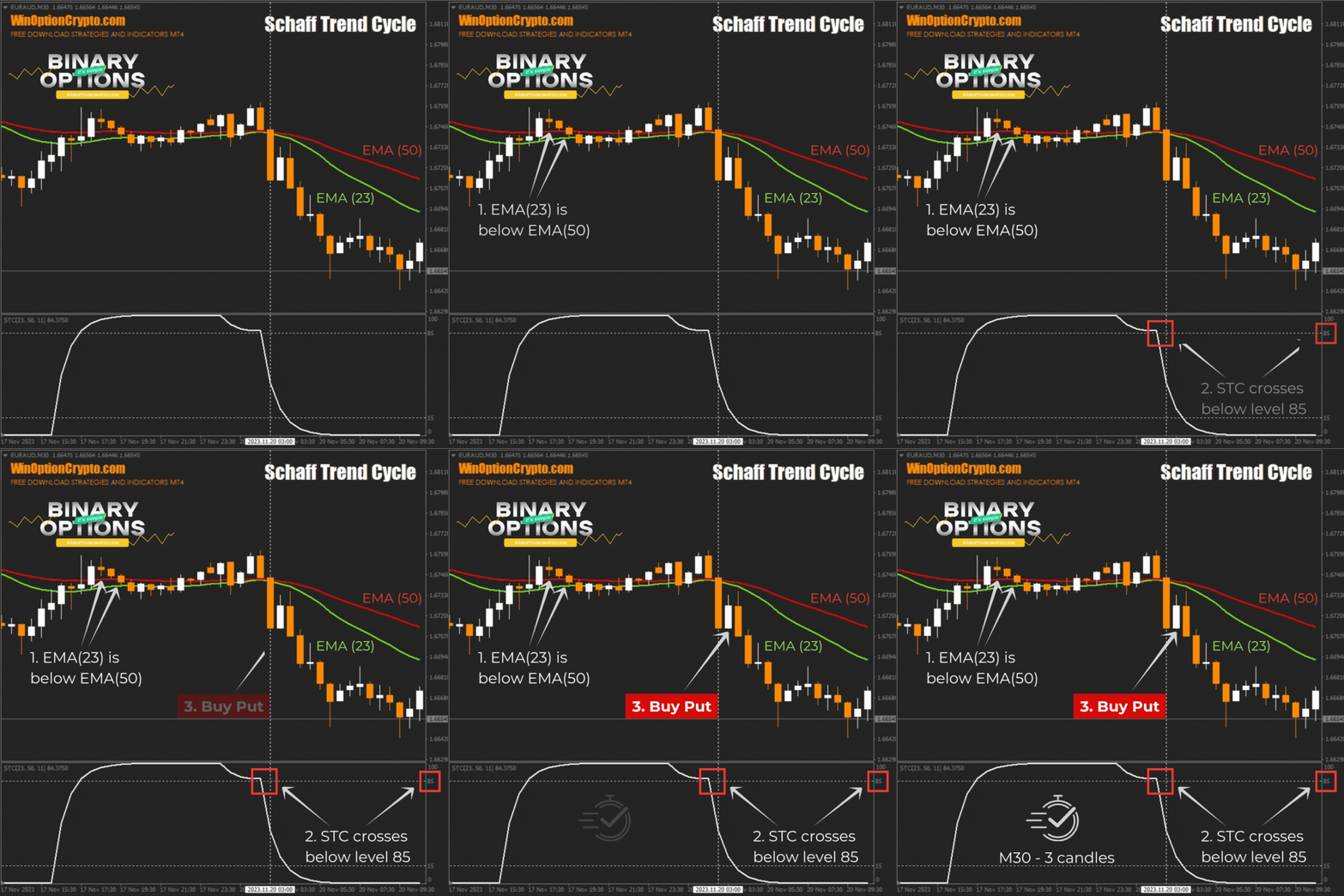
Opening a Put Option
- EMA(23) is below EMA(50).
- The STC oscillator crosses level 85 from above.
- Buy a Put option at the opening of the next candle.
Conclusion
In the context of constant financial market fluctuations, analytical tools are an essential component of successful trading. The Schaff Trend Cycle indicator is one such tool — valued by traders for its ability to identify trends and generate accurate entry signals.
The Schaff Trend Cycle is an attractive alternative to MACD, delivering earlier buy and sell signals. Combining MACD logic with a stochastic algorithm in a single indicator increases both reliability and effectiveness. Filtering its signals with two moving averages can further improve the proportion of profitable trades.
We encourage you to test this indicator on a demo account and share your thoughts in the comments. Remember to follow sound risk and capital management practices. We wish you successful trading!
Download the Schaff Trend Cycle Binary Options Indicator

See Also:
- How to make money on binary options
- Live chart for binary options online
- What Beginner Traders Need to Know About Binary Options
- Best Non-Repainting Indicators for Binary Options
To leave a comment, you must register or log in to your account.