
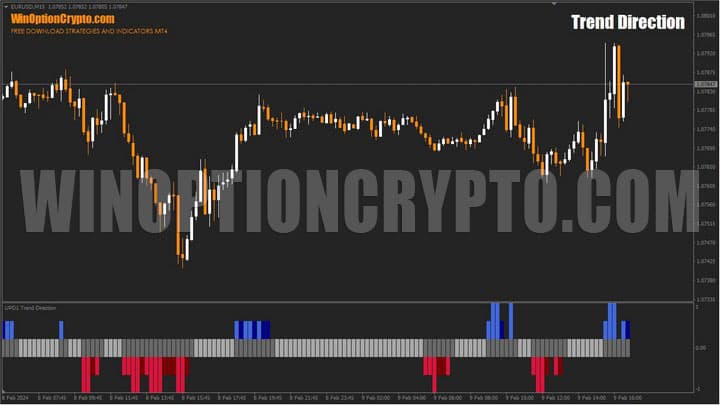
The Trend Direction binary options indicator is designed to identify trend and flat zones on the chart of a financial instrument. It can be used as a signal filter for trend-following trades, or as a standalone technical analysis tool.
A comprehensive built-in alert system ensures traders never miss a signal, while the reliable oscillator at its core helps avoid trading during flat market conditions. The developers keep the oscillator's name undisclosed and charge $37 for the indicator. In this review, we'll assess whether it's worth the price and explain how it works.
Trend Direction can be used equally effectively in Forex trading and binary options. No prior experience is required, which makes it particularly appealing to beginners — who can download it from our website free of charge for evaluation purposes.
Contents:
- Key Features
- Installation
- Overview and Settings
- Trading Rules for Trend Direction
- Opening a Call Option
- Opening a Put Option
- Conclusion
- Download Trend Direction
Key Features of the Trend Direction Indicator
- Terminal: MetaTrader 4;
- Timeframe: M15;
- Expiration: 3 candles;
- Option types: Call/Put;
- Indicators: Trend Direction.ex4;
- Trading instruments: currency pairs, commodities, cryptocurrencies, stocks;
- Trading hours: 08:00–21:00 UTC;
- Recommended brokers: Quotex, Pocket Option, Binarium.
Installing the Trend Direction Binary Options Indicator
The Trend Direction indicator is installed using the standard procedure in the MetaTrader 4 platform. To do this, add it to the terminal's root folder by selecting "File" in MT4, then "Open Data Folder." In the folder that opens, navigate to "MQL4," then "Indicators," and move all files there. Templates are installed in the same way, but are placed in the "Templates" folder instead. For more detailed installation instructions, watch our video:
Trend Direction Indicators: Overview and Settings
Trend Direction belongs to the classic "subwindow" oscillator type, displayed below the main price chart. It makes it very easy to visually distinguish flat zones from periods of directional price movement — that is, a trend.
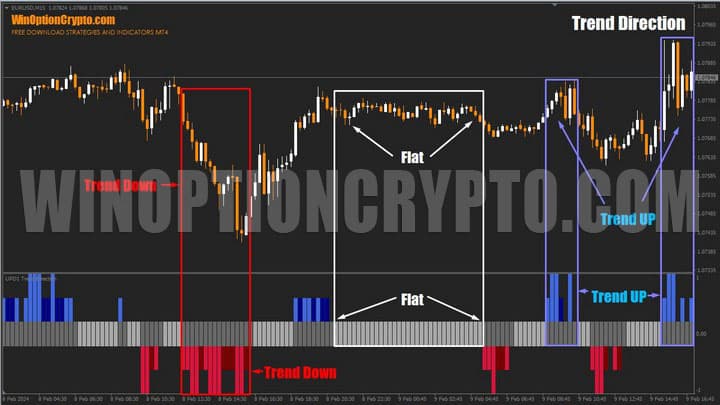
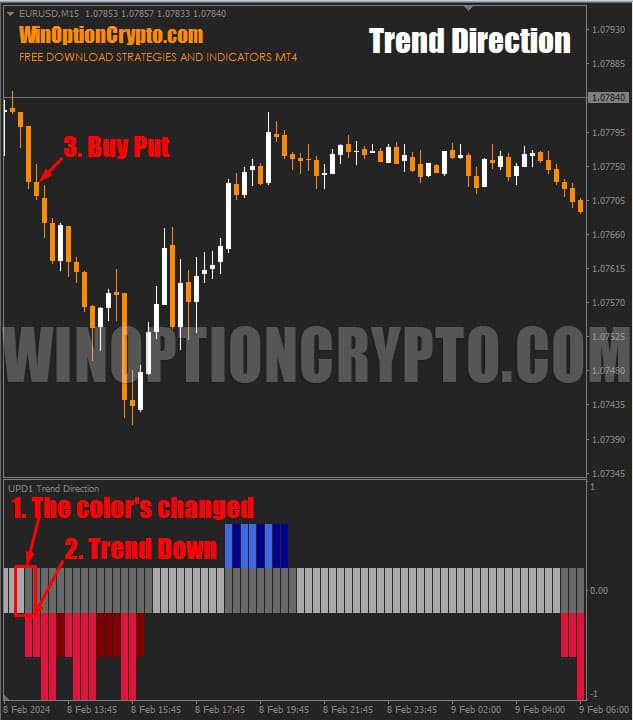
As shown in the image above, flat zones are highlighted in light gray (Flat), downtrends in red and dark red (Trend Down), and uptrends in blue (Trend Up). The display is simple and intuitive — beginners will find it easy to read at a glance.
The indicator's settings are organized into three main blocks:
- Basic settings;
- Visualization;
- Notifications (alerts).
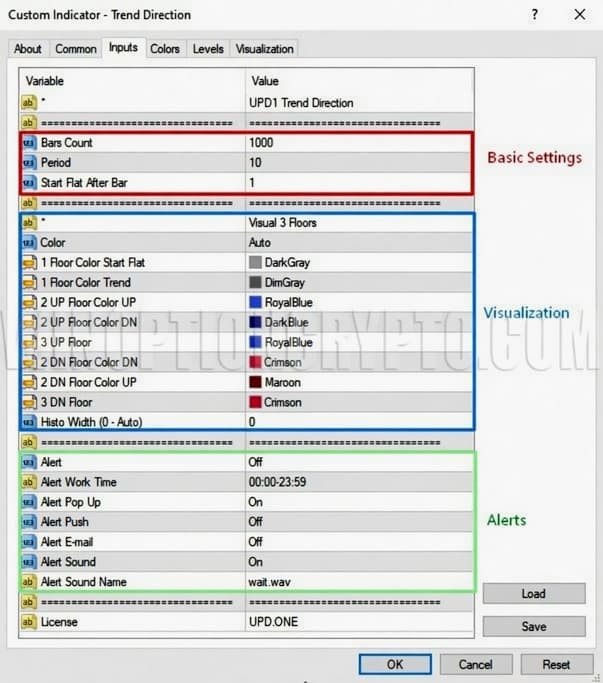
The basic settings block includes the following parameters:
- Bars Count — the number of candles (bars) for which the indicator readings are displayed;
- Period — the oscillator calculation period;
- Start Flat After Bar — the number of candles skipped after a trend ends before the flat zone is drawn.
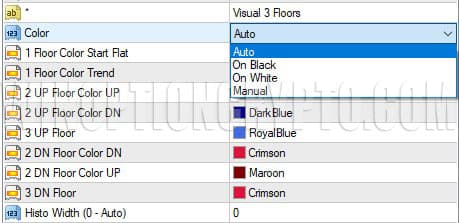
In the visualization block, you can customize the color scheme and appearance of the oscillator:
- Color — offers 4 color presets: automatic (Auto), optimized for a black background (On Black), optimized for a white background (On White), and manual (Manual), which activates individual color settings for each element;
- Floor Color — when Manual mode is selected, sets the colors for flat zones, trend zones, price growth, and decline;
- Histo Width (0 - Auto) — sets the histogram bar width (setting this to 0 selects the width automatically).
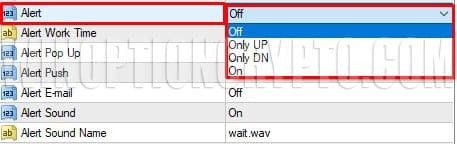
The alert settings offer a wide range of options that many traders will find useful:
- Alert — enables (On) or disables (Off) notifications, with display mode options: buy signals only (Only UP) or sell signals only (Only DN);
- Alert Work Time — sets the alert schedule by hour and minute (default: 00:00–23:59);
- Alert Pop Up — toggles the pop-up window on or off;
- Alert Push — toggles push notifications on or off;
- Alert E-mail — toggles email notifications on or off;
- Alert Sound — toggles sound notifications on or off;
- Alert Sound Name — selects the sound alert file.
The signal to open a trade in Trend Direction is a change in bar color, which indicates a shift in the price dynamics of the instrument being analyzed. Dark gray bars indicate a trend, while light gray bars indicate a flat. As long as the current market phase — trend or flat — remains unchanged, the bar colors remain the same.

Trading Rules for the Trend Direction Indicator
The Trend Direction indicator generates a strong number of accurate signals during periods of sustained directional price movement. It is not only capable of acting as a trend classifier — clearly distinguishing uptrends and downtrends from range-bound trading — but also produces a high volume of entry signals for both Call and Put positions.
To better understand trend trading, we recommend reviewing the following articles:
- How does a trend work in markets?
- Identifying and using bullish and bearish trends.
- Market phase changes.
- How to identify a flat in the market?
No additional filters are needed to trade with Trend Direction signals. Everything required for trading is already built into this analytical tool.
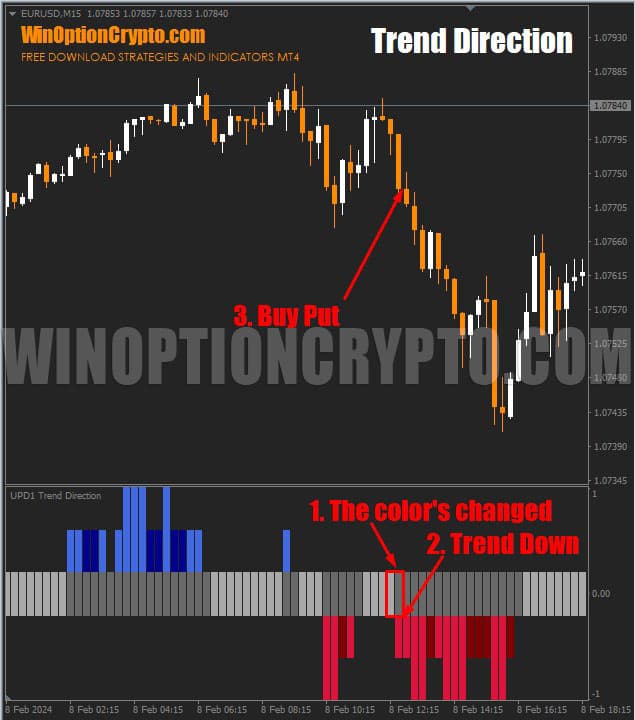
To trade a falling price, wait for the central oscillator bars to change from light gray to dark gray and for a red bar to appear. At the open of the next candle, buy a Put option.
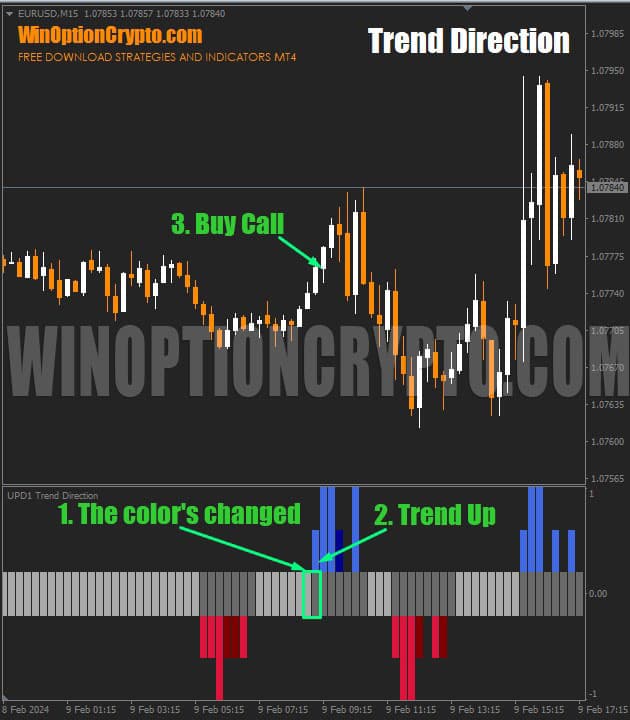
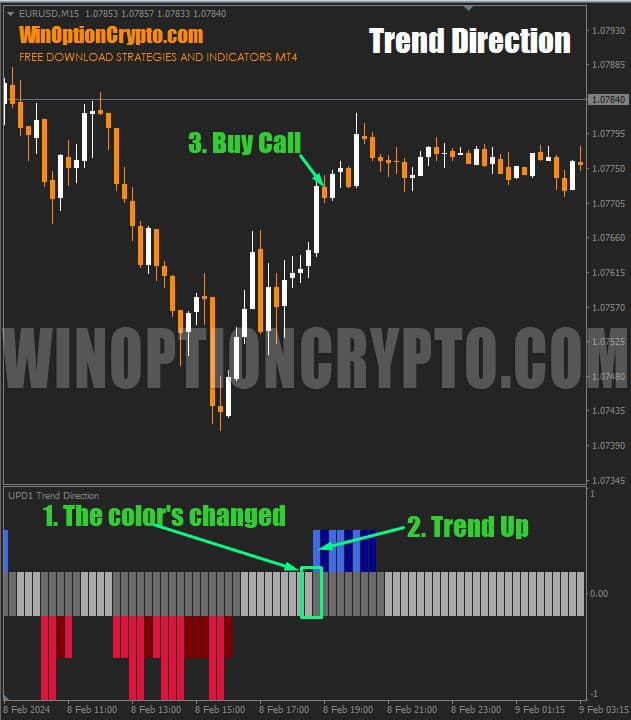
To trade a rising price, apply the same approach: wait for a trend to emerge from a flat, indicated by the central bars changing from light gray to dark gray, and wait for a blue bar to appear. Then, at the open of the next candle, buy a Call option.
The recommended expiration is 3 candles. However, the optimal expiration for a specific currency pair should be determined through backtesting on the relevant timeframe.
To increase the proportion of profitable trades, oscillator signals can be further filtered using various technical analysis techniques and pattern indicators for MetaTrader 4.
Opening a Call Option
The central oscillator bars change from light gray to dark gray, signalling the start of a trend. A blue bar appears, indicating an upward price impulse. At the open of the next candle, buy a Call option.
Opening a Put Option
The central oscillator bars change from light gray to dark gray, signalling the start of a trend. A red bar appears, indicating a downward price impulse. At the open of the next candle, buy a Put option.
Conclusion
The Trend Direction indicator is a versatile, multi-layered technical analysis tool that can complement any trading system. It will appeal not only to traders who favour turbo options and short-term trades, but also to intraday Forex traders holding positions for anywhere from a few minutes to several hours.
On the whole, this indicator is worth its modest price and is capable of generating a high volume of reliable signals that require little additional filtering. That said, filtering may still be beneficial for certain currency pairs. Always verify the effectiveness and profitability of entry points using historical data for the specific instrument you intend to trade.
As a general recommendation: when using this tool in binary options trading, avoid price consolidation zones and flat market conditions. Start on a demo account with a reliable broker, applying all the principles of risk management and money management. Only after achieving consistent results on a demo account should you move to live trading. Happy trading!
Download the Trend Direction Indicator

See Also:
- How to Make Money on Binary Options
- How Do Binary Options Brokers Make Money?
- Top 5 Binary Options Trader Mistakes
- How to Make a Profit by Trading on Clean Charts
To leave a comment, you must register or log in to your account.