
The MBFX Timing indicator for binary options is an oscillator that lets you predict corrections fairly accurately — both in the direction of the current move and against it. This makes it accessible even for novice traders looking to open profitable options.
The indicator is also highly versatile and can be incorporated into virtually any binary options strategy.
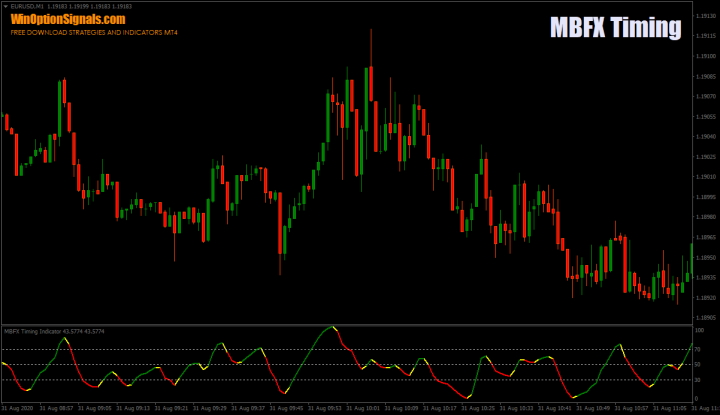
Key Features of the MBFX Timing Indicator
- Terminal: MetaTrader 4.
- Timeframe: M1–H4.
- Expiration time: 4 candles.
- Option types: Call/Put.
- Indicators: MBFX Timing.
- Trading instruments: Any.
- Trading hours: 08:00–21:00 UTC.
- Recommended brokers: Quotex, PocketOption, Binarium.
Installing the MBFX Timing Binary Options Indicator
The indicator is installed using the standard MetaTrader 4 process.
MetaTrader 4 instructions for installing indicators:
The MBFX Timing indicator has just two parameters in its settings:
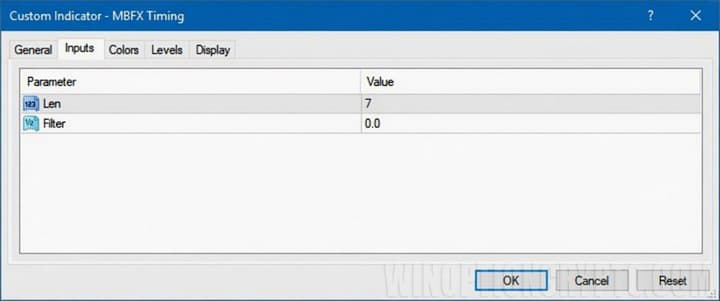
Increasing the "Len" parameter produces fewer reversal signals, though it is not entirely clear whether this improves their quality — many of the smaller corrections that were previously visible tend to disappear.
The "Filter" parameter adds a yellow band to the indicator display. A value of "0" is sufficient for comfortable trading.
MBFX Timing Indicator: Trading Rules
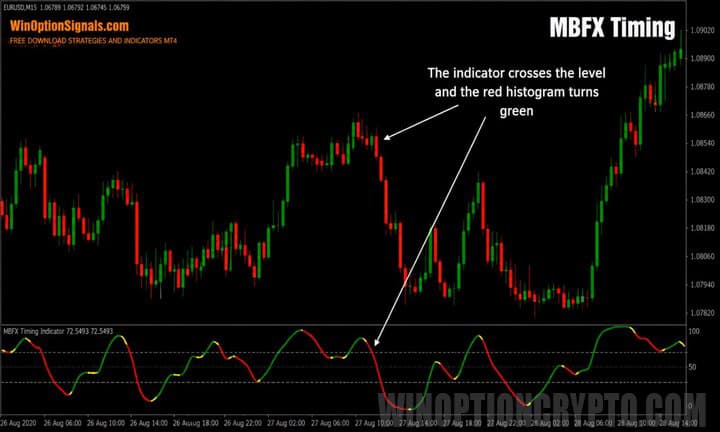
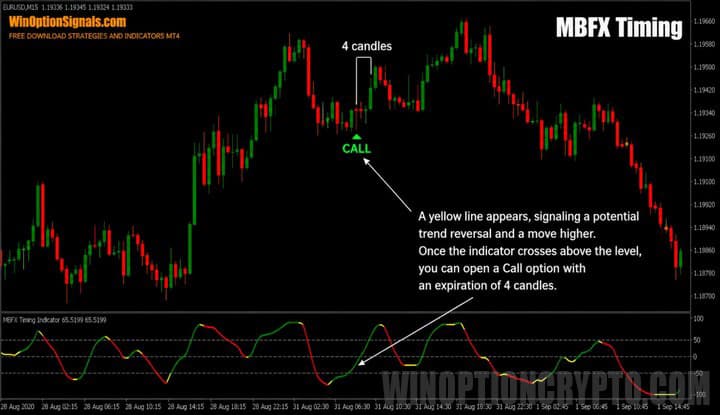
To open a Call option, the indicator must be in the lower zone (below the "30" level). Once the yellow line appears and begins crossing that level from bottom to top, the signal is confirmed:

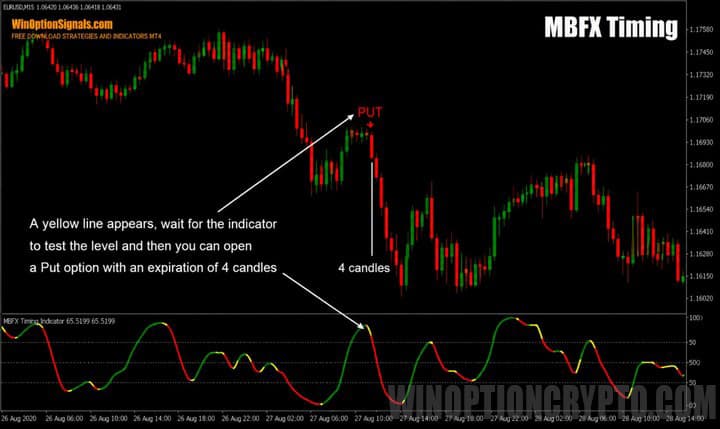
A Put option is opened when the indicator is in the upper zone and, after the yellow line appears, crosses the "70" level from top to bottom:

The expiration time should be set to four candles on the timeframe being used.
As mentioned earlier, the MBFX Timing indicator is designed to capture reversals and corrective pullbacks, and it can be used both with and against the trend. Scalpers will most often use it for counter-trend signals, since scalping trades are short and fast. For beginners, however, it is better to trade corrections in the direction of the trend, as these offer greater movement potential and do not require the preparation and experience that counter-trend scalping demands.
Before you start trading, it is worth understanding what a trend is and how to identify one. You may also find it helpful to read about how to identify trend phases and what bullish and bearish trends are.
The indicator has several advantages over other oscillators:
- High accuracy.
- Does not repaint values, thanks to its fixed range of "0" to "100".
- Spends relatively little time in the upper or lower zones compared to indicators like the Stochastic Oscillator.
The example below shows how accurately the indicator identifies corrective reversals:
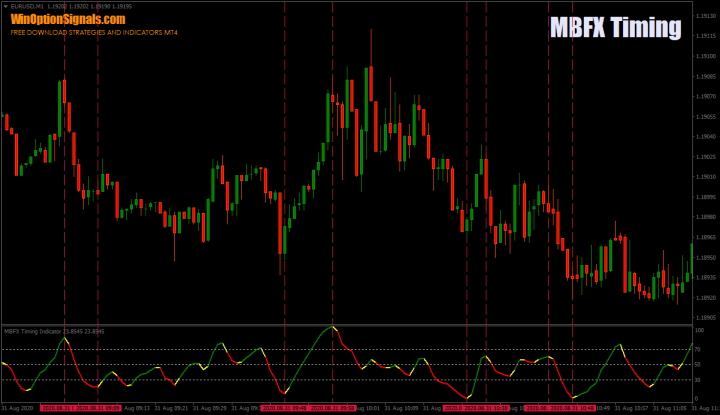
That said, there are times when the indicator signals a reversal that does not fully materialize — the correction may last only one candle. It is therefore advisable to confirm each signal with an additional indicator or, alternatively, with candlestick formations and patterns. This approach improves signal quality and helps you reach profitability faster.
One straightforward example of signal filtering is combining MBFX Timing with the Parabolic SAR indicator:
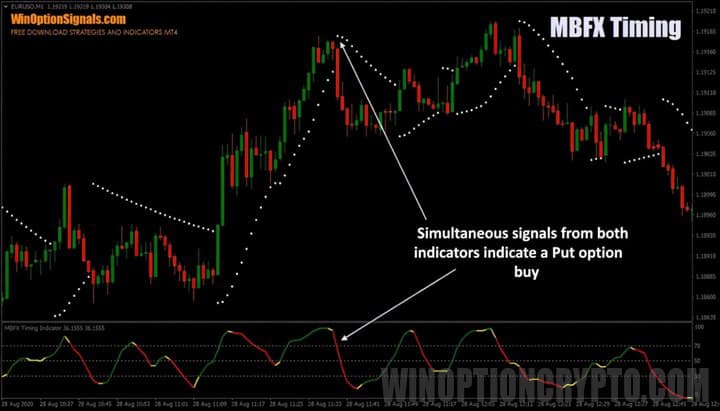
Adding a filter will naturally reduce the number of signals, but those that remain tend to be significantly more reliable.
Another example uses the Engulfing candlestick pattern:
As the image above shows, candlestick analysis pairs well with the MBFX Timing indicator.
Trading Examples Using the MBFX Timing Indicator
Below are several examples of trading with the MBFX Timing indicator for binary options, without any additional filters.
Opening a Call Option
The image below shows an upward trend. Once all the required signals align, a Call option is opened:
Opening a Put Option
Similarly, in a downward trend, once all the signals appear, a Put option can be opened:
Conclusion
The MBFX Timing indicator for binary options is straightforward and easy to understand. It does not repaint its signals and can be used on its own or alongside other indicators. Its ability to identify reversals and corrections with solid accuracy is one of its key strengths.
That said, it is not a holy grail for binary options — false signals do occur. Always follow the principles of money management and risk management, and test all indicators on a demo account before going live. Also, be sure to check our binary options broker ratings to find a reliable broker.
Download the MBFX Timing Template and Indicator
Not sure how this indicator works? Leave a comment below, and subscribe to our YouTube channel WinOptionCrypto — we'll answer your questions in an upcoming video.

To leave a comment, you must register or log in to your account.