
Behind the simple name "Market Reversal Alerts" lies a powerful binary options indicator designed to help traders identify market reversal points. Created by Lee Samson in 2020, this tool promises both ease of use and high effectiveness across all assets and timeframes. But is it worth its $49 price tag? This review answers that question — and explains how the indicator predicts market reversals and corrections.
Contents:
- Key Features
- Installation
- Overview and Settings
- Trading Rules for Market Reversal Alerts
- Specifics of Application
- Conclusion
- Download Market Reversal Alerts
Key Features of the Market Reversal Alerts Indicator
- Terminal: MetaTrader 4
- Timeframe: M15
- Expiration: 3 candles
- Option types: Call/Put
- Indicators: Market Reversal Alerts.ex4
- Trading instruments: currency pairs, commodities, cryptocurrencies, stocks
- Trading hours: 08:00–21:00 UTC
- Recommended brokers: Quotex, Pocket Option, Binarium
Installing the Market Reversal Alerts Binary Options Indicator
The Market Reversal Alerts indicator is installed using the standard procedure in MetaTrader 4. Copy the indicator files to the terminal's root folder by selecting "File" in MT4, then "Open Data Folder". In the folder that opens, navigate to "MQL4" and then "Indicators", and place all the files there. Templates are installed in the same way, but go into the "Templates" folder. For a full step-by-step walkthrough, see our video:
Overview and Settings of the Market Reversal Alerts Binary Options Indicator
The Market Reversal Alerts indicator, created by trader Lee Samson in May 2020, helps identify changes in price direction as they develop. It uses a proprietary algorithm to track breakouts and price impulses. Each time price moves in a given direction, the indicator's signal updates, giving traders advance notice of a potential trend change. This makes it possible to anticipate reversals and deep corrections.
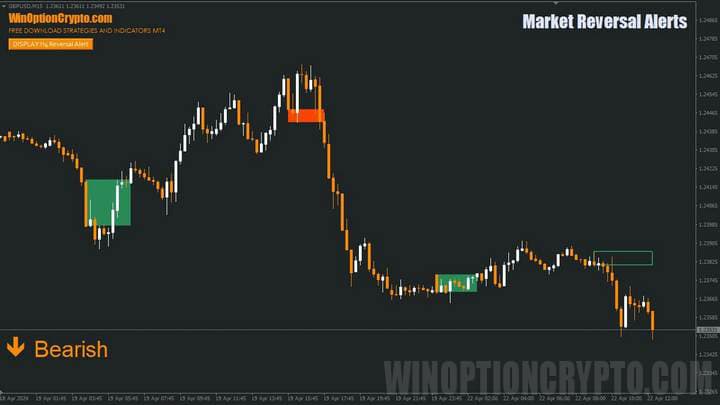
On the chart, the indicator appears as a rectangle that changes colour based on the direction of the price move following a breakout: green rectangles signal potential Call option entries, and orange rectangles signal Put option entries.
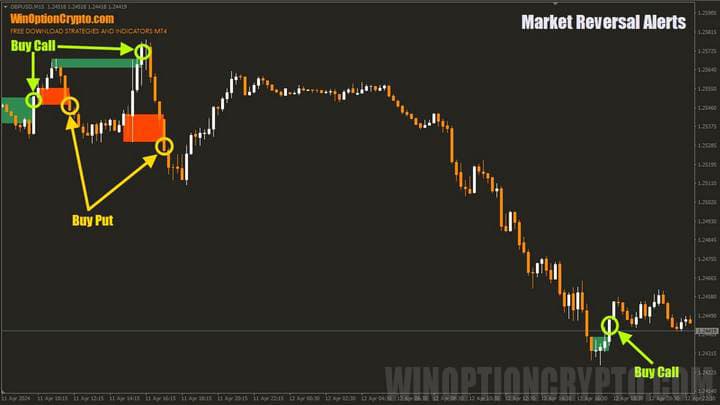
The Market Reversal Alerts indicator has several settings blocks, which will be covered in detail later in this review. First, let's look at how this tool can be applied to Forex trading.
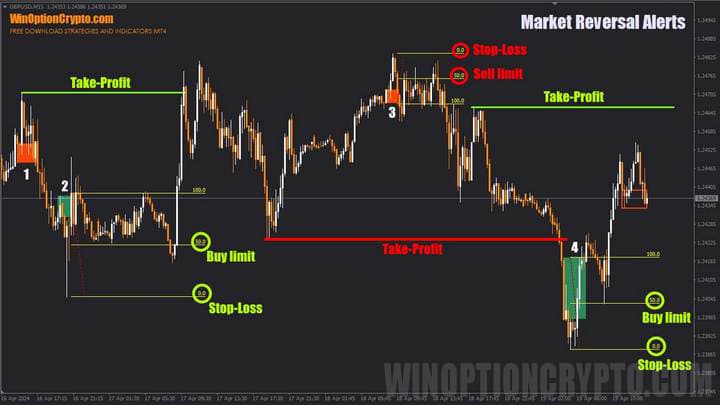
Take the first signal on the chart (marked with the number 1). After the orange rectangle appeared, price behaved somewhat unusually: rather than correcting to the local high, it immediately began to decline, leaving no opportunity to open a short position.
The second signal offered a buying opportunity: after the green rectangle appeared, price moved toward the local low and reached the 50% Fibonacci retracement level, measured from the low to the upper boundary of the rectangle. A stop-loss should be placed beyond the local low, with the take-profit set at the nearest significant high (marked with the green horizontal level labelled "Take-Profit"). The same logic applies to short trades.
Now let's look at how to improve signal quality. It starts with the main parameters block, "Reversal Alerts To See", which controls the trading direction — that is, the direction in which the indicator will generate signals.

The same block contains a "Number of Reversal Alerts to Show" setting, which determines how many rectangles marking trend changes are displayed on the chart. There is also a boolean parameter "Use Wicks of Left Candle?", which affects how the rectangles are drawn: when set to true, candle wicks are included in the rectangle boundaries; when set to false, they are excluded.
The next section covers the visual settings.

Here you select the rectangle colours for bullish and bearish conditions. This is followed by settings for alerts and other visual elements.
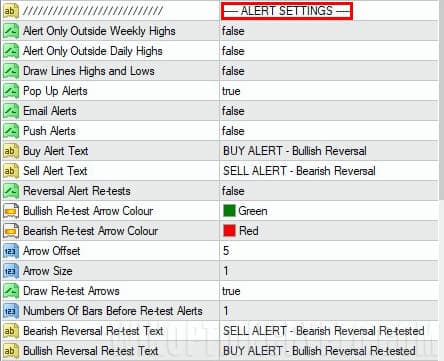
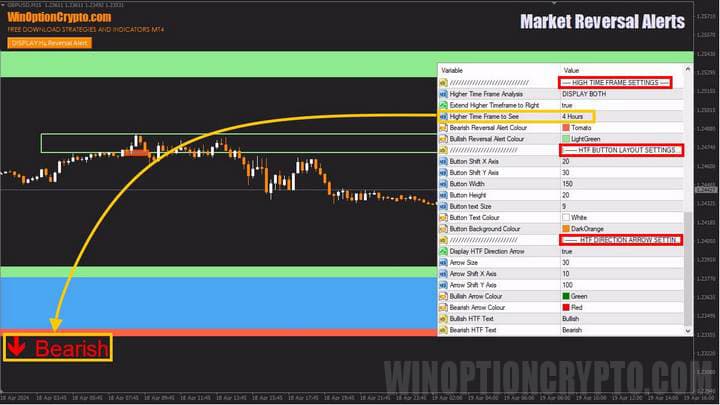
The final block covers higher timeframe (HTF) settings. Here you can select the analysis period, the colours of the support and resistance zones, and the font size and arrow style. How to use this block to obtain more accurate signals is covered later in this review.
Trading Rules for the Market Reversal Alerts Binary Options Indicator
The Market Reversal Alerts indicator not only alerts the trader to changes in the current trend, but also provides trend information from higher timeframes — which can significantly improve the proportion of profitable trades. If you need a refresher on identifying and using bullish and bearish trends, the following articles on our website are a good starting point:
- How does a trend work in the markets?
- Identifying and using bullish and bearish trends.
- Market phase changes.
- How to identify a flat market.
As noted above, we will add higher timeframe trend direction analysis to improve signal quality — and the developer has conveniently built this capability directly into the indicator.
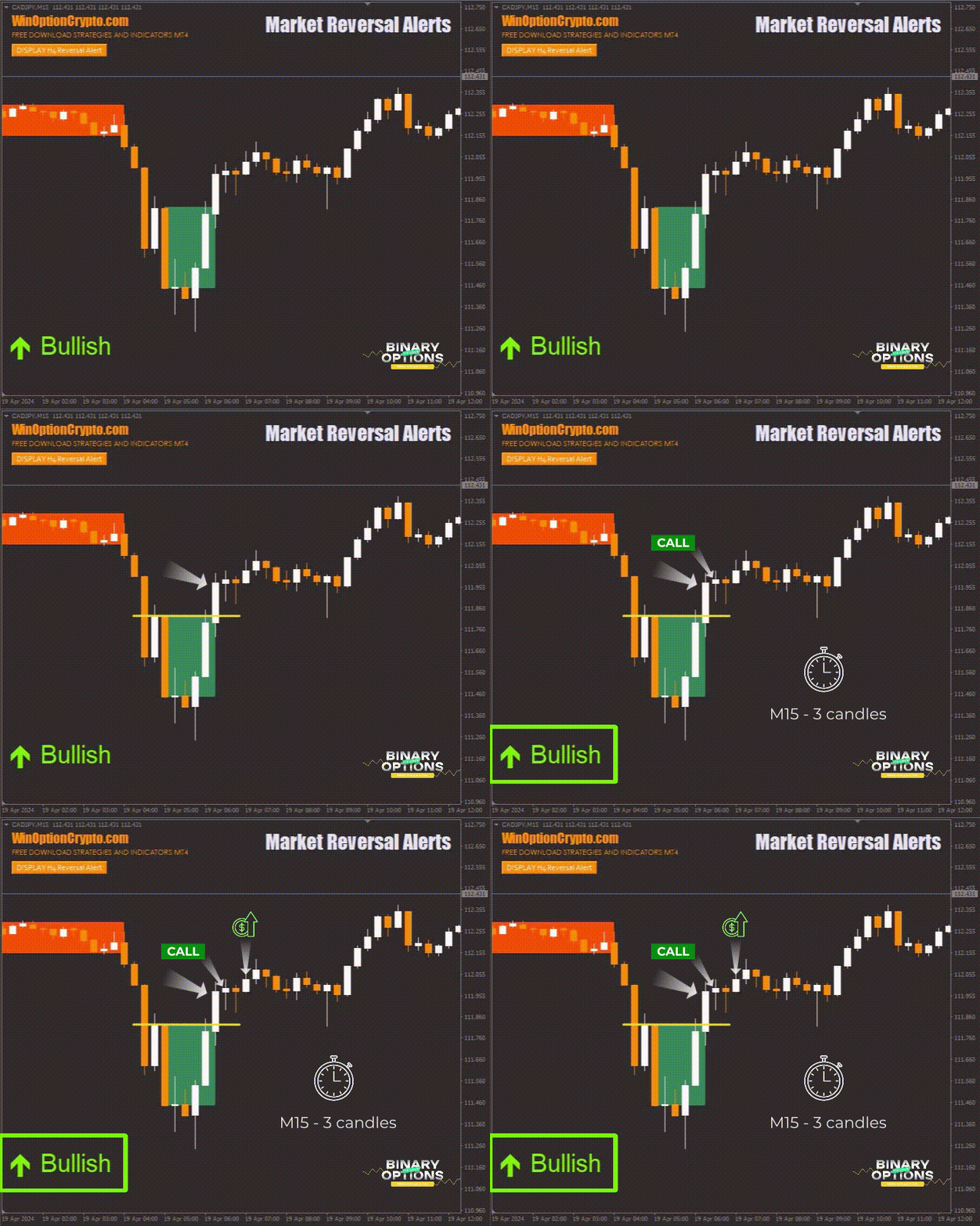
Opening a Call Option
- The higher timeframe (HTF) signal reads "Bullish".
- A candle has closed above the green rectangle.
- Open a Call option at the start of the next candle.
Opening a Put Option
- The higher timeframe (HTF) signal reads "Bearish".
- A candle has closed below the orange rectangle.
- Open a Put option at the start of the next candle.
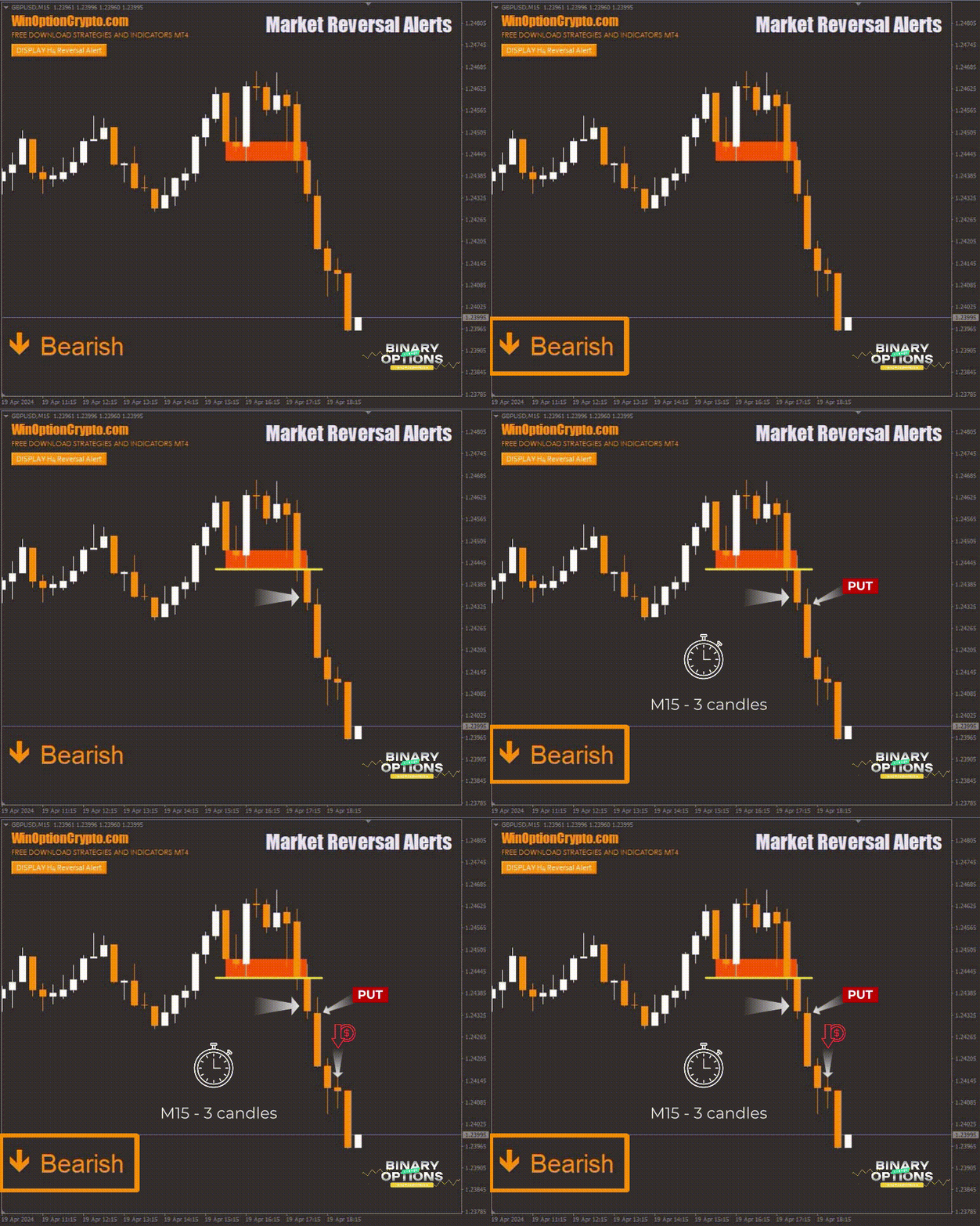
The recommended expiration time is 3 candles. Adjust the holding period based on the financial instrument and the results of backtesting on historical data.
Specifics of Using the Market Reversal Alerts Binary Options Indicator
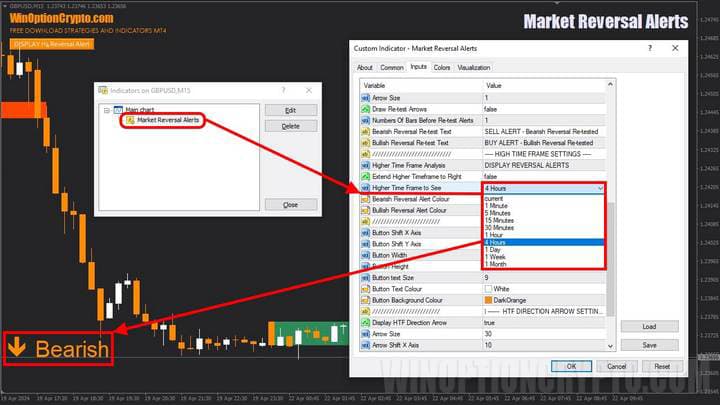
In the examples above, the four-hour (H4) chart was used as the trend filter — an ideal pairing for trading on the 15-minute (M15) timeframe. If you prefer to trade on the 5-minute (M5) or 1-minute (M1) timeframe, use the one-hour (H1) or 30-minute (M30) chart as your filter respectively. To change the trend filter, go to the "HIGH TIME FRAME SETTINGS" section and select the desired option from the "Higher Time Frame To See" drop-down list, as shown below.
Pros of the Market Reversal Alerts Indicator
This is a versatile technical analysis tool suitable for traders of different styles. It is easy to use and highly effective. The indicator tracks changes in market structure, works across all assets and timeframes, and sends alerts — making it a reliable aid for traders looking to identify reversal points.
Disadvantages of the Market Reversal Alerts Indicator
The indicator has some drawbacks, including a relatively low signal frequency for any given asset. Additionally, some signals may contradict the trend on higher timeframes, which can lead to losses if the trader does not enable the "Higher Time Frame Analysis" setting in the "HIGH TIME FRAME SETTINGS" block.
Conclusion
The Market Reversal Alerts binary options indicator is a straightforward and effective technical analysis tool. It tracks changes in market structure across all assets and timeframes, helping traders identify reversal points. It is worth noting that the indicator generates a limited number of signals, some of which may conflict with the higher timeframe trend. To reduce the risk of losses, it is recommended to enable the "Higher Time Frame Analysis" settings in the "HIGH TIME FRAME SETTINGS" block.
At $49, this indicator can be considered a worthwhile investment — but before trading with real funds, it is recommended to test its settings and signals thoroughly on a demo account with a reliable broker. It is also important to follow sound risk and capital management practices. You can also download this indicator from our website free of charge for evaluation purposes. We wish you successful trading!
Download the Market Reversal Alerts Binary Options Indicator

To leave a comment, you must register or log in to your account.