
The HMA indicator for binary options is an analogue of the SMA indicator, but features a more advanced construction algorithm that delivers better results in practice.
The Hull Moving Average can be used in any market, and even beginners can trade with it. This version of the indicator changes the color of the moving average depending on whether the price is rising or falling, and also includes alerts that notify you when it is time to open an option.
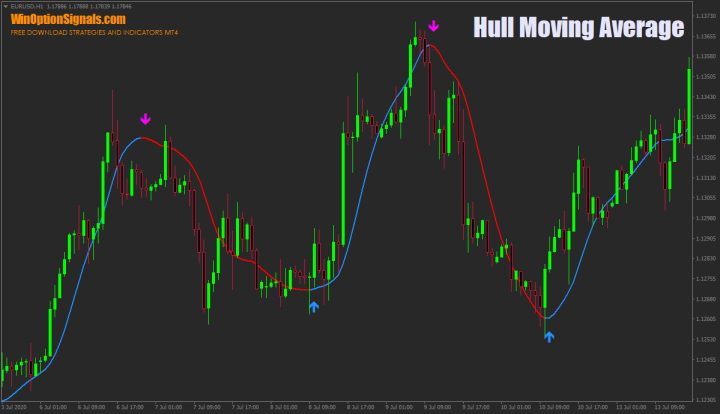
Key Features of the HMA Indicator
- Terminal: MetaTrader 4.
- Timeframe: M1–H4.
- Expiration: 5 candles.
- Option types: Call/Put.
- Indicators: HMA.
- Trading instruments: all currency pairs.
- Trading hours: 08:00–21:00 UTC.
- Recommended brokers: Quotex, PocketOption, Binarium.
Installing the HMA Binary Options Indicator
The indicator is installed using the standard procedure in the MetaTrader 4 terminal.
MetaTrader 4 instructions for installing indicators:
The HMA indicator offers various settings that let you customize both the moving average itself and its visual appearance:
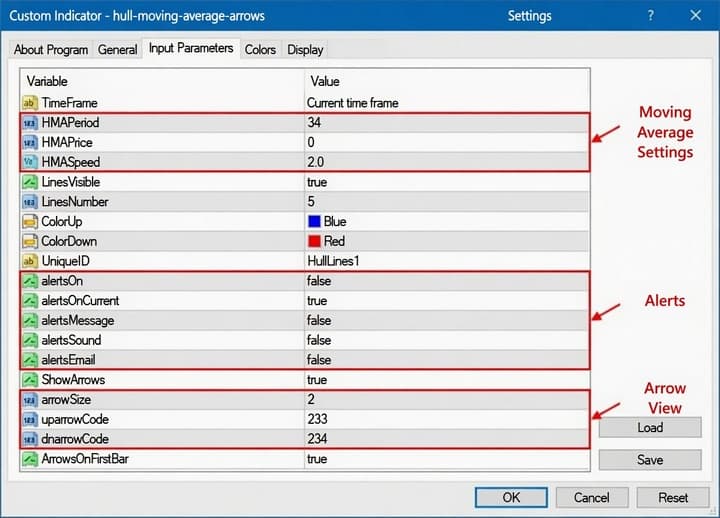
It is worth noting that the default settings are quite accurate and, in most cases, signal a reversal almost at its very beginning.
However, if multiple Hull Moving Averages are used in binary options trading, the settings should be adjusted based on the timeframe and the instrument being traded.
HMA Trading Rules and Description
Since the HMA indicator for binary options is a trend indicator, it is worth understanding what a trend is and how to identify it, as well as how to identify the phases of a trend before you start trading with it. It is also helpful to understand what bullish and bearish trends are. These topics are not strictly required, but a solid understanding of them will help you achieve significantly better results in binary options trading.
The Hull Moving Average algorithm works by smoothing the standard SMA using a special calculation formula rather than relying on the moving average period itself. This makes the moving average more responsive to price changes and produces more accurate results:
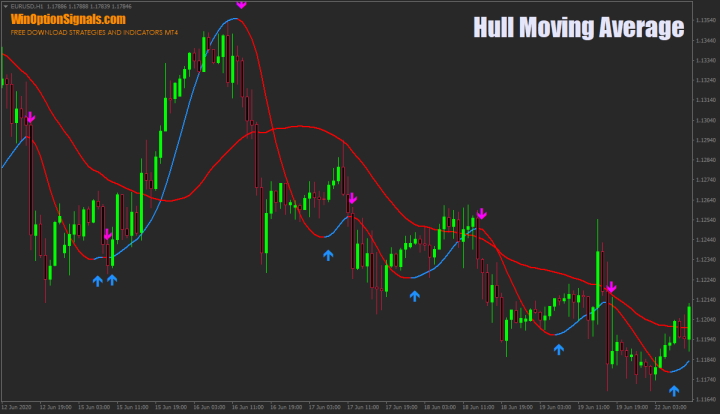
As the image above shows, the Hull Moving Average and a standard SMA with the same period can produce very different values. The Hull Moving Average identifies not only minor corrections but also stronger price moves, while the SMA lags behind during both weak and strong movements.
Before using the HMA indicator, you should be aware of its drawbacks. The first is that it can overstate the average price when the market does not actually support such a reading. As a result, if you open a trade on every signal, some will not be justified — certain signals will prove false, while others will be highly accurate.
The second drawback is that signals generated by the crossover of multiple moving averages will often be false, because the Hull Moving Average lacks the built-in lag present in standard moving averages:
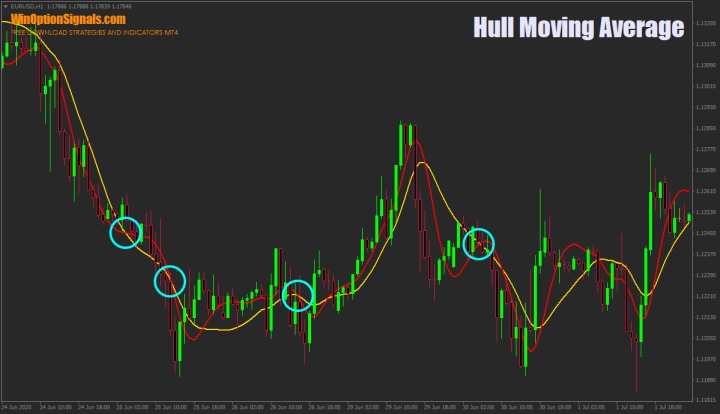
As you can see, many crossover signals are false and will result in losses if traded in this way.
When it comes to the trading rules for the HMA indicator, the built-in signal arrows make it straightforward to use: an upward-pointing arrow indicates a Call option entry, and a downward-pointing arrow indicates a Put option entry.
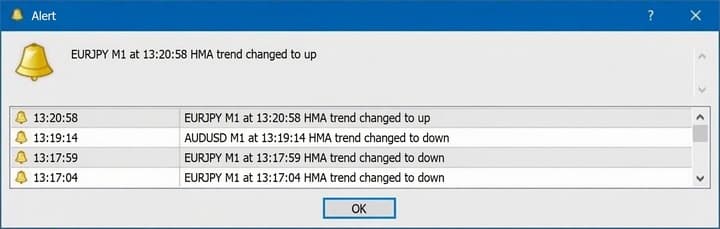
The indicator also includes alerts that notify the trader when a signal appears:
Examples of Trading with the HMA Indicator
The examples below will help you better understand when it makes sense to open an option when trading with the Hull Moving Average indicator, since not every signal should be acted on.
Opening a Call Option
In the image below, you can see that the trend is upward. In this case, only Call option signals should be considered, and once a signal appears, the option can be opened with an expiration of five candles:
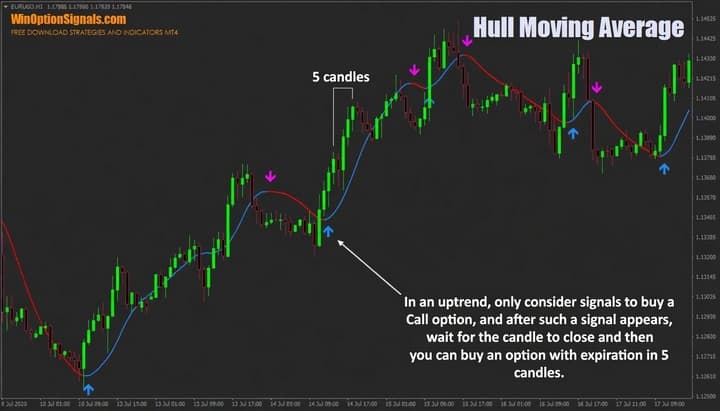
It is also important to wait for the signal candle to close before opening the trade.
Opening a Put Option
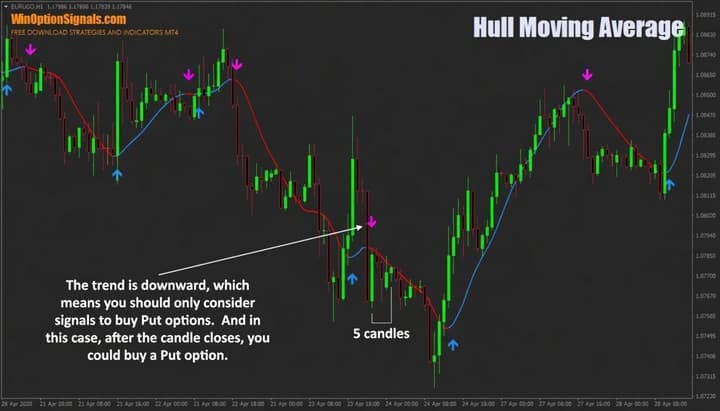
The approach for a downtrend is the same. Once a signal appears, wait for the candle to close and then open a Put option with an expiration of five candles:
Conclusion
As demonstrated, the HMA indicator can generate accurate signals for binary options trading even with its default settings, particularly when used in line with the prevailing trend. To get the most out of it, however, it is worth taking the time to fine-tune the settings to match both your trading style and the instrument you are trading. Before going live, the right approach is to practise on a demo account to understand how the indicator behaves and what to expect from it going forward.
It is equally important not to overlook the principles of money management and risk management, as sound position sizing allows you to remain profitable even through losing trades. Choosing a reliable broker is just as essential — you can find one in our binary options broker ratings.
Download the HMA Template and Indicator
Not sure how a particular strategy or indicator works? Leave a comment below, and subscribe to our YouTube channel WinOptionCrypto — we’ll answer your questions in upcoming videos.

To leave a comment, you must register or log in to your account.