
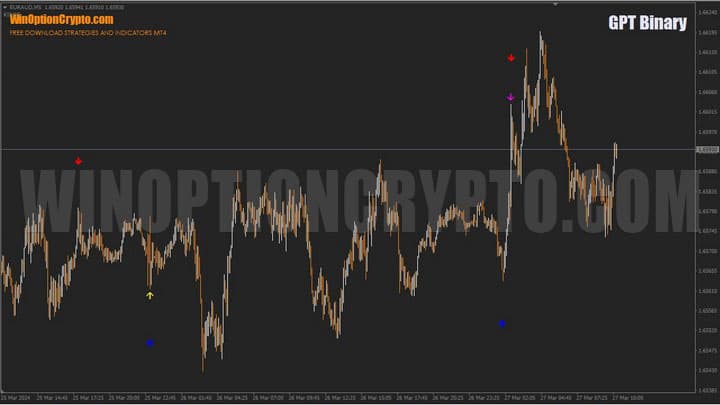
GPT Binary is a binary options signal indicator that combines the readings of three other technical analysis tools. Its trading signals are reliable, though they appear less frequently than those of the underlying indicators it draws its arrows from.
The GPT Binary indicator is available as a free download and is a good choice for beginners. It features a dashboard displaying trade statistics, making it easier to identify reliable financial instruments for profitable trading. We'll explain in detail how to use this information and determine the optimal timeframe in this review.
Contents:
- Key Features
- Installation
- Overview and Settings
- GPT Binary Trading Rules
- Specifics of Application
- Conclusion
- Download GPT Binary
Key Features of the GPT Binary Indicator
- Terminal: MetaTrader 4
- Timeframe: M5
- Expiration: 3 candles
- Option types: Call/Put
- Indicators: GPTBinary.ex4, CryptoBinary_Pro V2.1.ex4, K_BetterVolume_Arrow.ex4, RSI-BB.ex4
- Trading instruments: currency pairs, commodities, cryptocurrencies, stocks
- Trading hours: 08:00–21:00 UTC
- Recommended brokers: Quotex, Pocket Option, Binarium
Installing the GPT Binary Indicator
Indicators are installed in the MetaTrader 4 platform using the standard procedure. To do this, add them to the terminal's root folder by selecting "File" in MT4, then "Open Data Folder." In the folder that opens, navigate to "MQL4," then "Indicators," and move all files there. Templates are installed in the same way, but placed in the "Templates" folder. For more detailed installation instructions, watch our video:
GPT Binary Indicator Overview and Settings
GPT Binary is a typical signal arrow indicator. Its main distinction from similar indicators is that it generates all its signals based on data from other underlying tools.
One of these is CryptoBinary_Pro V2.1, which provides GPT Binary with a preliminary signal to open a position. We covered this indicator in the article "Crypto Binary Pro V2 Binary Options Indicator," so we won't go into detail here — we'll focus instead on the general principle of how it works.
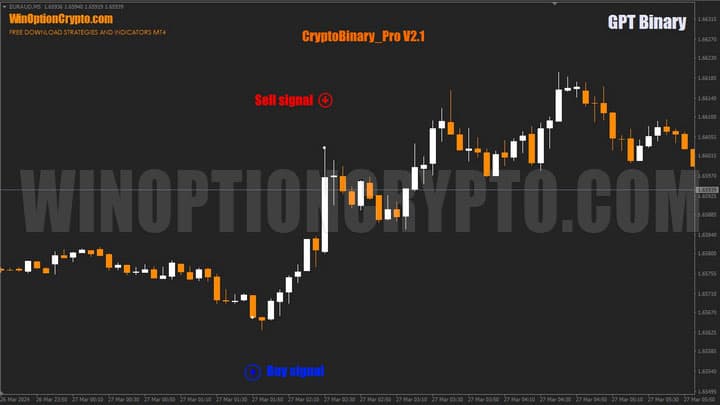
As shown above, it identifies short-term trend changes with reasonable accuracy, providing timely warning of reversals. However, it has a notable drawback: it repaints its signals when a previous extreme is exceeded.
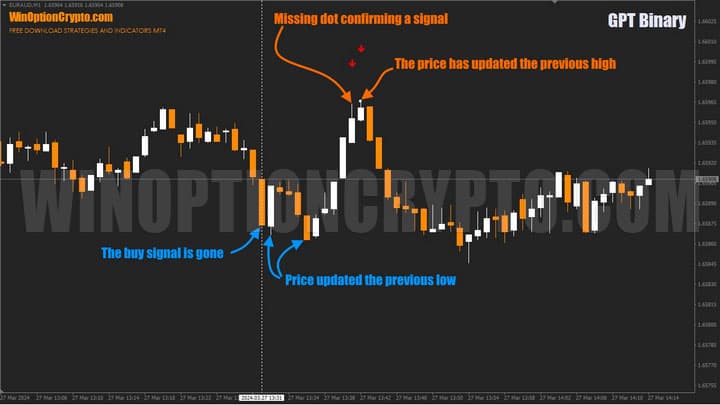
That said, it does an excellent job of identifying local highs and lows that influence price movements. To build on its strengths and compensate for this weakness, GPT Binary filters the data received from CryptoBinary_Pro V2.1 using the K_BetterVolume_Arrow and RSI-BB indicators.
K_BetterVolume_Arrow is an arrow indicator that generates signals based on Better Volume 1.4 and price action. It helps assess overall market sentiment and accurately identifies the onset of price movements.
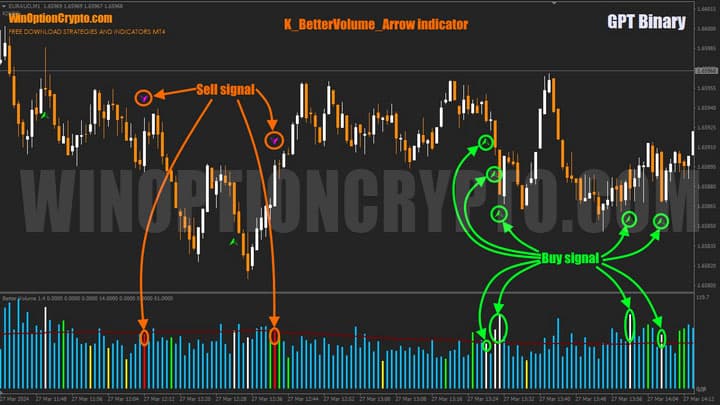
The screenshot above shows K_BetterVolume_Arrow in action. Its signals are derived from the subwindow volume indicator. A sell signal (purple arrow) is triggered when the maximum effective volume — calculated as the candlestick range multiplied by tick volume — reaches its highest value over the period specified in the settings, and the candlestick closes in its upper half (Close > (High+Low)/2). A buy signal (green arrow) occurs on a bar with the maximum effective volume and a close in the lower half of its range (Close < (High+Low)/2).
Note: Tick volume is the number of times an asset's price changes by one basis point over a given period of time.
The final filter GPT Binary applies when generating signals is RSI-BB, a signal indicator based on the interaction of Bollinger Bands and the RSI oscillator. We covered how this combination works in detail in the article "Bollinger Bands and RSI Strategy for Pocket Option," so here we'll limit ourselves to examples of the signals these straightforward but effective tools can generate.
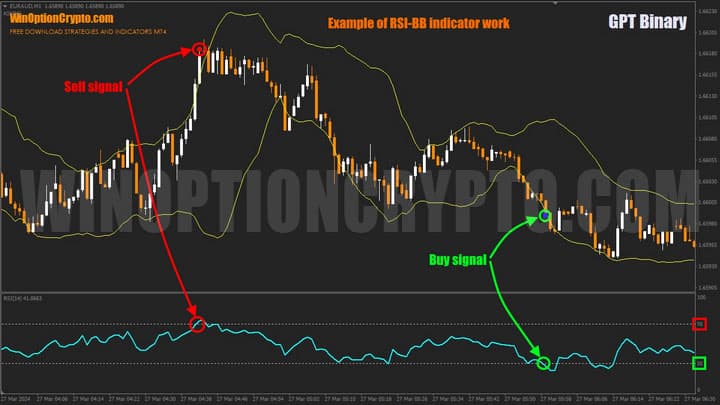
As shown above, sell signals are triggered when a candle closes above the upper Bollinger Band and the RSI enters the overbought zone (above 70). Buy signals are triggered when a candle closes below the lower band and the RSI enters the oversold zone (below 30).
GPT Binary Settings
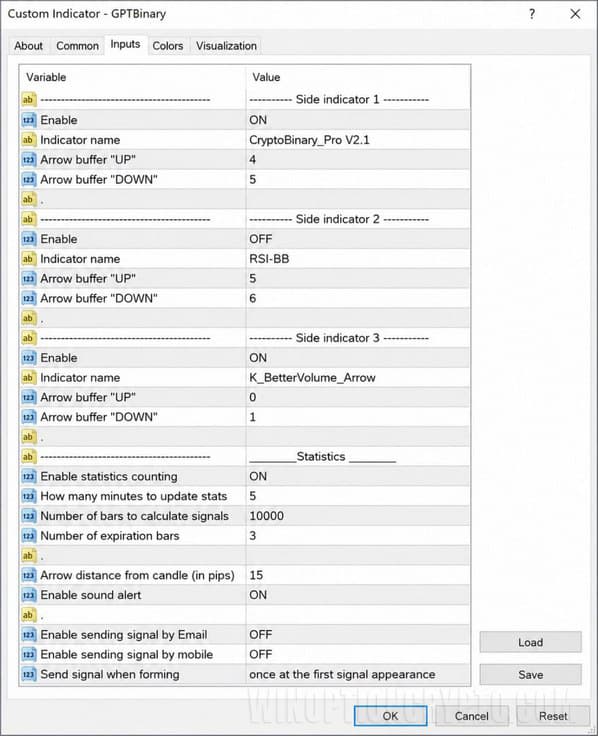
The main indicator's settings consist of several indicator activation blocks and a statistics module.
Trading Rules for the GPT Binary Indicator
GPT Binary combines a set of technical analysis tools, each of which produces solid signals individually — but when used together, they can significantly improve the win rate. To confirm GPT Binary signals, more experienced traders can also apply price patterns, which we discuss in detail in the following articles:
- Price Action Binary Options
- Pattern Indicators for MetaTrader 4
- Top 7 Patterns in Binary Options
Our tests showed that for the best win rate, a combination of just two tools is sufficient: CryptoBinary_Pro V2.1 and K_BetterVolume_Arrow. This pairing proved more than adequate for identifying high-probability entry points. The trading rules below are therefore based on this combination.
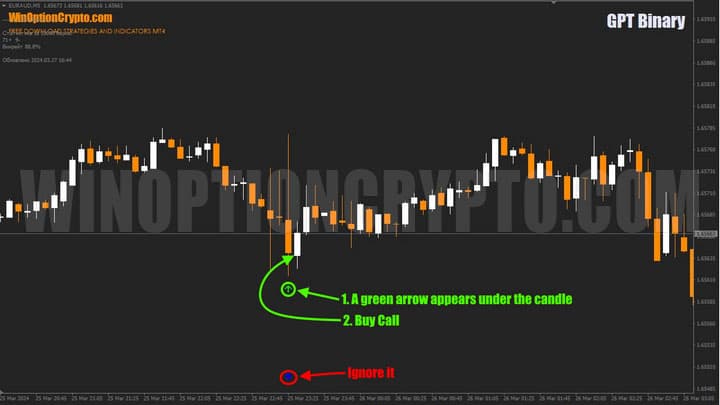
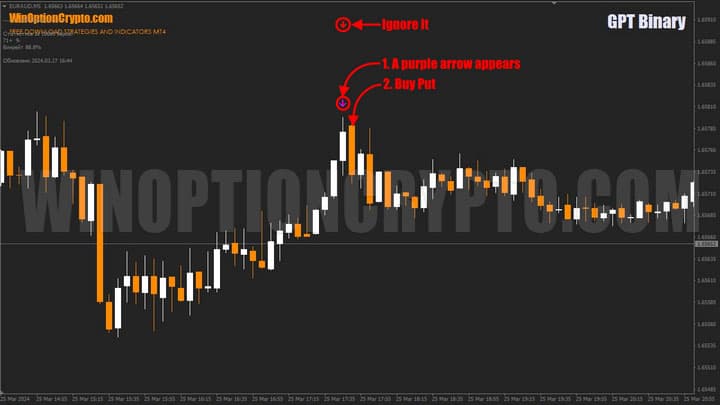
Please note: Only open trades based on green and purple arrows; ignore all others.
Opening a Call Option
- A green arrow appears below the candle.
- At the open of the next candle, buy a Call.
Opening a Put Option
- A purple arrow appears above the candle.
- At the open of the next candle, buy a Put.
The recommended expiration is 3 candles. Select the holding period based on the financial instrument and your historical data testing results.
Specifics of Using the GPT Binary Indicator
A standout feature of GPT Binary is its ability to collect performance statistics on its signals. This allows traders to estimate the expected win rate for a given combination of signals on a specific financial instrument and timeframe.
Before trading live, we recommend running your own research to identify the currency pair with the highest win rate and the most favourable timeframe.
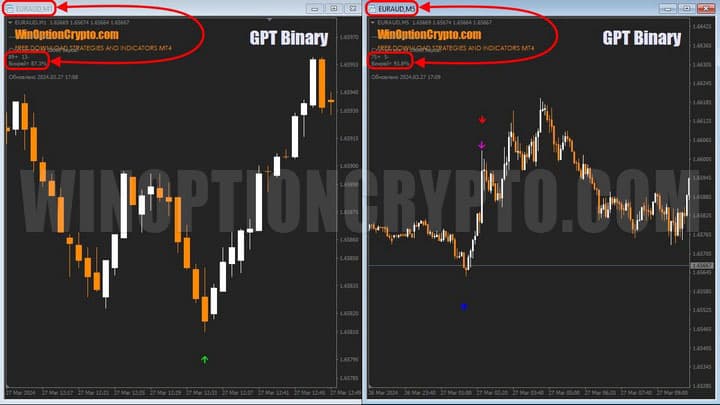
As shown in the screenshot above, the win rate on M5 was 93.8% — slightly higher than on M1 (87.3%). By testing different timeframes, traders can find the optimal one for their chosen instrument.
Advantages of the GPT Binary Indicator
The main advantages of this indicator are the ability to identify the most promising currency pairs and cryptocurrencies based on win rate, and the built-in alert system. Alerts help traders avoid missing profitable entries when monitoring a large number of instruments simultaneously.
Disadvantages of the GPT Binary Indicator
One drawback is the relatively low number of signals generated per day for a single currency pair. This is the natural trade-off of the extensive filtering applied by this tool — fewer signals, but higher quality.
Conclusion
The GPT Binary indicator is a powerful tool that deserves traders' attention. By combining data from three other technical analysis indicators and tracking trade statistics, it delivers accurate and reliable signals. While they may appear less frequently than those of some comparable indicators, their quality and consistency make them worth the wait.
We have examined the operating principles of GPT Binary and its components — CryptoBinary_Pro V2.1 and K_BetterVolume_Arrow — in detail, and confirmed their effectiveness for binary options market analysis. We recommend conducting your own research to determine the optimal expiration and select financial instruments with the greatest potential.
Using these insights, traders can refine their strategies and improve their win rate. Keep reading our reviews to build your knowledge of binary options and technical analysis. We recommend all beginners start on a demo account with a low-minimum-deposit broker, following sound risk and money management principles. Only move to live trading after achieving consistent results on a demo account. Happy trading!
Download the GPT Binary Indicator

To leave a comment, you must register or log in to your account.