
The Spaghetti binary options strategy was originally developed for Forex trading but adapts naturally to binary options. It combines trend and histogram indicators and comes with three templates designed for different trading approaches.
One of the templates also includes automatic level plotting, which simplifies trading further.
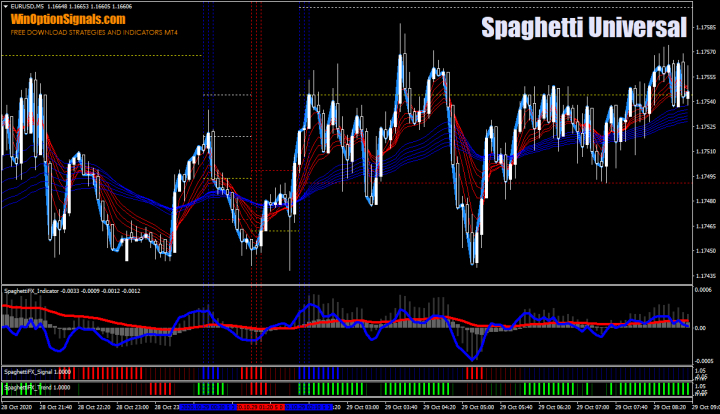
Key Features of the Spaghetti Strategy
- Terminal: MetaTrader 4.
- Timeframe: M1–D1.
- Expiration: 1 hour.
- Option types: Call / Put.
- Indicators: HullMA.ex4, SpaghettiFX_Fast.ex4, SpaghettiFX_Indicator.ex4, SpaghettiFX_Signal.ex4, SpaghettiFX_Slow.ex4, SpaghettiFX_STM.ex4, SpaghettiFX_Trend.ex4.
- Trading instruments: any.
- Trading hours: 08:00–21:00 UTC.
- Recommended brokers: Quotex, Pocket Option, Binarium.
Installing the Spaghetti Binary Options Strategy
Indicators are installed using the standard MetaTrader 4 procedure.
MetaTrader 4 guide — installing indicators:
The Spaghetti strategy uses a set of proprietary indicators:
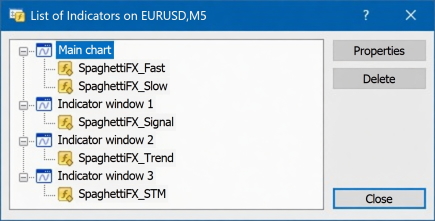
Almost all of them are based on Moving Averages. There is no need to configure them manually — the three included templates already contain the optimal settings.
Spaghetti Indicators: Overview and Settings
Because the Spaghetti strategy is built on Moving Average-based indicators, it is a trend-following system. Understanding how trends work and how to identify a ranging market is important for filtering out false signals. The strategy's dedicated trend template makes this easier by providing a clear visual read of current market direction:
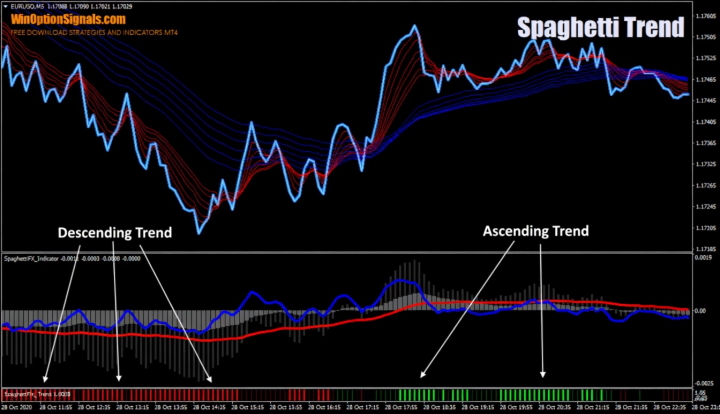
As shown above, red histogram bars on the SpaghettiFX Trend indicator indicate a downtrend; green bars indicate an uptrend.
The second template is the signal template. It differs from the trend template only in the colour scheme of the histogram bars:
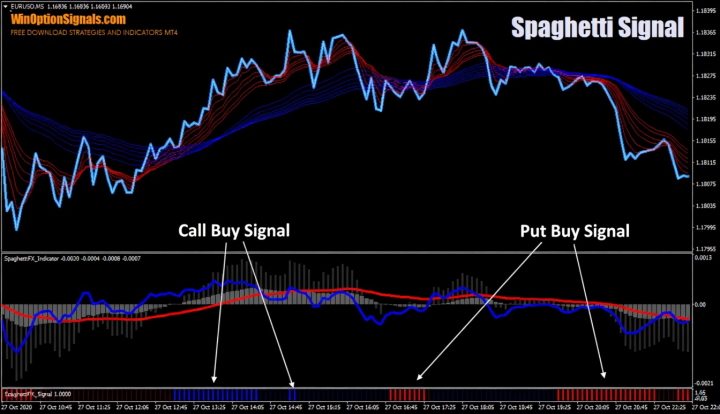
Trades are taken when blue or red bars appear.
The third template is the universal template, which combines all the indicators above into a single chart for a complete, ready-to-trade setup. It also includes a signal indicator that marks entry points directly on the chart and draws levels automatically:
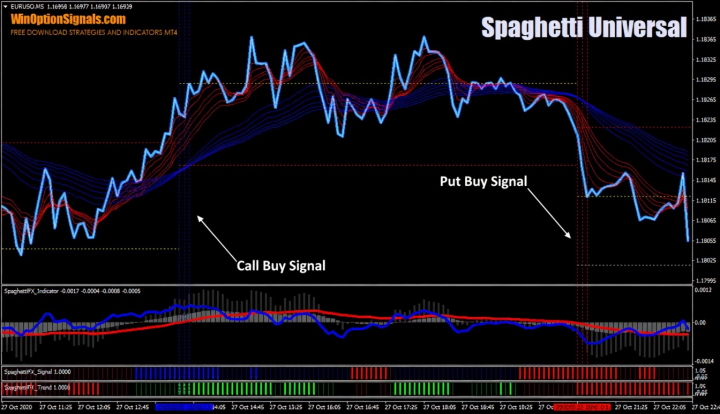
The SpaghettiFX Indicator generates additional signals and is worth understanding in detail:
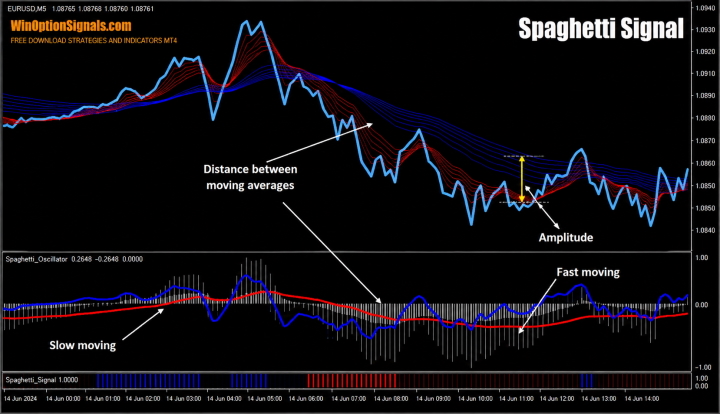
The indicator displays Moving Averages and measures two values — Distance and Amplitude — which are interpreted as follows:
- Distance. A large gap between the moving averages signals a strong, sustained trend. A very small gap suggests the market is ranging or that the current move is nearing exhaustion.
- Amplitude. Carries the same information as Distance but is more sensitive, reacting even to minor corrections and pullbacks.
Spaghetti Strategy Trading Rules
With a clear understanding of each indicator's role, the entry rules are as follows.
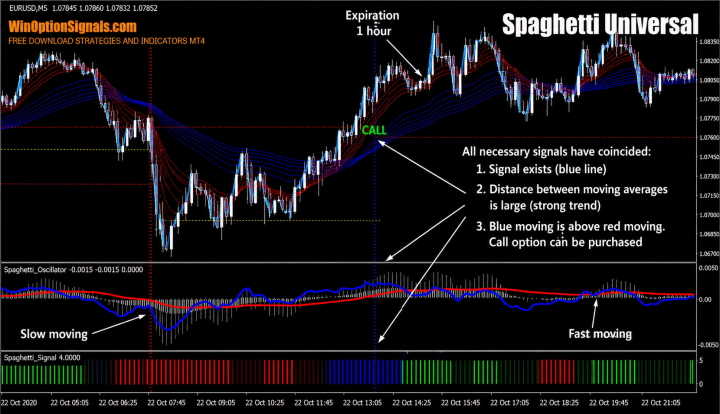
Open a Call option when:
- An uptrend is confirmed (via the amplitude, the distance between the moving averages, or the trend indicator);
- A dotted blue line signal appears on the chart;
- The blue SpaghettiFX Indicator line is above the red line.
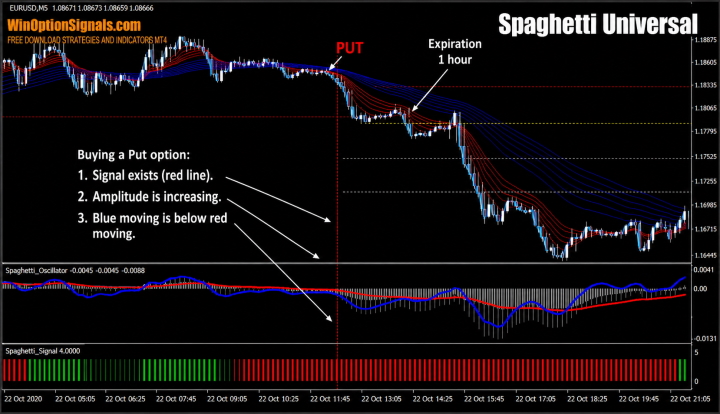
Open a Put option when:
- A downtrend is confirmed (via the amplitude, the distance between the moving averages, or the trend indicator);
- A dotted red line signal appears on the chart;
- The blue SpaghettiFX Indicator line is below the red line.
The recommended timeframe for this strategy is M5, with an expiration of 1 hour.
Trading Examples
The examples below use M5 charts on the EUR/USD pair and include candle closes so you can see how the signals interact with a 1-hour expiration.
Opening a Call Option
All indicator conditions aligned for a Call entry. Note that the option is opened on the candle that follows the signal candle (the one on which the dotted line appeared):
Opening a Put Option
The same conditions applied for the Put entry. In this case, a new trend was already visible from the amplitude reading when the signal appeared. As with the Call, the trade is opened on the candle after the signal candle closes:
Conclusion
Although the strategy includes three templates, we recommend using only the universal template (Spaghetti Universal). It combines all the strategy's indicators on a single chart, giving you the complete picture in one place and making trading as straightforward as possible.
As with any strategy, always test it on a demo account before going live. When switching to a real account, apply sound money management and risk management principles throughout.
Choosing a reliable broker is equally important. You can find vetted options in our binary options broker rankings.
Download the Spaghetti Binary Options Strategy
Not sure how a particular strategy or indicator works? Leave a comment below, and subscribe to our YouTube channel WinOptionCrypto — we'll answer your questions in upcoming videos.

To leave a comment, you must register or log in to your account.