
The PipFinite Trend PRO indicator for Forex and binary options was developed by Carlo Wilson Vendiola, a well-known author of trading systems with a wide following in the trading community.
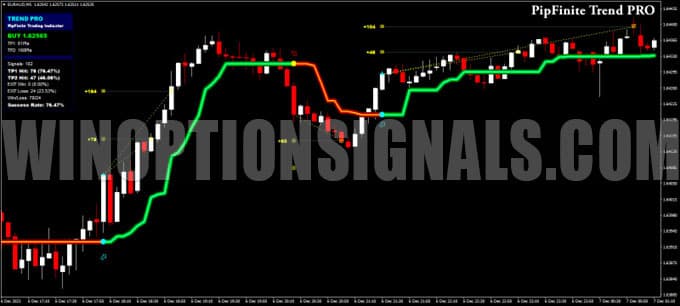
The algorithm behind PipFinite Trend PRO accurately identifies trend reversals, filters out the market noise that inevitably arises during consolidation, and does not repaint its signals. The indicator also tracks the quality of past trades, displaying live statistics in a built-in information panel.
With PipFinite Trend PRO, you can evaluate the indicator's actual performance on your chosen instrument and timeframe yourself — no need to rely on anyone else's assessment.
Content:
- Key Features of PipFinite Trend PRO
- Installing PipFinite Trend PRO in MetaTrader 4
- How PipFinite Trend PRO Works and Its Settings
- Trading Rules for PipFinite Trend PRO
- Buying a Call Option
- Buying a Put Option
- Conclusion
- Download PipFinite Trend PRO
Key Features of the PipFinite Trend PRO Indicator
- Platform: MetaTrader 4
- Instruments: highly volatile currency pairs, oil, metals, indices, cryptocurrencies
- Timeframe: M5 and above
- Expiration: 3 candles
- Trading hours: active market hours
- Recommended brokers: Pocket Option, Quotex, Binarium
Installing PipFinite Trend PRO in MetaTrader 4
Installation follows the standard procedure for MetaTrader 4 custom indicators. Extract the downloaded files and place the indicator files in the Indicators folder of your MT4 data directory. You can find the path to this folder via File → Open Data Folder.
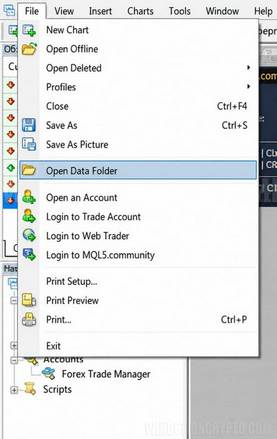
If this is your first time installing a custom indicator in MetaTrader 4, we have a step-by-step video on our YouTube channel covering the full process.
After copying the indicator files, remember to also transfer the template to the .../templates folder. This saves time on chart setup and ensures the indicator's visual parameters are correctly configured from the start.
How PipFinite Trend PRO Works and Its Settings
PipFinite Trend PRO is based on trend tracking. When the closing price of a bar crosses below or above a defined level — typically a local price extreme — the indicator reverses its value and generates a signal to enter in that direction.
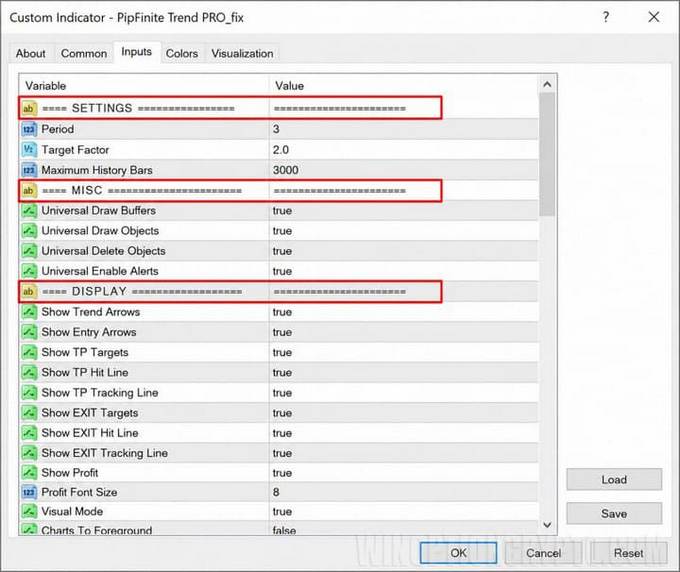
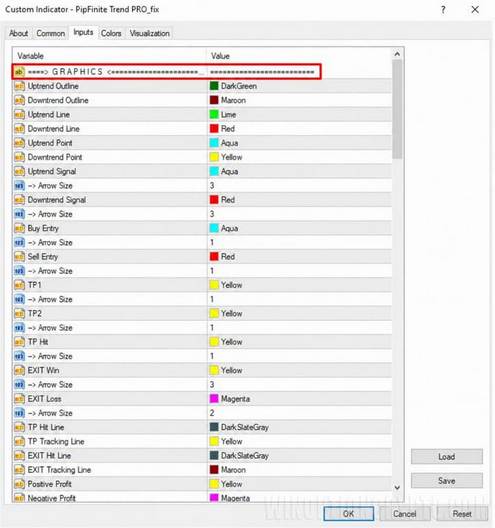
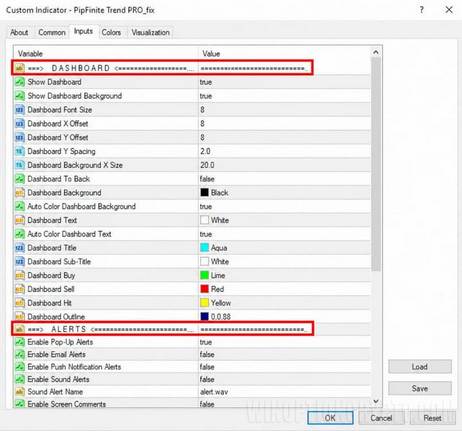
The indicator has a comprehensive set of configurable parameters, organised into the following blocks:
- SETTINGS — calculation period, stop/take ratio, history depth;
- MISC — internal technical parameters;
- DISPLAY — visualisation of trend direction, entry points, take-profit levels, and profit amount;
- GRAPHICS — visual style of the indicator's main elements;
- DASHBOARD — information panel settings;
- ALERTS — alert settings.
Trading Rules for PipFinite Trend PRO
PipFinite Trend PRO is designed as a trend classifier that reacts to meaningful shifts in trend momentum. It is best used within trend-following trading systems. The optimal entry point is the trend turning point, which the indicator highlights in blue at the start of a bullish trend and yellow at the start of a bearish one.
Pay particular attention to the Success Rate figure on the indicator's information panel. This shows the percentage of profitable historical trades for the selected instrument at the configured history depth and timeframe. Use this data to identify the asset and timeframe combination with the highest win rate available at your broker.
When trading Forex with PipFinite Trend PRO, enter in the direction of the signal. Place a stop loss a few pips below the last significant low (referencing significant extremes visible on higher timeframes). Set two take-profit orders at the levels recommended by the indicator; the remaining portion of the position can be closed on the opposite signal or trailed along the indicator line.
A multi-timeframe approach can further improve results: identify the trend direction on a higher timeframe (such as H4), then switch to M5 and wait for a confirming signal in the same direction. This approach is valid, but worth noting that tightening entry rules to reduce losing trades will inevitably filter out some winning ones as well. Whether to apply this filter is a personal decision, depending on individual trading style and risk tolerance.
Call Option Signal Conditions:
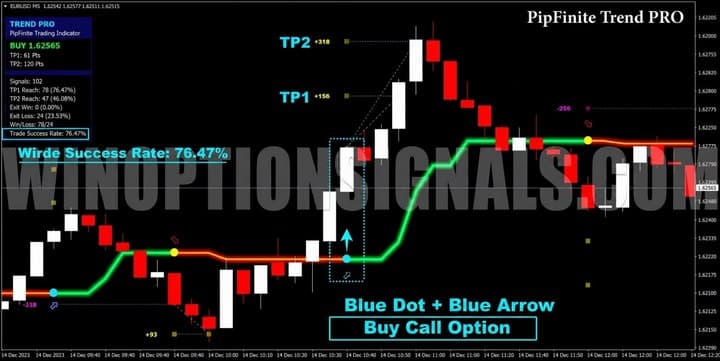
- A blue dot appears on the chart, signalling a trend change;
- A blue arrow appears below the price.
Put Option Signal Conditions:
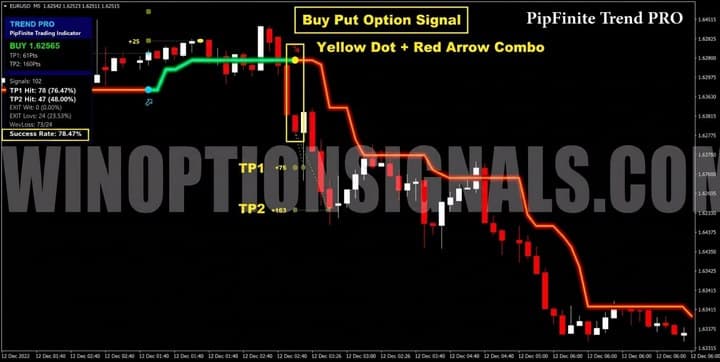
- A yellow dot appears on the chart, signalling a trend change;
- A red arrow appears above the price.
Expiration time: 3 to 5 candles, depending on the instrument.
Buying a Call Option
A buy signal occurs when a blue dot and a blue arrow appear simultaneously. Buy a Call binary option at this point.
Buying a Put Option
The sell signal is the mirror of the buy signal: a yellow dot and a red arrow appear simultaneously. When you see this signal, buy a Put binary option. For Forex trading, open a short position and set a stop loss slightly above the most recent pullback high (referencing the extreme visible on the higher timeframe). Place two take-profit orders at the levels recommended by the indicator.
Conclusion
PipFinite Trend PRO is a capable and versatile technical analysis tool that can meaningfully complement any trader's approach, regardless of experience level. Precise trend reversal signals combined with indicator-defined take-profit levels — all validated by actual trade statistics — make this a compelling indicator to work with.
PipFinite Trend PRO Serves Three Purposes:
- As a screening tool to identify instruments with a high win rate;
- As a standalone trading system for the Forex market;
- As a binary options signal generator with a high probability of success.
Given these capabilities, PipFinite Trend PRO can be applied not only to binary options but also to standard Forex and cryptocurrency trading.
Not sure how a particular strategy or indicator works? Leave a comment below, and subscribe to our YouTube channel WinOptionCrypto — we'll answer your questions in upcoming videos.
Download PipFinite Trend PRO for Free

To leave a comment, you must register or log in to your account.