
The Gann Made Easy binary options indicator was created for trading based on the methods of the legendary trader William Gann. Without any formal education, this man managed to earn more than $50 million using his own methods. A unique strategy built on market cycles brought him a vast fortune. To this day, his remarkable ability to predict market reversals remains a mystery.
This indicator is based on the best principles of his trading and is capable of generating accurate buy and sell signals, along with stop-loss and take-profit levels — which is particularly useful for Forex trading. This tool may not be a standout performer in the forex market, but for binary options it has solid potential. In our opinion, it is definitely worth your attention, though it needs to be used in a specific way. Read on to find out how.
Content:
- Key Features
- Installation
- Gann Made Easy: Overview and Settings
- Trading Rules
- Opening a Call Option
- Opening a Put Option
- Conclusion
- Download Gann Made Easy
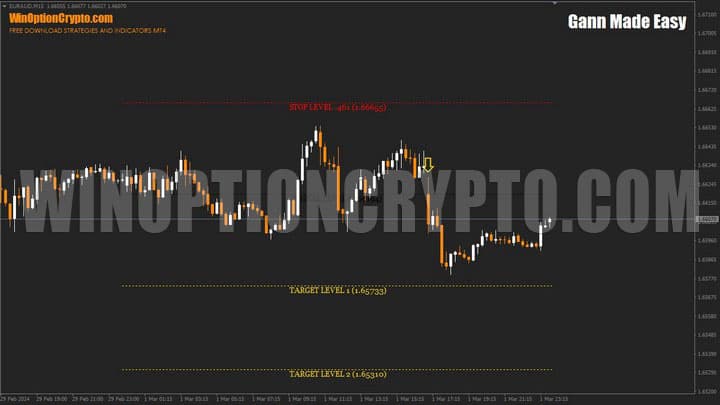
Key Features of the Gann Made Easy Indicator
- Terminal: MetaTrader 4
- Timeframe: H1
- Expiration: 3 candles
- Option Types: Call/Put
- Indicators: GannMadeEasy.ex4
- Trading instruments: currency pairs, commodities, cryptocurrencies, stocks
- Trading hours: 08:00–21:00 UTC
- Recommended brokers: Quotex, Pocket Option, Binarium
Installing the Gann Made Easy Binary Options Indicator
The Gann Made Easy indicator is installed using the standard procedure for the MetaTrader 4 platform. To do this, add it to the terminal's root folder by selecting "File" in MT4, then "Open Data Folder". In the folder that opens, navigate to "MQL4" and then "Indicators", and move all the files there. Templates are installed in the same way, but go into the "templates" folder. For more detailed installation instructions, see our video:
Gann Made Easy Indicator: Overview and Settings
The Gann Made Easy binary options indicator was built on the theory of William Gann — a theory that is challenging to grasp not only for beginners but even for experienced traders. Many of its elements draw on planetary aspects (the interaction between planets), natal charts (diagrams of celestial body positions at a specific date), and astrology. Equally demanding are more conventional techniques such as the Fan, the Square of Nine, and the Gann Hexagon, as well as time cycle analysis, which studies repeating price patterns.
To simplify market analysis, a tool was developed that generates buy and sell signals based on the core principles of Gann's methods. The binary options trader's task is now reduced to simply following the arrow indicator's signals, while Forex traders also benefit from the included stop-loss and take-profit levels.
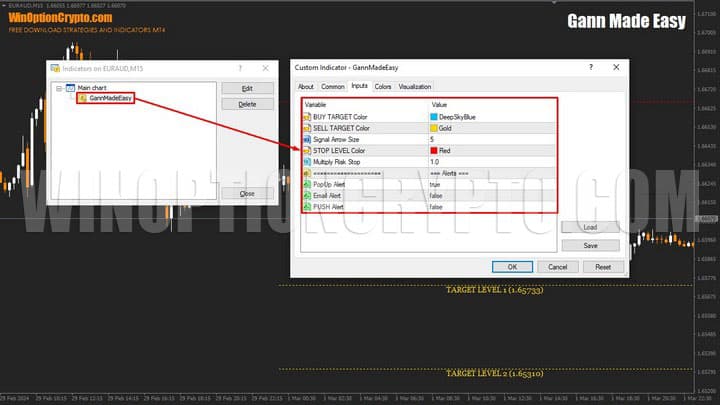
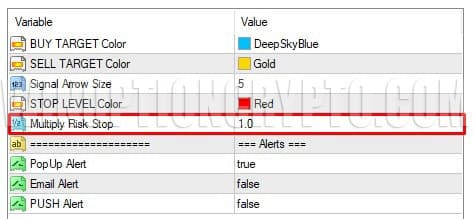
The indicator has very few settings. The developer has clearly locked most of them, leaving users only the option to adjust the color of the take-profit and stop-loss levels and the size of the signal arrow — a rather minor customization.
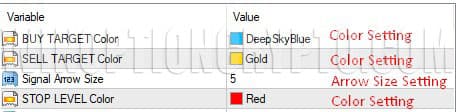
The setting that actually matters for Forex trading is the distance in points from the opening price of the signal bar to the stop-loss level, referred to in the tool as "Multiply Risk Stop". This value determines how far the Stop Level will be placed from the opening price.
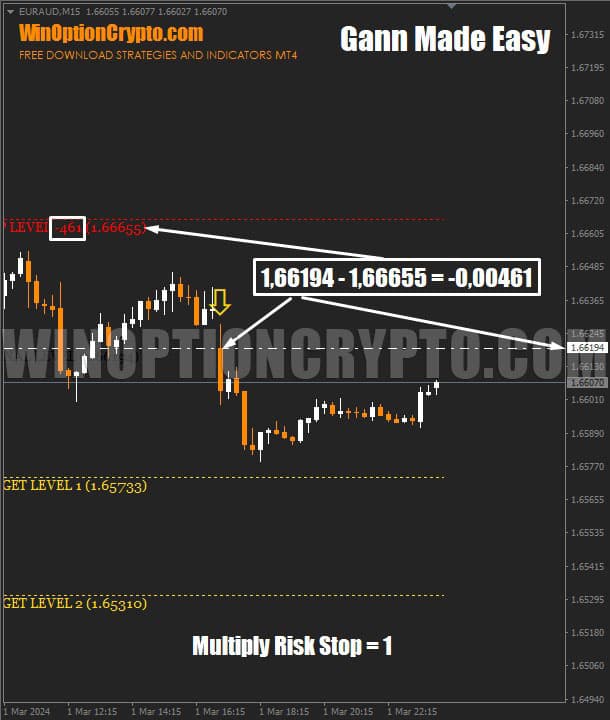
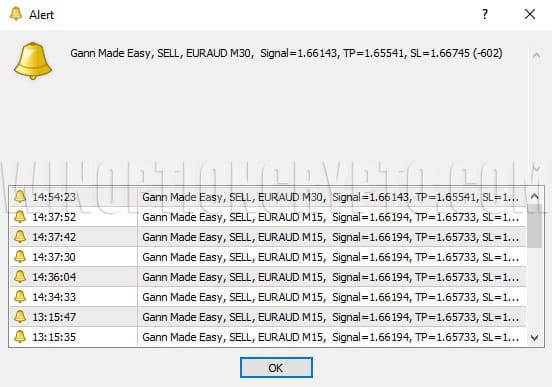
As we can see, our assumptions were confirmed. In the chart above, the signal appeared on a bar with an opening price of 1.66194, and the stop loss was set at 1.66655. The difference between these values is −0.00461, which corresponds to −461 points — the figure shown next to the Stop Level.
Now let's compare how the charts look with different "Multiply Risk Stop" values.
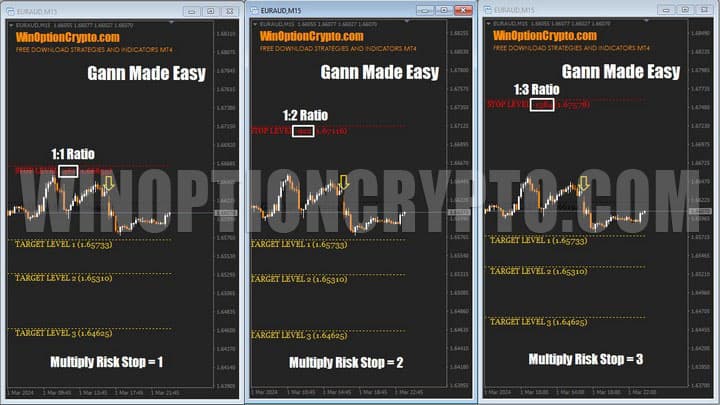
As you can see, the higher the "Multiply Risk Stop" value, the farther the Stop Level is placed from the opening price of the signal candle. This means the risk/reward ratio worsens as the stop loss moves further away, given that the take-profit levels remain unchanged.
On the downside, this indicator has a notable limitation: the coefficient described above can only be adjusted in increments of 1, which offers very limited precision.
In the final parameter block, you can enable or disable alerts, with the option to deliver them as a standard pop-up message, an email, or a push notification.
Gann Made Easy Trading Rules
The Gann Made Easy binary options indicator works on any index, metal, cryptocurrency, and timeframe. In practice, however, we recommend using it alongside a trend analysis tool. You can find a suitable option in our selection of the best trend indicators for binary options.
To improve the win rate, we will add an exponential moving average with a period of 100 to the chart. Buy signals from Gann Made Easy will only be considered when price is above the EMA(100). For sell signals, the conditions are reversed.
To open a Call option:
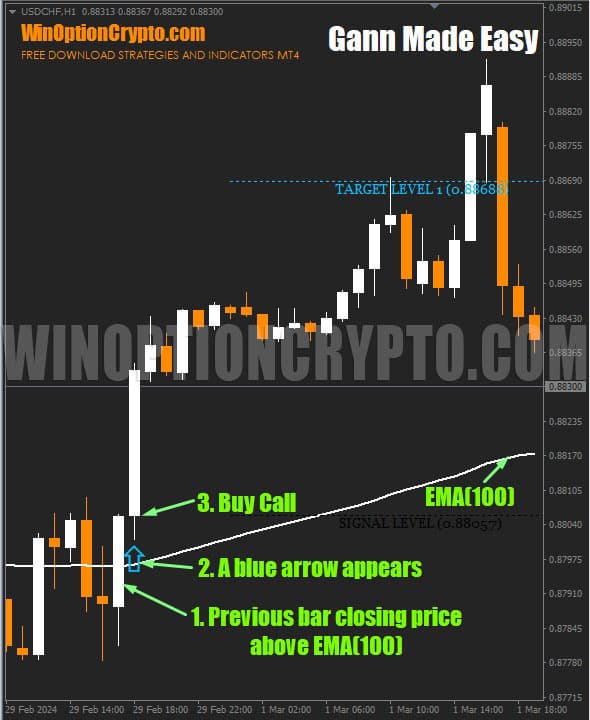
- The closing price of the previous bar is above EMA(100)
- A blue arrow has appeared
- Open a Call immediately after the arrow appears, without waiting for the candle to close
To open a Put option:
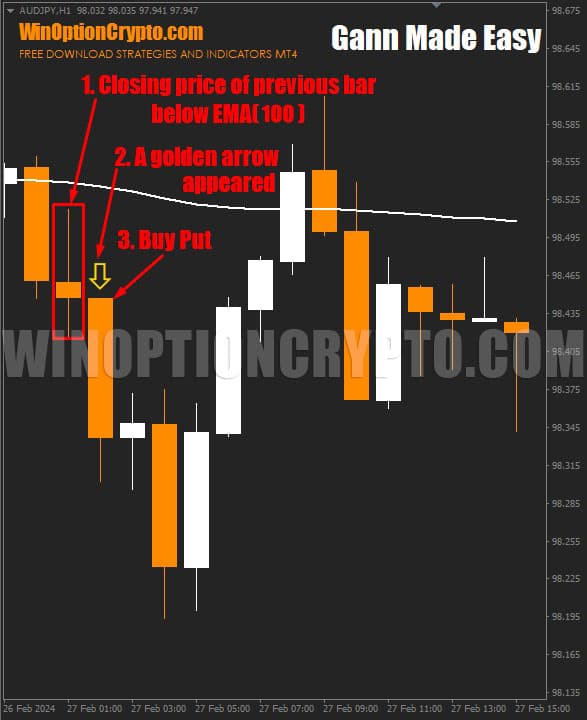
- The closing price of the previous bar is below EMA(100)
- A golden arrow has appeared
- Open a Put immediately after the arrow appears, without waiting for the candle to close
The recommended expiration time is 3 candles. That said, the optimal holding period for a given instrument should be determined through backtesting, taking the timeframe into account.
Opening a Call Option
In this example, the trend is upward, as price is trading above EMA(100). A blue buy signal has appeared. We open a Call option immediately after the arrow appears, without waiting for the candle to close.
Opening a Put Option
Here the trend is downward, as price is trading below EMA(100). A golden sell signal has appeared. We open a Put option immediately after the arrow appears, without waiting for the candle to close.
Conclusion
The Gann Made Easy binary options indicator gives every trader the opportunity to benefit from Gann's principles without needing prior knowledge of his methods. It can significantly simplify the analysis of any financial instrument. If you want to experience what it's like to trade using William Gann's approach, we recommend downloading this indicator.
In our opinion, this tool is genuinely worth your attention. By filtering its signals with a moving average, you can improve trading efficiency and increase the proportion of profitable trades. Test it on a demo account first and share your impressions in the comments — we'd love to hear your thoughts. Remember to follow sound risk management and money management practices. Happy trading!
Download the Gann Made Easy Binary Options Indicator

To leave a comment, you must register or log in to your account.