
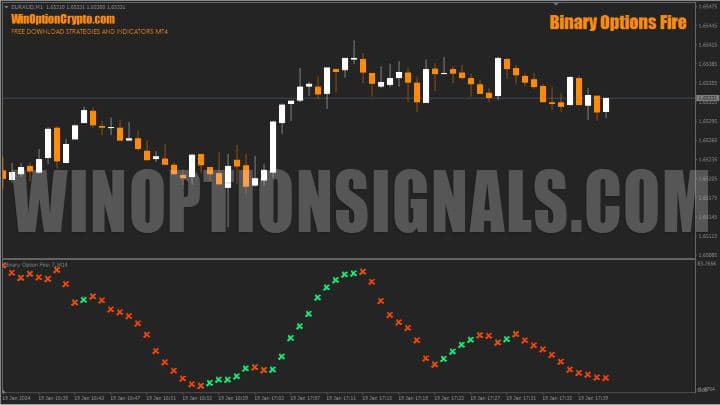
The Binary Options Fire binary options indicator is designed for active trading and scalping. It generates frequent entry points that will appeal not only to turbo options traders, but also to Forex scalpers.
The indicator is built around capturing short price impulses. Trades should be opened at the moment of a trend direction change to lock in a quick profit measured in pips. Binary options traders can incorporate this indicator into short-term strategies or use it as a standalone decision-making tool.
The developer sells this indicator for $12.99, but you can download it from our website free of charge for evaluation purposes.
Contents:
- Key Features
- Installation
- Binary Options Fire: Overview and Settings
- Trading Rules
- Opening a Call Option
- Opening a Put Option
- Conclusion
- Download Binary Options Fire
Key Features of the Binary Options Fire Indicator
- Terminal: MetaTrader 4;
- Timeframe: M1;
- Expiration: 3 candles or more, depending on the instrument;
- Option types: Call/Put;
- Indicators: Binary Options Fire.ex4;
- Trading instruments: currency pairs, commodities, cryptocurrencies, stocks;
- Trading hours: 08:00–21:00 UTC;
- Recommended brokers: Quotex, Pocket Option, Binarium.
Installing the Binary Options Fire Binary Options Indicator
The Binary Options Fire indicator is installed using the standard procedure in MetaTrader 4. Copy the indicator files to the terminal's root folder by selecting "File" in MT4, then "Open Data Folder". In the folder that opens, navigate to "MQL4" and then "Indicators", and place the indicator file there. Templates are installed in the same way, but go into the "Templates" folder. For a full step-by-step walkthrough, see our video:
Binary Options Fire Indicators: Overview and Settings
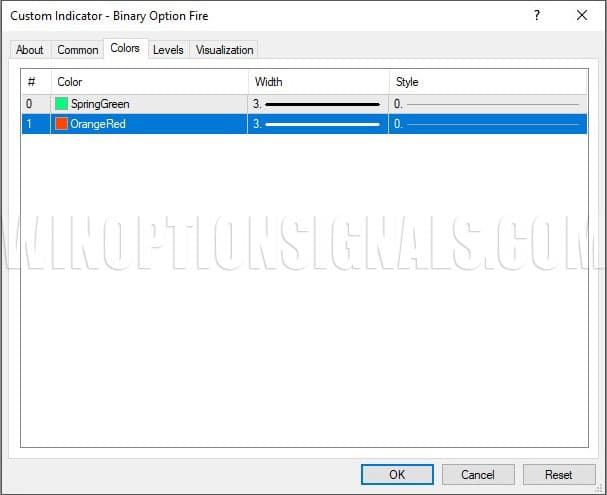
The developer has locked most of the indicator's parameters, leaving users only the ability to change the colour of the crosses and configure the lines.
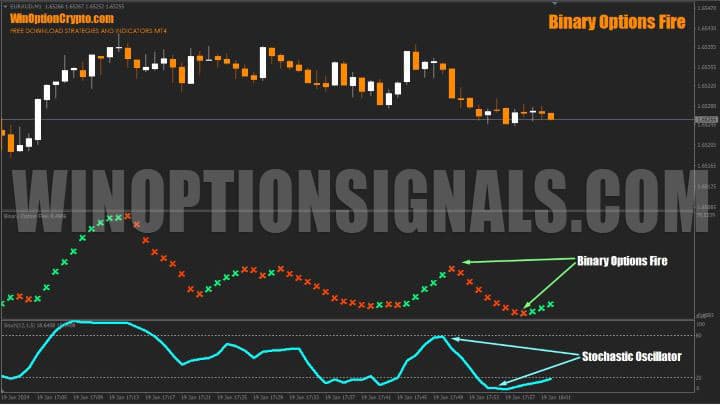
Judging by the shape of the signal elements in the sub-chart panel, they are clearly based on Stochastic calculations. We tested this by adding a Stochastic Oscillator to the sub-chart panel, and as you can see, its readings closely mirror the curves of Binary Options Fire — leaving little doubt about the oscillator's involvement in the calculations.
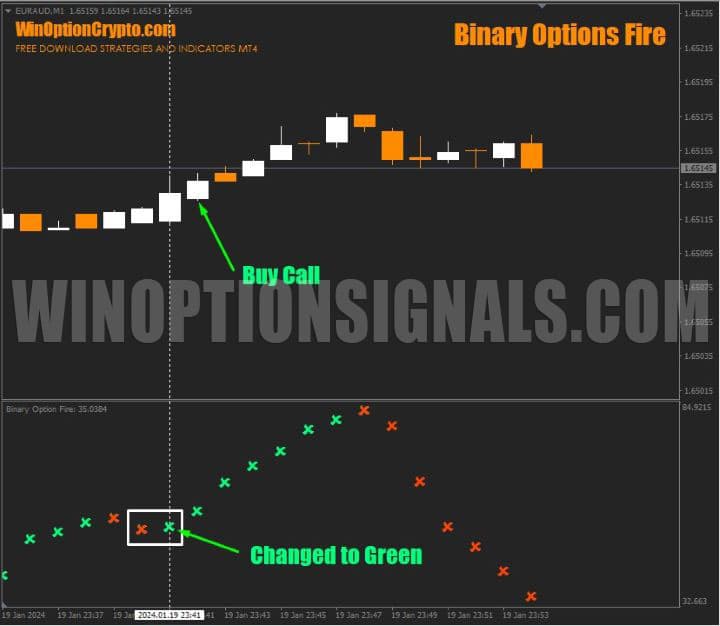
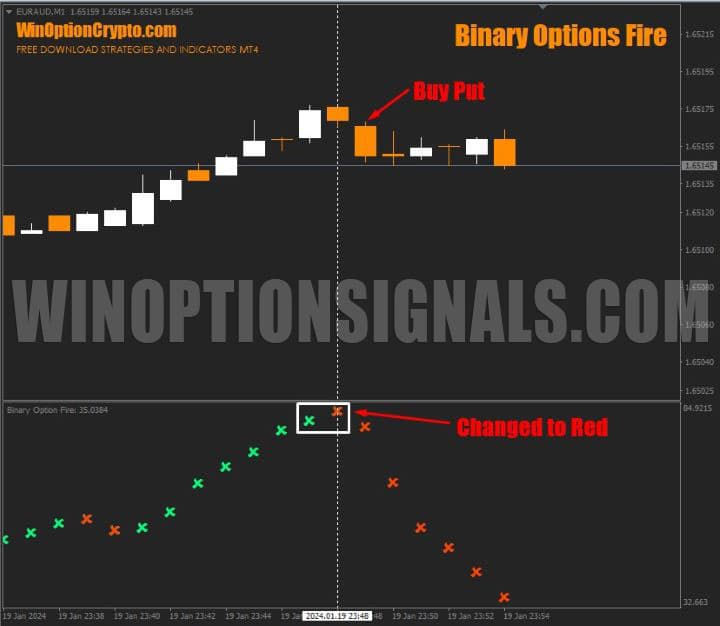
The entry signal is a change in the colour of the crosses, which indicates a shift in price impulse direction. As long as the trend direction remains unchanged, the cross colour stays the same.
To trade a rising market, wait for the crosses to change from red to green, then buy a Call option at the opening of the next candle.
When the trend reverses from upward to downward, the sub-chart indicator crosses change from green to red. Buy a Put option at the opening of the next candle.
Binary Options Fire Trading Rules
Binary Options Fire generates a good number of accurate signals during sustained directional price movement. In a ranging market, however, the oscillator is prone to false signals — recorded trend direction changes do not always lead to continued movement in that direction.
This is a common challenge with most trend-following systems and indicators. To understand how to manage it and integrate Binary Options Fire into a trading strategy to grow your account, we recommend reviewing the list of the best trend indicators.
To improve signal reliability, we recommend using additional filters alongside this indicator. For example, the standard MetaTrader 4 volatility indicator StdDev with a period of 5 can serve as a filter. A simple moving average with a period of 9 (SMA9) is then applied to the StdDev values.
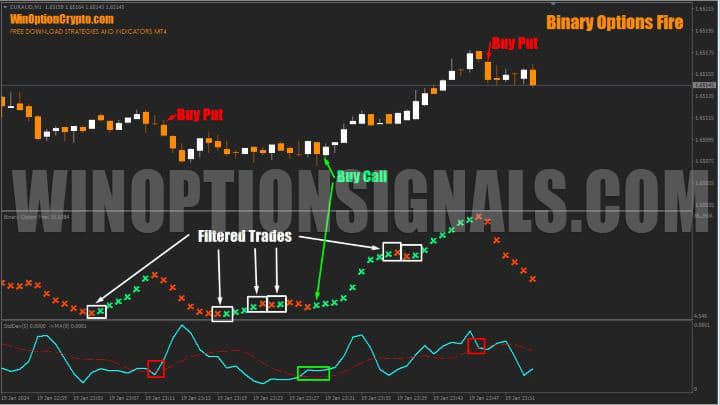
Signals from Binary Options Fire are only taken when the StdDev(5) values are above the nine-period moving average SMA(9) built on those values. In other words, trades are only entered when market volatility is rising.
As shown in the chart, this rule effectively filters out weak signals and significantly reduces the number of losing trades — essentially ignoring ranging conditions and entering only when the market has established a clear direction.
Other filtering approaches can also be applied using various technical analysis methods and pattern indicators.
Opening a Call Option
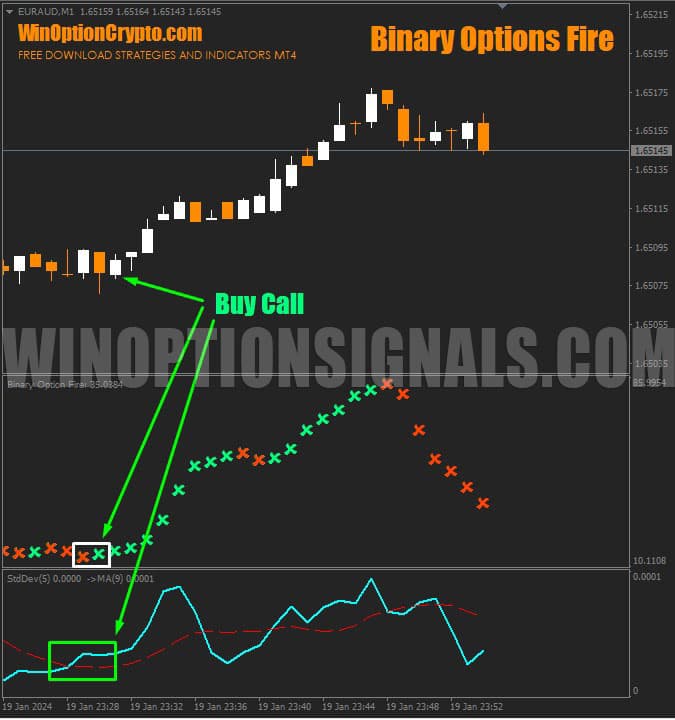
On the previous candle, the Binary Options Fire sub-chart indicator changed from red to green. StdDev(5) is above SMA(9) built on its values. Buy a Call option at the opening of the next candle.
Opening a Put Option
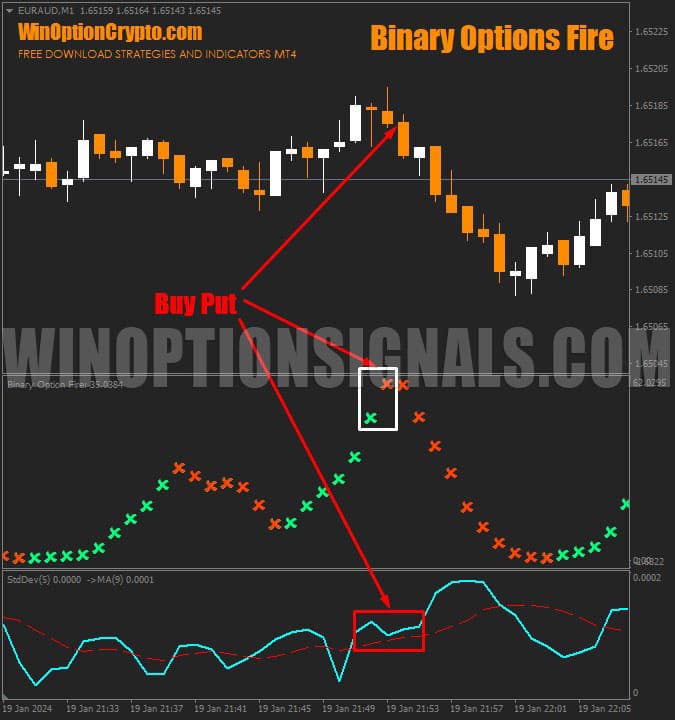
On the previous candle, the Binary Options Fire sub-chart indicator changed from green to red. StdDev(5) is above SMA(9) built on its values. Buy a Put option at the opening of the next candle.
Conclusion
Binary Options Fire is well suited to binary options scalping and will appeal to traders who favour turbo options and fast trades. It generates a good number of accurate signals overall, but filtering is essential. Avoid ranging and consolidation phases — enter trades only during impulse moves.
It should be noted that this indicator largely replicates the behaviour of the Stochastic oscillator and is, frankly, not worth the asking price. Using its signals without filtering is not recommended.
Before using it in live trading, test it thoroughly on historical data. Once you are confident in the signals and the chosen filter, the best approach is to start on a demo account with a reliable broker, applying sound risk management and money management principles.
Download the Binary Options Fire Binary Options Indicator

See Also:
- How to choose a binary options broker
- Binary options broker bonuses
- How do binary options brokers make money
- List of unregulated brokers
To leave a comment, you must register or log in to your account.