
This strategy for the Pocket Option broker is based on two core binary options indicators, one of which was created by Welles Wilder — hence the name Welles MACD.
The strategy combines the MACD and the Parabolic SAR: the first generates trade entry signals, while the second identifies trend changes.
The advantage is that the Pocket Option indicators available on the trading platform already include both of these tools, so there is no need to use the MetaTrader 4 terminal.
Also, keep in mind that you can start trading with additional funds by using promo codes to top up your account from Pocket Option, and to improve your results with this strategy, you can use a promo code to cancel loss trade $10.

Setting Up the Indicators on the Pocket Option Platform
This strategy is extremely easy to use, and beginners can start trading with it without difficulty. It has simple rules and uses basic indicator settings.
The MACD indicator is a histogram based on moving averages that shows the strength and direction of the trend. The Parabolic SAR is similar to a moving average but moves with greater acceleration.

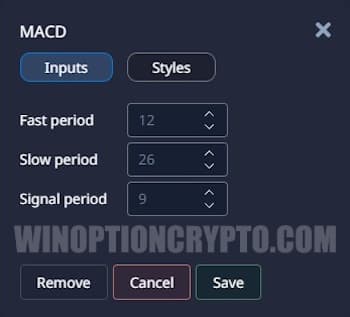
Both indicators are applied with their default settings. For the MACD, these are "12-26-9":
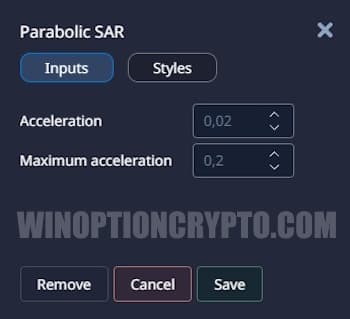
And for the Parabolic SAR — "0.02-0.2":
To add the indicators, open the indicators panel in the upper-left corner:

Trading Rules and Trade Examples on Pocket Option
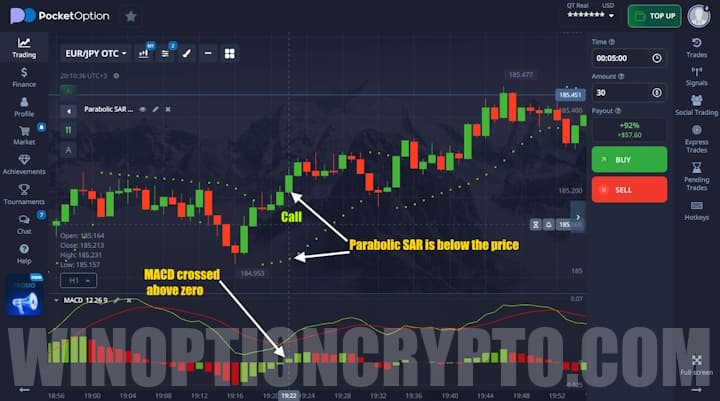
Once the indicators are in place, you can start trading. Buy a Call option when:
- MACD crosses the zero level from below to above;
- Parabolic SAR is below the price.
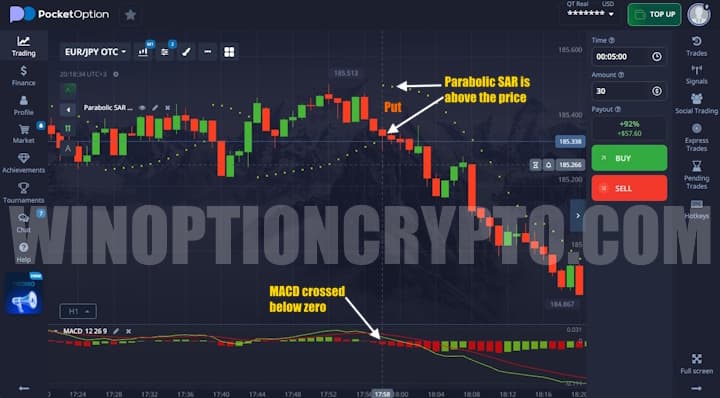
Buy a Put option when:
- MACD crosses the zero level from above to below;
- Parabolic SAR is above the price.
Expiration time should be 5 minutes, matching the timeframe.
Now let's look at examples of buying Call and Put contracts, starting with a Call option. In the image below, you can see that the MACD has crossed the zero level from below to above and continues to rise. The price is also rising, which places the Parabolic SAR below it. Under these conditions, you can buy a Call with an expiration of 5 minutes:
In the next image, you can see a Put option setup: the MACD has crossed the zero level from above to below, the price is falling, and the Parabolic SAR sits above the price. Under these conditions, you can buy a Put with an expiration of 5 minutes:
Conclusion
The Welles MACD strategy was designed specifically for beginners in binary options trading, as it has simple trading rules and uses basic indicators familiar even to novice traders.
Keep in mind that binary options trading involves risk, so be sure to test this strategy on a demo account and follow the principles of money management and risk management.
OPEN AN ACCOUNT WITH POCKET OPTION
Not sure how this strategy or indicator works? Leave a comment below and subscribe to our YouTube channel WinOptionCrypto — we'll answer your questions in upcoming videos.

See Also:
- How to Trade from Mobile Devices on the Pocket Option Platform
- Pocket Option Broker Platform for Windows
- How to Trade Express Orders with the Pocket Option Broker
- How to Participate in Tournaments on the Pocket Option Platform
- How to Use Signals on Pocket Option
To leave a comment, you must register or log in to your account.