
Among hundreds of technical analysis indicators, only a few have stood the test of time and remained in the arsenal of professional binary options traders worldwide for decades. MACD is one such tool. Since its creation in the 1970s, it has stayed relevant and accurate, and today it is used across all financial markets, including binary options and cryptocurrency trading. The reason for this popularity is the indicator's ability to simultaneously identify the direction of a trend and its reversal point.

The MACD-based strategy for the Binarium broker addresses the core challenge every binary options trader faces: how to distinguish a genuine signal from a false price move and enter a trade at the right moment, rather than chasing the market too late. The indicator is based on the crossover of two moving averages and is displayed visually as a histogram and signal lines, which show whether the market is gaining or losing momentum. In this article, we'll explore a MACD-based trading system that you can start using on the Binarium platform right after reading.
Contents:

What Is the Advantage of the MACD Strategy?
The main advantage of the MACD strategy for binary options trading on the Binarium platform is that it simultaneously addresses two problems most traders typically handle separately: identifying the direction of the current trend and pinpointing the precise moment to enter a trade.
Most indicators either show the trend well but lag on signals, or deliver timely trading signals but offer little insight into the broader market context. The MACD combines both qualities in a single tool. The crossover of its signal lines marks the entry point, while the position of the histogram relative to the zero line confirms the trade direction.
As a result, the trader receives not just a signal, but a contextualized one — which significantly improves reliability and reduces the number of losing trades. This makes the strategy appealing both to beginners looking for a simple, clear system and to experienced traders seeking maximum accuracy on the Binarium platform.
How to Apply the MACD Strategy on Binarium
Before trading with this strategy, you need to add the MACD indicator to the chart in the Binarium terminal.
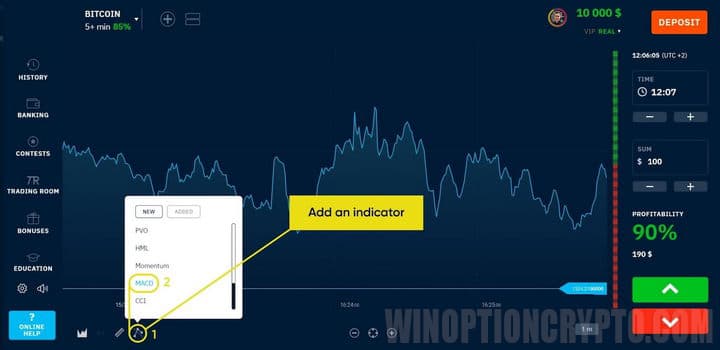
This indicator is very popular among binary options traders and is widely used across various trading strategies. Typically, traders on the Binarium platform watch for the MACD signal line to cross zero. When the line breaks through from below, the price is likely to begin rising. The system we'll be examining uses two MACD indicators with different calculation periods.
For a valid buy signal, the histograms of both indicators must be above zero. Conversely, when the signal line crosses the zero level from top to bottom, the price is expected to decline. This sell signal is considered valid only when the histograms of both indicators are in negative territory.
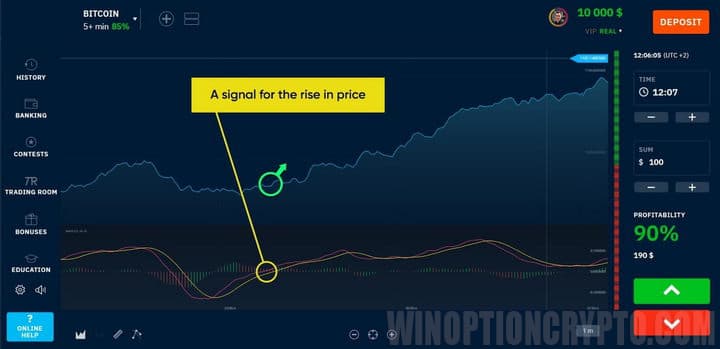
It is recommended to trade using this system with an expiration time of 3–5 candles, investing no more than 2% of the deposit per trade.
Conclusion
The MACD indicator has earned its place among the most widely used technical analysis tools, and a strategy built on it for the Binarium platform gives traders exactly what they need for consistent results: clear trading signals and straightforward entry rules, free from emotion and subjective interpretation. In this article, we've covered the indicator's logic, entry rules, and position sizing principles.
The next step is to register on the Binarium platform, open a demo account, and test the strategy under real market conditions without risking your own funds. Once you're comfortable with the approach, fund your account and place your first live trade. Thousands of traders already use MACD as the foundation of their trading system on Binarium, and you can join them today.
Having trouble understanding how this strategy or indicator works? Let us know in the comments below, and subscribe to our WinOptionCrypto YouTube channel, where we'll answer all your questions in a dedicated video.
To leave a comment, you must register or log in to your account.