
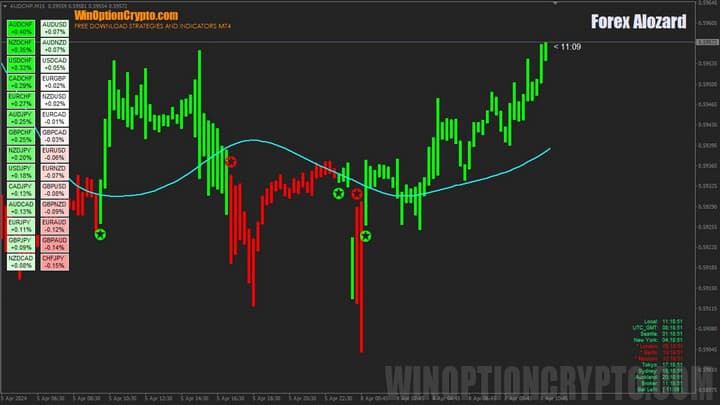
The Forex Alozard binary options strategy reliably identifies both the continuation of the current trend and its reversal. It helps pinpoint the beginning of a price impulse almost immediately after it forms, and also effectively determines when that impulse is complete. This binary options strategy lets traders track all significant price movements so they never miss an opportunity to open a trade in the direction of the main trend.
The trading system is available for $40, but at the end of this review you will be able to download it for free to try it out. And although $40 is not a large sum, no one wants to spend it unnecessarily — so keep reading to learn how to use this strategy correctly.
Content:
- Key Features
- Installation
- Overview and Settings
- Forex Alozard Trading Rules
- Specifics of Application
- Conclusion
- Download Forex Alozard
Key Features of the Forex Alozard Binary Options Strategy
- Terminal: MetaTrader 4
- Timeframe: M15
- Expiration: 6 candles
- Option Types: Call/Put
- Indicators: Alozard HeatMap.ex4, Alozard Indicator.ex4, ProfitableStrategy_16.ex, BK Clock.ex4, FGM.ex4
- Trading instruments: currency pairs, commodities, cryptocurrencies, stocks
- Trading hours: 08:00 – 21:00 UTC
- Recommended brokers: Quotex, Pocket Option, Binarium
Installing the Forex Alozard Binary Options Strategy
The Forex Alozard strategy indicators are installed using the standard procedure for the MetaTrader 4 platform. Open MT4, click File, then select Open Data Folder. In the directory that opens, navigate to the MQL4 folder and then to Indicators, and move all indicator files there. Templates are installed the same way, but are placed in the Templates folder. For more detailed installation instructions, watch our video:
Overview and Settings of the Forex Alozard Binary Options Strategy
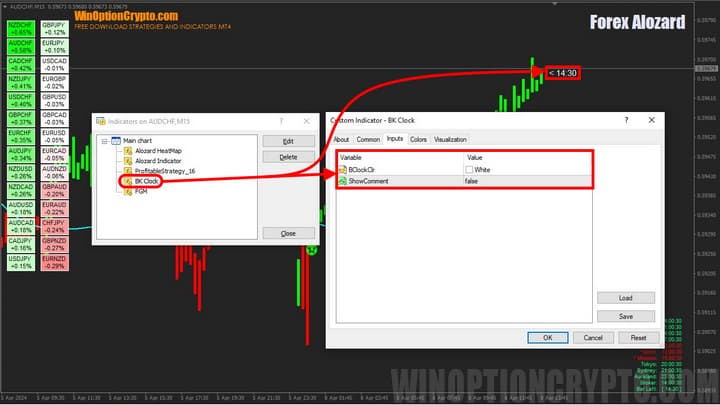
The Forex Alozard strategy consists of four indicators, each of which plays a specific role in the system:
- Alozard HeatMap — an indicator displayed in the upper left corner of the chart, showing a heat map with the percentage rate change of currency pairs over a selected period. Pairs with a strong upward trend are highlighted in green, while those with a strong downward trend are highlighted in red.
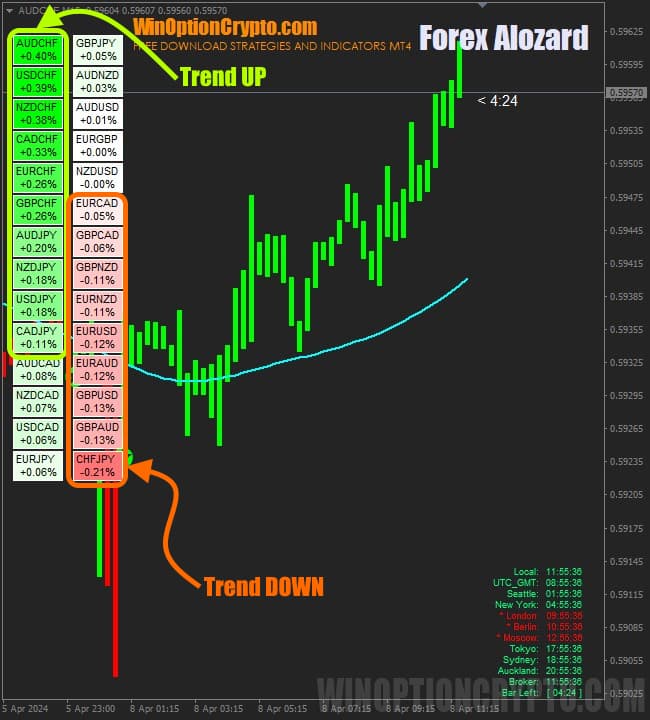
This tool makes it easy to monitor the rise and fall of exchange rates across multiple currencies, analyse the data, and develop trading strategies. Its settings are minimal and straightforward enough for a beginner to configure.
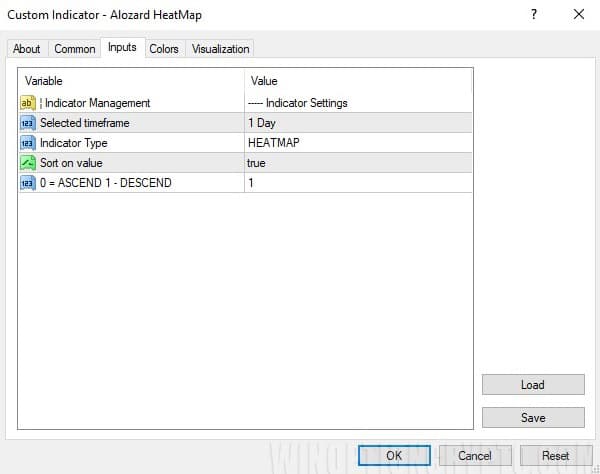
Selected Timeframe — sets the time period used to identify the presence of a trend. Accepts values ranging from the current timeframe up to 1 Month.
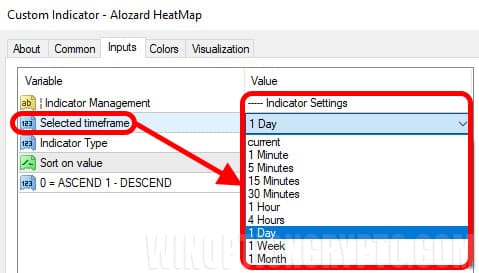
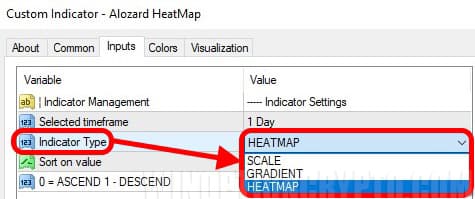
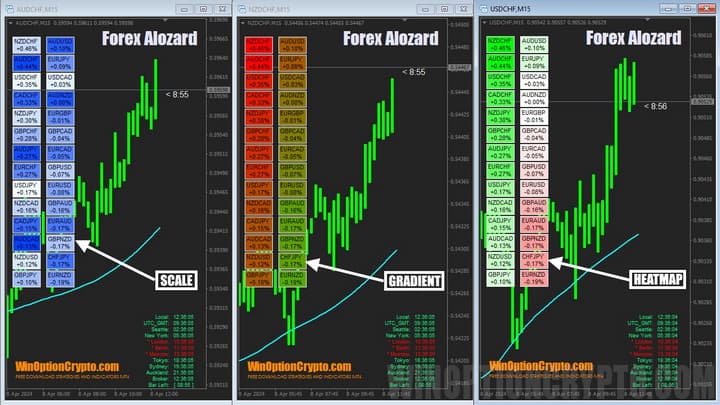
If you are trading on M15, we recommend setting this parameter to 1 Day. Another important parameter of the Heat Map indicator is Indicator Type, which lets you choose one of three display modes for the heat map.
Each mode has a distinct visual appearance.
The final parameter of this indicator is Sort on Value — enables or disables sorting of currency pairs by their percentage change over the period selected in the Selected Timeframe parameter.
0 — ascending order; 1 — descending order.
- Alozard Indicator is the primary signal indicator. It does not repaint its signals and performs reliably on any asset across any timeframe. It has two main parameters that control its behaviour:
- Average Period — the calculation period for the Alozard Indicator
- Sensitivity — the sensitivity level
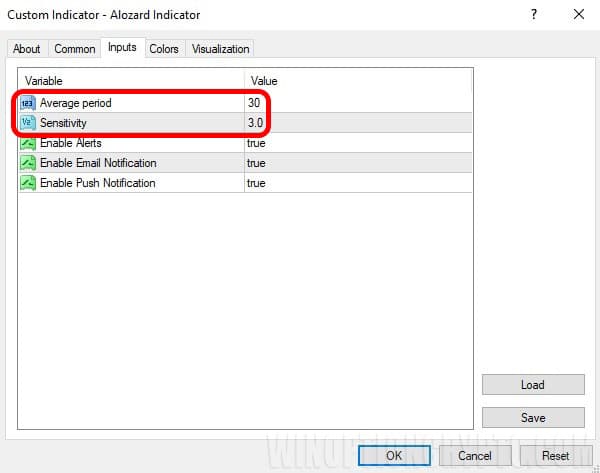
Alert settings are also available, including pop-up notifications within the MetaTrader 4 platform, email alerts, and push notifications.
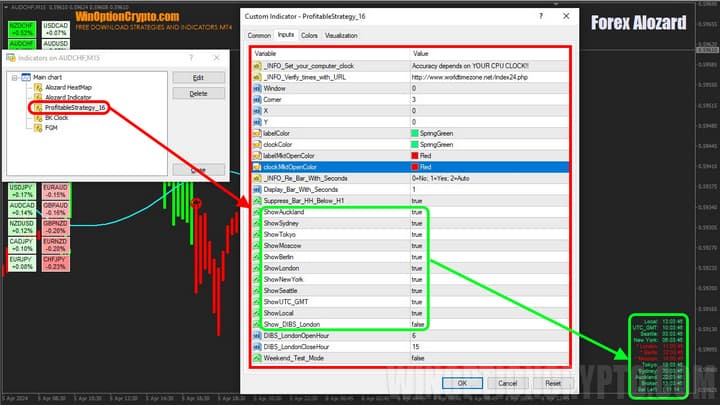
- ProfitableStrategy_16 — an information panel in the lower right area of the chart that displays local time and the time in various regions of the world. It is unclear why the developers included this component, as it offers no practical benefit within the context of this trading strategy.
- BK Clock — a countdown timer showing the time remaining until the current candle closes. The only available setting is the ability to change the colour.
Forex Alozard Trading Rules
This is a classic trend-following strategy based on entering the market after a confirmed trend reversal. Despite the developers' claims that the system performs well on all timeframes, we recommend avoiding shorter timeframes due to the higher number of false signals. In our view, M15 and above is the optimal range.
For the heat map's currency pair rankings, we recommend using daily data.
The Forex Alozard binary options strategy works as follows:
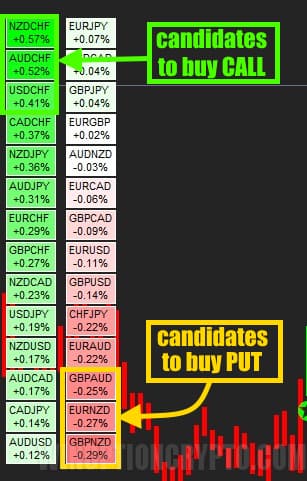
- Select an asset to trade. Use the heat map to identify currency pairs with the most stable trend. The top three green pairs are suitable for buying Call options, and the bottom three red pairs are suitable for buying Put options.
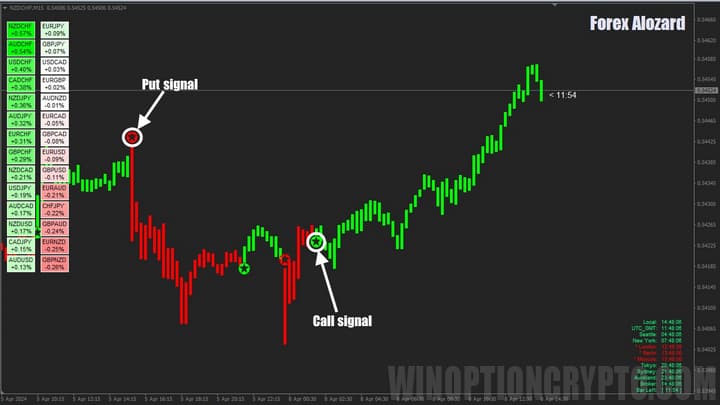
- Wait for a signal to open a position. To buy on Forex or purchase a Call option, wait for the chart to turn green and a green star to appear below the candle. To sell (or purchase a Put option), wait for the chart to turn red and a star to appear above the candle.
Following standard trend-trading principles, we also add a moving average (FGM) with a period of 21 to the chart as a filter. Call options are opened when the bar with a green star is above FGM(21), and Put options are opened when the bar with a red star is below FGM(21).
Opening a Call Option
- Confirm the trend is upward — the entire candle is above FGM(21)
- The candle turns green and a star appears below it
- Buy Call at the open of the next candle
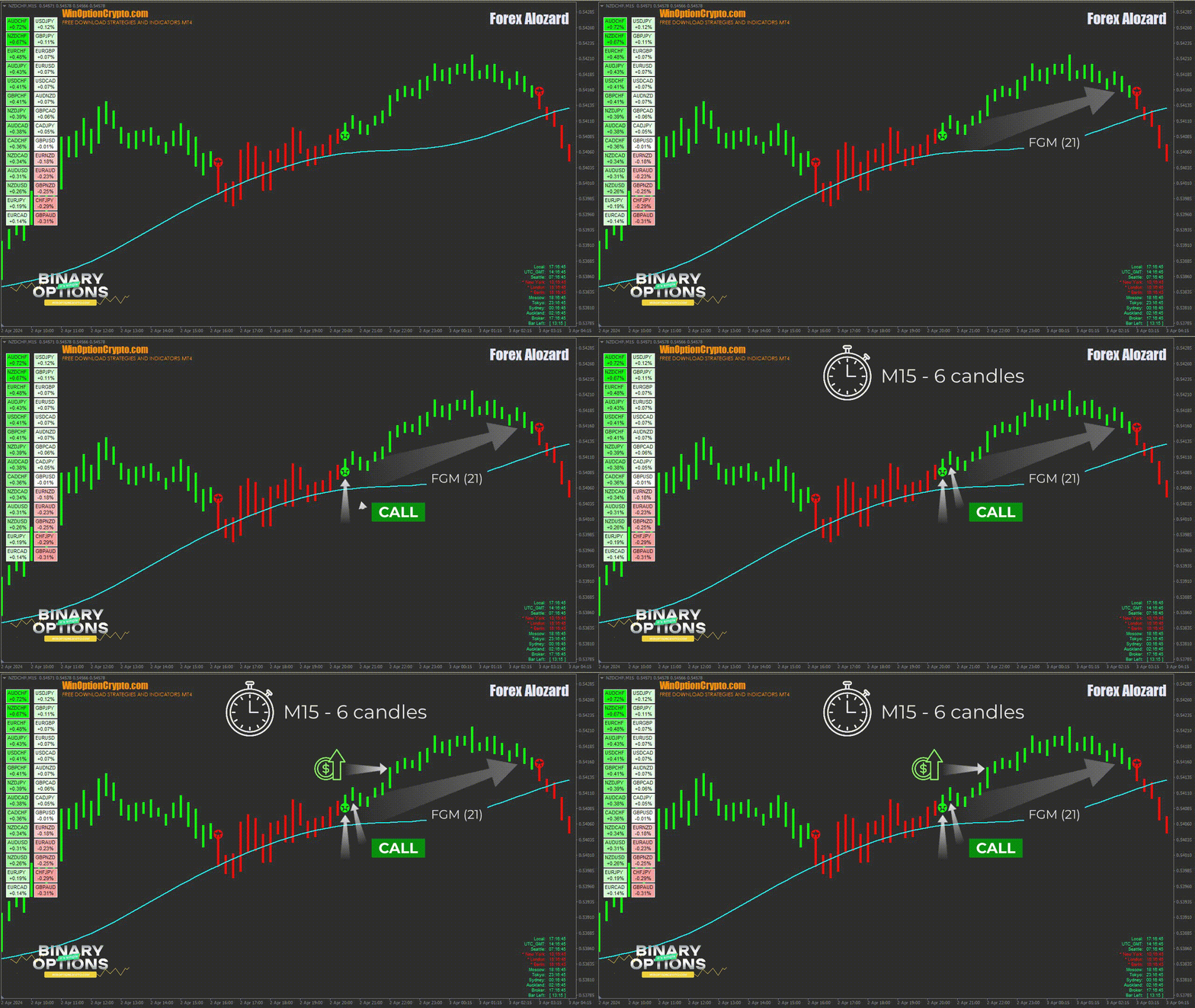
Opening a Put Option
- Confirm the trend is downward — the entire candle is below FGM(21)
- The candle turns red and a star appears above it
- Buy Put at the open of the next candle
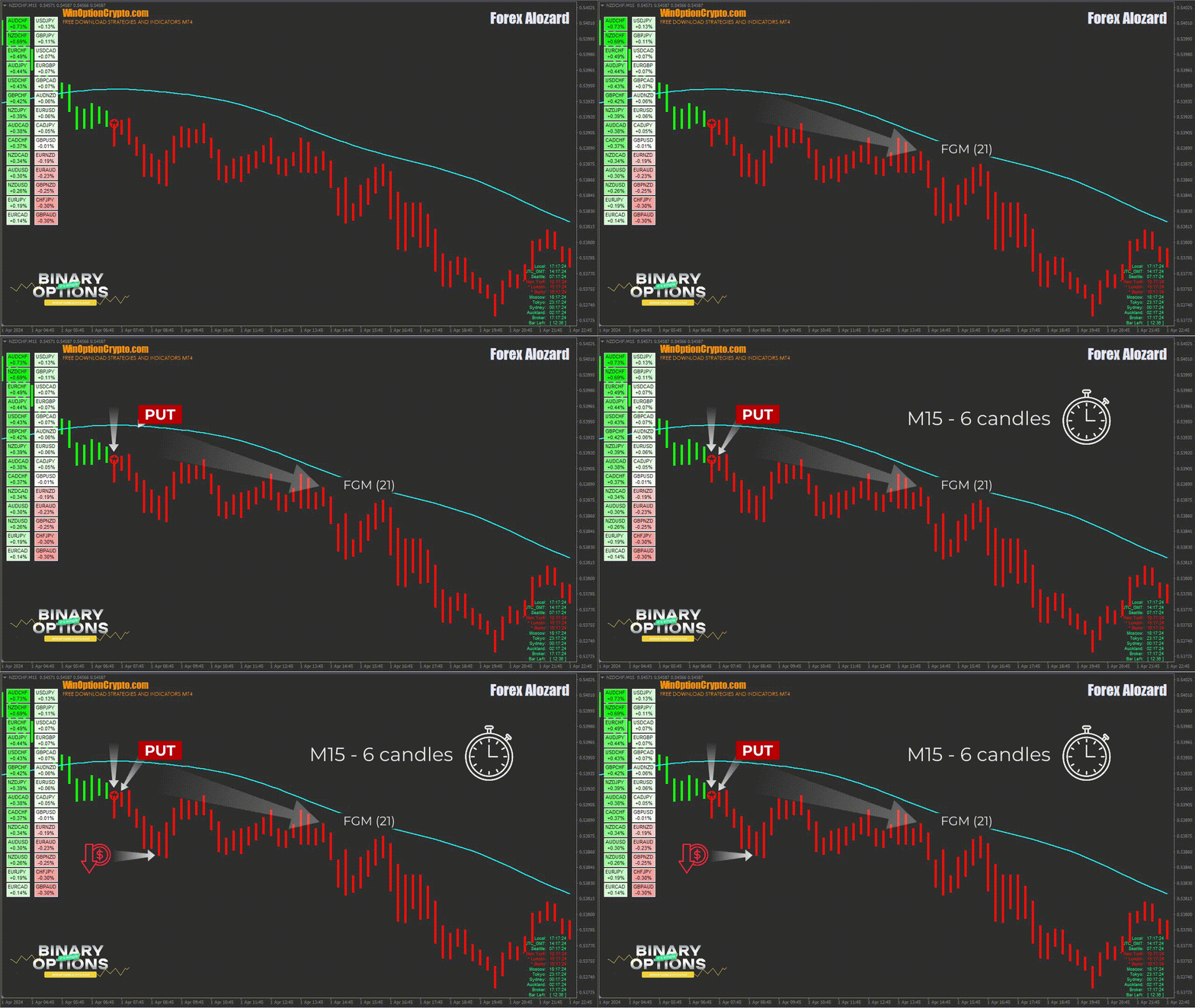
The recommended expiration time is 6 candles. Adjust the holding period based on the financial instrument and the results of backtesting on historical data.
Specifics of Applying the Forex Alozard Binary Options Strategy
We recommend using this system on longer timeframes, preferably M15 and above. When selecting assets, focus on currency pairs showing the most pronounced upward or downward trend, as indicated by the heat map. No strategy is perfect — each has its own strengths and weaknesses, and the Forex Alozard binary options strategy is no exception.
Pros of the Forex Alozard Strategy
The key advantages of the Forex Alozard strategy are its non-repainting indicators, which are easy to master even for a beginner. The indicators include alert functionality, keeping traders informed of new signals even when they are away from their monitor. The system is compatible with all timeframes and supports a range of trading styles, from scalping to swing trading. Signal accuracy is approximately 60–80%, depending on the asset. The Heat Map provides a clear overview of rate movements across many currency pairs and helps identify pairs with a stable trend. The overall chart design is clean and visually appealing.
Cons of the Forex Alozard Strategy
Signals are not always optimal. This strategy is not well-suited to aggressive traders, as signals do not appear frequently. If you prefer scalping, you will need patience. The chart can also become difficult to read when it fills with coloured bars, making it harder to identify opening and closing prices.
Conclusion
The Forex Alozard binary options strategy is a reliable tool for identifying a new trend. It lets you accurately determine when a price impulse begins and when it ends — and that is one of the key strengths of this strategy.
The Forex Alozard binary options strategy offers solid value at its $40 price point, and the free trial version makes it accessible to traders of all experience levels. Use its non-repainting indicators to stay on top of market developments even when you are away from your monitor. Start by trading on a demo account opened with a reliable broker with a low minimum deposit. Once you are achieving consistent results and following risk management and capital management principles, move on to live trading. Good luck!
Not sure how a particular strategy or indicator works? Leave a comment below, and subscribe to our YouTube channel WinOptionCrypto — we'll answer your questions in upcoming videos.
Download Forex Alozard

See Also:
- How to make money on binary options
- Pros and Cons of Binary Options Trading
- How to Make Profits Trading Clean Charts
- How to adapt Forex strategy to Binary Options?
To leave a comment, you must register or log in to your account.