
The choice of strategies for trading binary options is vast, but most of them require the use of the MetaTrader 4 terminal. When analysis is carried out on one platform and trading on another, this can reduce trading efficiency. However, there are a number of effective strategies for which the set of technical indicators available on the Quotex broker is sufficient. One of these is the Awesome MACD strategy.
This strategy for the Quotex broker is based on three effective indicators:
- Awesome Oscillator;
- MACD;
- Fractals.
The versatility of this strategy allows it to be used when trading any financial assets available on Quotex. Moreover, by strictly following the trading rules and analysing the indicator readings together, you can minimise risks, which over the long term will help increase profits.
Adding Indicators to Quotex
To add indicators to the Quotex platform, click the indicator panel icon in the web terminal:
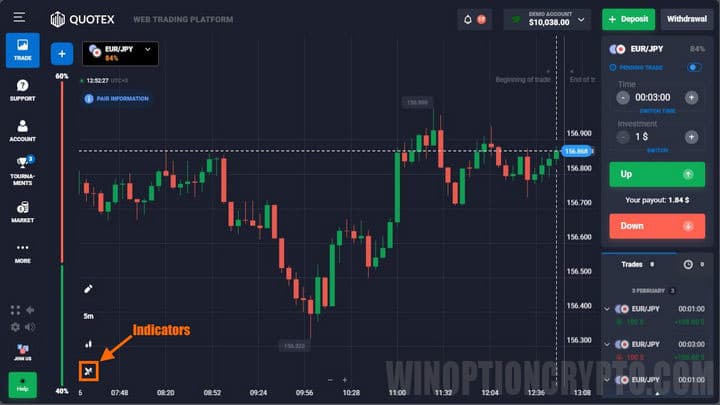
Then select the indicators needed for the Awesome MACD strategy. Before adding them to the chart, note that each one has its own operating principle, and once selected, you will need to change the default settings of the MACD and Awesome Oscillator indicators. Fractals work on the basis of a fixed number of Japanese candlesticks, so their settings cannot be changed.
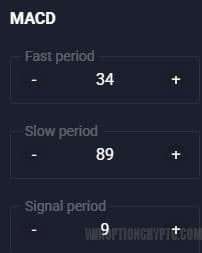
First, place the MACD indicator on the chart. Its task is to help determine the direction in which the price is moving. Note that traders usually watch for the histogram crossing the zero line, but in this strategy you need to track the green and red signal lines. The bars themselves can be used to determine the trend: when the histogram bars cross the zero level upwards, this indicates an uptrend, and when the histogram is below the zero level, the trend is downward.
MACD values to set: fast period – “34”, slow period – “89”, signal period – “9”:
Next, add the AO indicator. Its standard values are “5” and “34”:
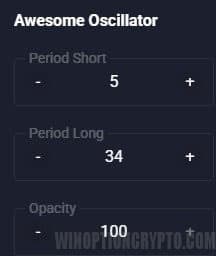
There is no need to change these settings, as the default parameters give good results.
The AO indicator is used in the Awesome MACD strategy to determine the moment to buy options. To get accurate signals, you should rely on a number of patterns specific to the AO indicator:
- Crossing the zero (middle) line;
- "Saucer".
The first pattern is straightforward — it is simply the crossing of the Awesome Oscillator bars through the zero level.
The Saucer pattern is more complex. It is formed by three bars on the histogram, and for Call options it looks like this:

And for Put options, like this:
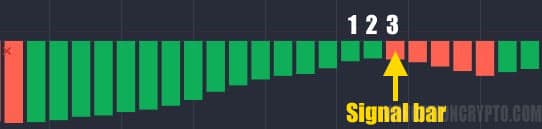
The images clearly show that bar "1" is higher than bar "2", and bar "3" is the highest — this signals an option purchase. When this combination forms, you should enter a trade.
Call and Put options for the Saucer pattern are purchased depending on the position of the AO indicator relative to the "0" line. A Call is bought when the signal bars are above the line, and a Put is bought when they are below it.
Finally, add the Fractals indicator. It helps you track the price breaking out of a range, which is also a signal to buy an option, but fractals should be used only after a pattern has formed on AO.
The Fractals indicator appears as arrows above or below the candles. It does not require any settings, so you simply need to place it on the chart.
Examples of Trading on Quotex Using the Awesome MACD Strategy
Trades on Quotex using this strategy are opened when all indicators give the required signals at the same time. For Call options, the following conditions must be met:
- MACD bars are above the green and red lines.
- AO has formed a Saucer pattern above the zero line, or its bars have crossed the zero line upwards.
- The asset price has broken through the previous fractal upwards.
For Put options, the conditions are:
- MACD bars are below the green and red lines.
- AO has formed a Saucer pattern below the zero line, or its bars have crossed the zero line downwards.
- The asset price has broken through the previous fractal downwards.
The Awesome MACD strategy is effective on any timeframe, but the expiration time should not exceed 3 candles.
Note that the Saucer pattern of the Awesome Oscillator indicator is best used only by experienced traders, as it forms quite often but is not always reliable. For this reason, novice traders should focus only on the crossing of the middle line ("0").
Entering a trade with a Call option purchase looks like this:
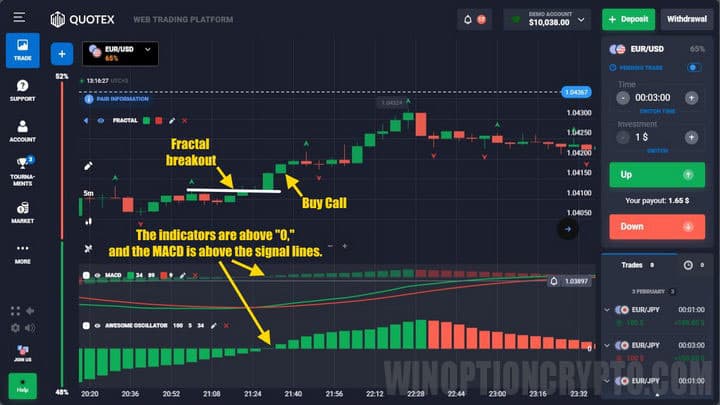
As you can see, once the indicators cross “0”, you need to wait until the boundary of the last fractal before the crossing is broken.
Buying Put options follows the same logic, but in reverse:
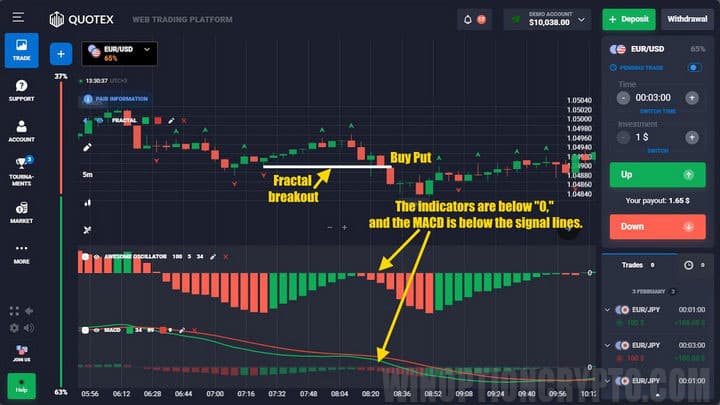
Please note that the price sometimes crosses fractals early. In this case, you do not need to wait for the next fractal — you can buy an option if the other signals confirm the entry.
Don't forget that if you have taken a loss on signals from the Awesome MACD strategy, you can always use the promo code to cancel loss trade on Quotex.
Conclusion
The Awesome MACD strategy stands out not only because it can be used directly in the Quotex broker terminal. It is essentially a universal strategy with simple trading rules, which makes it suitable for novice traders trading binary options.
Can't figure out how this strategy or indicator works? Write about it in the comments to this article, and subscribe to our YouTube channel WinOptionCrypto, where we cover all your questions on video.
Find the best bonuses, promo codes, and contests for Quotex on our social networks: Telegram Group | Facebook Group.

See Also:
- How to Open an Account with Quotex
- How to Verify your Quotex Account
- Quotex Broker Affiliate Program
To leave a comment, you must register or log in to your account.