
The Traffic Light binary options strategy combines several trading approaches, giving you a way to anticipate likely price direction and the flexibility to enter trades using either an aggressive or a conservative method.
The strategy incorporates both trend and ranging indicators, which broadens the range of trading conditions it can be applied to.
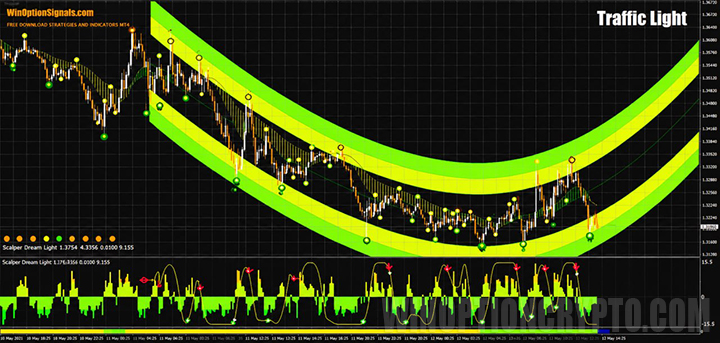
Key Features of the Traffic Light Strategy
- Terminal: MetaTrader 4.
- Timeframe: M1–H1.
- Expiration: 1 candle (aggressive method) or 10 candles (conservative method).
- Option types: Call / Put.
- Indicators: 7-21-55 H2, CCI NUF, GG TrendBar, Semafor 1-2-3 Triangles, SFET V PODVALE, SHI SIGNAL, T3 Color, Trend Signal, Trend Line Channel WC NLR.
- Trading instruments: all currency pairs.
- Trading hours: 08:00–21:00 UTC.
- Recommended brokers: Quotex, Pocket Option, Binarium.
Installing the Traffic Light Binary Options Strategy
Indicators are installed using the standard MetaTrader 4 procedure.
This strategy includes a large number of indicators with multiple settings, so the easiest approach is to install the strategy via the included template, which can be downloaded at the end of the article.
Instructions for installing indicators in MetaTrader 4:
Trading Rules
Before applying this strategy, it is important to understand what a trend is and how to identify one. With that foundation in place, you are ready to trade the Traffic Light strategy.
The core of the strategy is a price channel that projects the likely direction of price going forward:
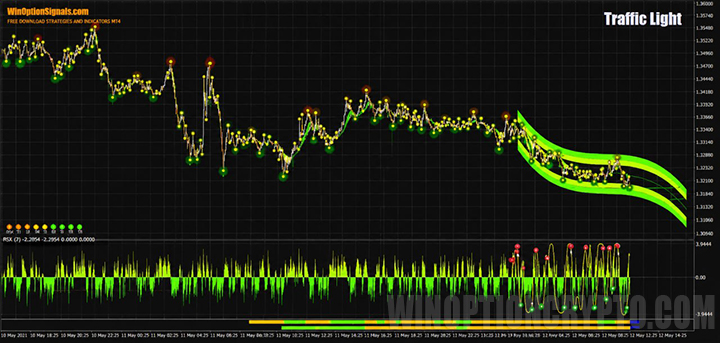
Following the channel alone would be a mistake, however — no indicator can predict price movements with certainty. The strategy therefore includes additional indicators and filters to improve signal accuracy. The first of these is GG TrendBar:
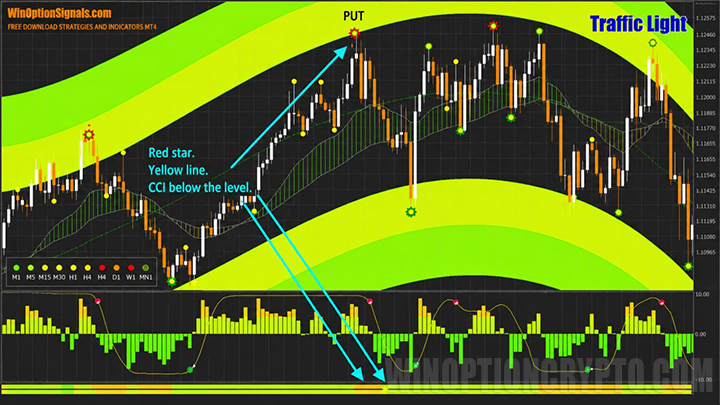
GG TrendBar shows the overall trend direction across multiple timeframes. Its reading must align with the channel direction before a trade is considered. The color of each timeframe square indicates the following:
- Orange — downtrend.
- Yellow — ranging (flat) market.
- Green — uptrend.
The second key indicator is 7-21-55 H2. Despite the name, this is a set of standard Moving Averages presented in a more visually informative format:
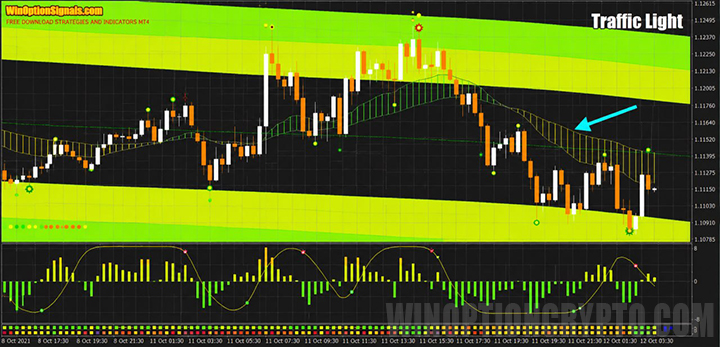
The direction of this indicator is also important and must be factored into every trade decision.
Two further indicators also generate signals, but these are only acted upon when they align with the readings of the indicators described above.
With all of that in mind, here are the entry rules for both the aggressive and conservative methods.
Conservative Method (Expiration: 10 Candles)
Open a Call option using the conservative method when the following conditions are met:
General conditions:
- The green-yellow channel is pointing upward.
- The GG TrendBar square for the traded timeframe is green.
- The 7-21-55 H2 (Moving Averages) indicator is pointing upward and displaying green.
Entry trigger:
- The CCI histogram (lower window) is above the −100 level.
- The lowest indicator is green.
- A green star has appeared — wait for the candle to close before entering.
Open a Put option using the conservative method when the following conditions are met:
General conditions:
- The green-yellow channel is pointing downward.
- The GG TrendBar square for the traded timeframe is orange.
- The 7-21-55 H2 (Moving Averages) indicator is pointing downward and displaying orange.
Entry trigger:
- The CCI histogram (lower window) is below the 100 level.
- The lowest indicator is yellow.
- A red asterisk has appeared — wait for the candle to close before entering.
The conservative method carries lower risk, but signals are infrequent and this style will not suit every trader.

Aggressive Method (Expiration: 1 Candle)
The aggressive method requires fewer conditions to be met and has several practical advantages:
- More frequent signals.
- Accessible for beginners.
- Requires less time monitoring the chart.
- Can be used for counter-trend entries.
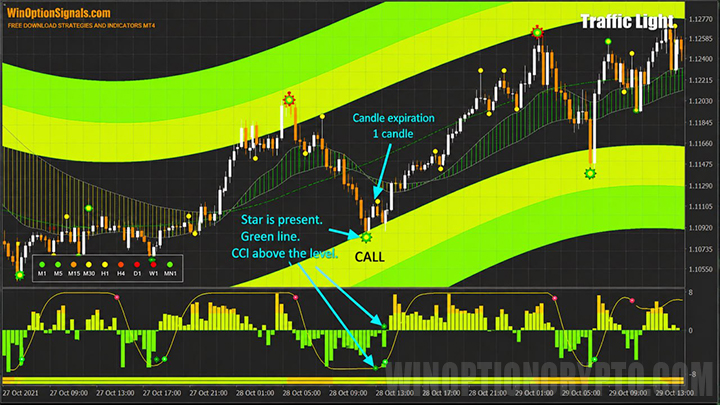
Open a Call option using the aggressive method when:
- A green star has appeared — wait for the candle to close before entering.
- At least one line of the lowest indicator has turned green.
- The CCI histogram (lower window) is above the −95 level.
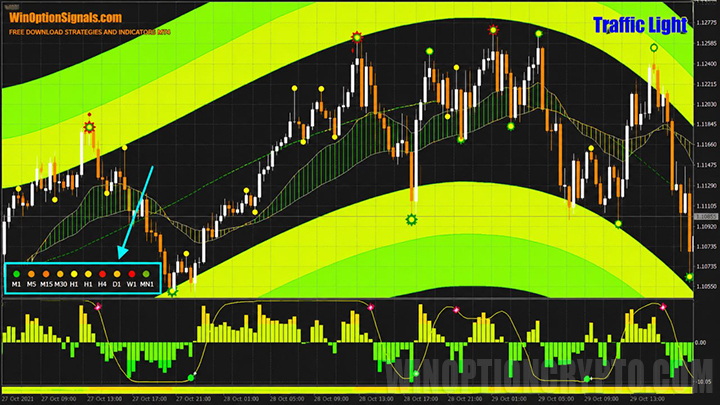
Open a Put option using the aggressive method when:
- A red asterisk has appeared — wait for the candle to close before entering.
- At least one line of the lowest indicator has turned yellow.
- The CCI histogram (lower window) is below the 95 level.
Trading Examples
To make the rules concrete, here are chart examples using the aggressive method — conservative signals are too infrequent to illustrate effectively.
Currency pairs: EUR/JPY and AUD/USD. Expiration: 1 candle.
Opening a Call Option
All conditions for an aggressive method Call entry are met:
Opening a Put Option
The same applies for the Put entry:
Conclusion
The Traffic Light strategy is versatile — it works for both medium-term trading and scalping. Keep in mind that medium-term trading should follow the trend, while scalping also allows for counter-trend entries.
Always test strategies and indicators on a demo account before trading live. This builds familiarity with the system and helps avoid unnecessary losses from the outset.
Choosing a reliable broker is equally important. You can find vetted options in our binary options broker rankings. We wish you successful trading!
Download the Traffic Light Binary Options Strategy
Not sure how a particular strategy or indicator works? Leave a comment below, and subscribe to our YouTube channel WinOptionCrypto — we'll answer your questions in upcoming videos.
To leave a comment, you must register or log in to your account.