
Every trader dreams of a reliable analysis tool whose effectiveness holds up regardless of the preferred asset or timeframe.
The Contrast indicator is one such tool — a solid foundation on which to build a binary options strategy.
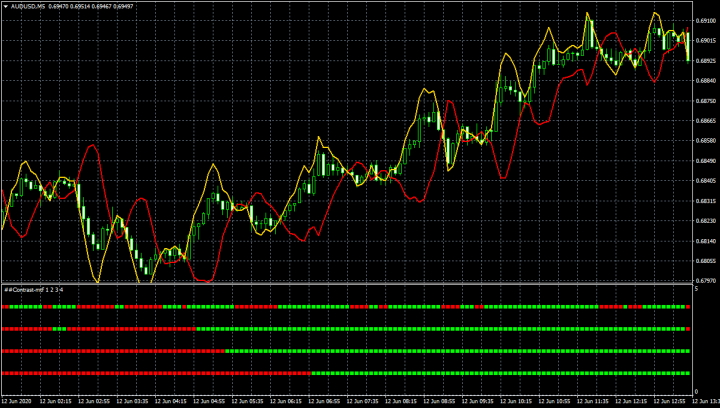
How the Contrast Indicator Works
The indicator's operating principle follows directly from its name. It automatically analyses price fluctuations and identifies "contrasts" on the chart — comparing current price movements with previous ones to anticipate how the asset will behave in the periods ahead.
The indicator was developed for the MetaTrader 4 platform and has produced solid results across all currency pairs. It is compatible with any timeframe and trading session. Recommended brokers: Quotex, Pocket Option, Binarium.
Contrast is a custom indicator with flexible settings. Its author, drawing on many years of market observation, arrived at two key conclusions:
- The probability of any price direction forecast is no higher than 50% in isolation.
- An established trend will continue in the same direction with a probability greater than 50%.
The practical implication is clear: a trader who enters in line with the market trend has a meaningfully better chance of profit than one acting at random. The Contrast indicator incorporates a function that compares the dominant trend with the preceding price movement. It identifies two primary scenarios:
- A trend reversal is approaching.
- Following a period of consolidation, a continuation move — up or down — is likely.
By anticipating a trend change, the trader can identify the new direction and either enter immediately or wait for a pullback.
Setting Up the Contrast Indicator
To add Contrast to your trading terminal, follow these steps:
- Download the archive. It should contain an indicator file with the extension .ex4 or .mql. Place the files in the MQL4/Indicators folder of your MT4 installation.
- Restart the terminal.
- Open the price chart for the desired instrument.
- Go to the Insert menu, then Indicators, then Custom. Contrast will appear in the list.
- Click the indicator name and adjust the settings in the window that appears if needed. The indicator is now ready to use.
For full installation instructions, watch our MetaTrader 4 setup video:
The indicator is available in two display modes:
- Channel mode: Two multi-coloured lines forming a channel. Their intersection generates an entry signal. The coeff parameter controls the channel width — a lower value produces more frequent intersections and signals, which is useful when trading binary options on short timeframes such as M1. A higher value widens the channel and reduces signal frequency. Negative values can also be used for binary options trading.
- Multi-timeframe histogram: A histogram displaying Contrast readings across multiple timeframes simultaneously. Up to three priority timeframes can be configured in the settings. The defaults are Day, Week, and Month.
A notable strength of the Contrast indicator is that it does not repaint — all historical signals remain visible exactly as they were generated, making manual backtesting straightforward.
Trade Entry Rules
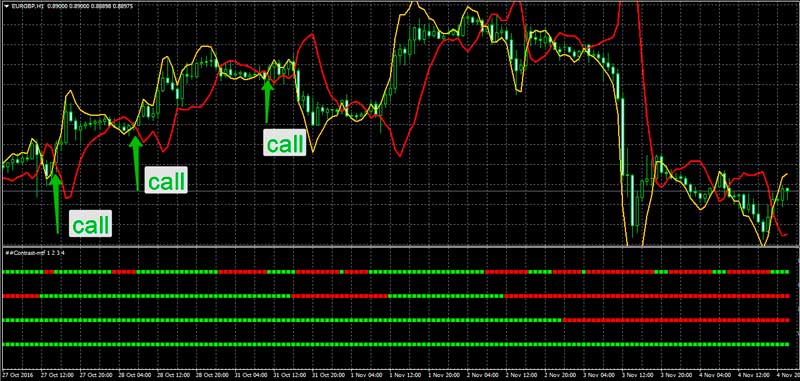
Buy a Call option when the yellow line crosses the red line from bottom to top, or when a green bar forms on the histogram. Expiration: 1 candle on the active timeframe.
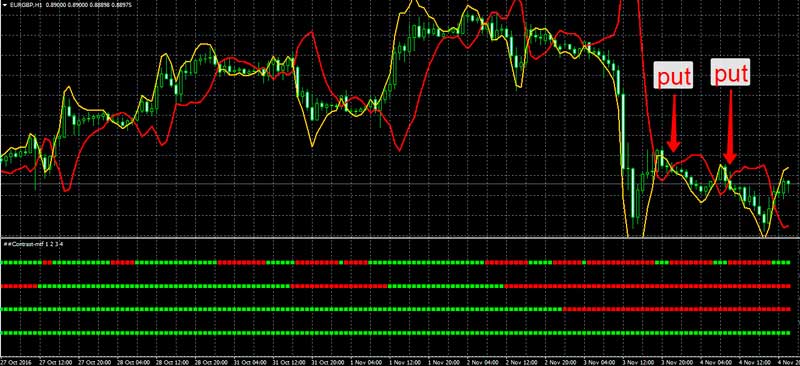
Buy a Put option when the yellow line crosses the red line from top to bottom, or when a red bar forms on the histogram. Expiration: 1 candle on the active timeframe.
Despite encouraging results in testing, it is advisable not to use the indicator in isolation. It works best as part of a broader trading strategy with additional confirmation filters. Bollinger Bands or standard support and resistance levels are good complements. Some traders also require the same signal to appear across all three configured timeframes before entering a trade.
The indicator includes an alert function that notifies you of suitable entry opportunities and their direction.
Conclusion
Contrast is a well-designed indicator for processing analytical data and a reliable addition to any trader's toolkit. As with any indicator, a certain percentage of signals will be incorrect — so additional confirmation filters are recommended, along with choosing a reliable broker.
Download the Contrast Indicator
Not sure how this strategy or indicator works? Leave a comment below, and subscribe to our YouTube channel WinOptionCrypto — we'll answer your questions in upcoming videos.

To leave a comment, you must register or log in to your account.