
The Pocket Option "Supertrend" binary options strategy is built around one of the most popular indicators in modern technical analysis. Introduced in the early 2000s, it quickly gained the trust of traders worldwide thanks to its simplicity and reliability. In this review, we explain how to use this tool effectively in binary options trading.
Contents:
- Key Features
- Installation
- Overview and Settings
- Trading Rules for the Pocket Option "Supertrend" Strategy
- Specifics of Application
- Conclusion
Key Features of the Pocket Option "Supertrend" Strategy
- Terminal: Webtrader Pocket Option
- Timeframe: M5
- Expiration: 3 candles
- Option Types: Call/Put
- Built-in indicators: Supertrend
- Trading instruments: currency pairs, commodities, cryptocurrencies, stocks
- Trading hours: 08:00–21:00 UTC
- Recommended brokers: Pocket Option
Installing the Pocket Option "Supertrend" Binary Options Strategy
The Supertrend indicator is added to a chart in the standard way. Open the main trading platform window, click the "Indicators" icon, and navigate to the selection menu. From the list, select the indicator and configure its parameters.
Pocket Option "Supertrend" Binary Options Strategy: Overview and Settings
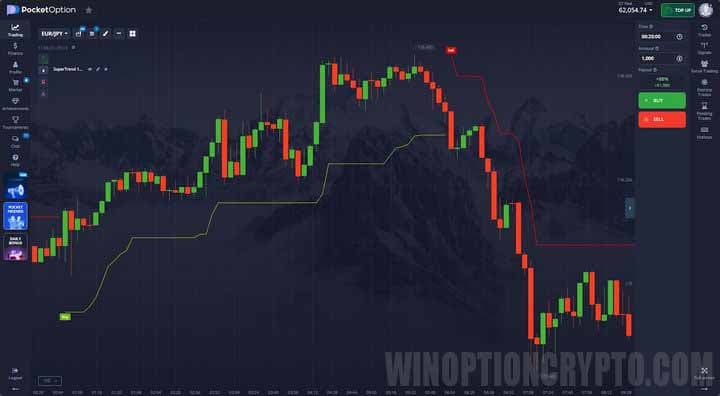
This strategy generates trading signals based on the Supertrend indicator. Traders began actively discussing and adopting it in the early 2000s, drawn to its simplicity and reliability as a trend-following tool. It clearly displays the current price trend on the chart, making it easy even for novice traders to determine their trading direction.
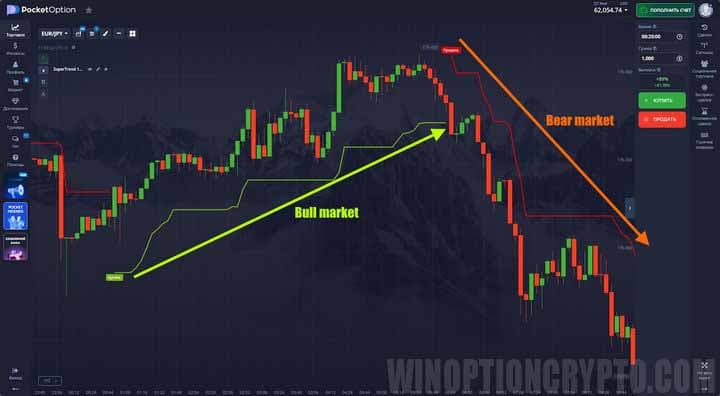
As shown in the image above, when the trend shifts from bearish to bullish, the indicator line turns green and drops below prices, with a "Buy" marker appearing at the start of the new trend. The opposite occurs when the trend shifts from bullish to bearish: the line turns orange, rises above prices, and a "Sell" marker appears.
The Supertrend line can be used in several ways. In Forex trading, it can serve as a trailing stop-loss reference. For binary options traders, it functions as a trend indicator: a green line below prices signals a bullish market, suggesting Call options only; an orange line above prices signals a bearish market, suggesting Put options.
The Supertrend indicator has two main settings: the ATR period and the multiplier. To adjust them, click the "Pencil" icon in the Pocket Option platform. A settings window will open where you can enter new values for each parameter.
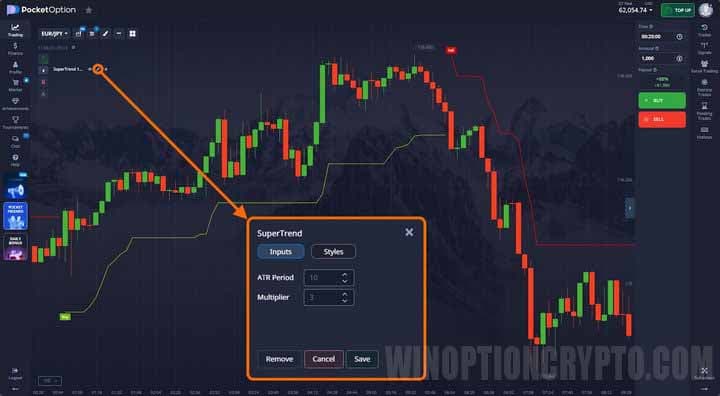
The ATR Period defines how many recent candles are used to calculate the Average True Range, which measures an asset's volatility. Based on this value, the Supertrend indicator determines how far its line should sit from the price. The higher the volatility, the further the line is drawn; during periods of low activity, it moves closer to the price.
The multiplier is the coefficient applied to the ATR value. It controls the indicator's sensitivity: a higher multiplier makes Supertrend less reactive, reducing false signals but increasing the lag when a trend changes.
In the Pocket Option platform, the multiplier can be set to a maximum value of 5.
Trading Rules for the Pocket Option "Supertrend" Strategy
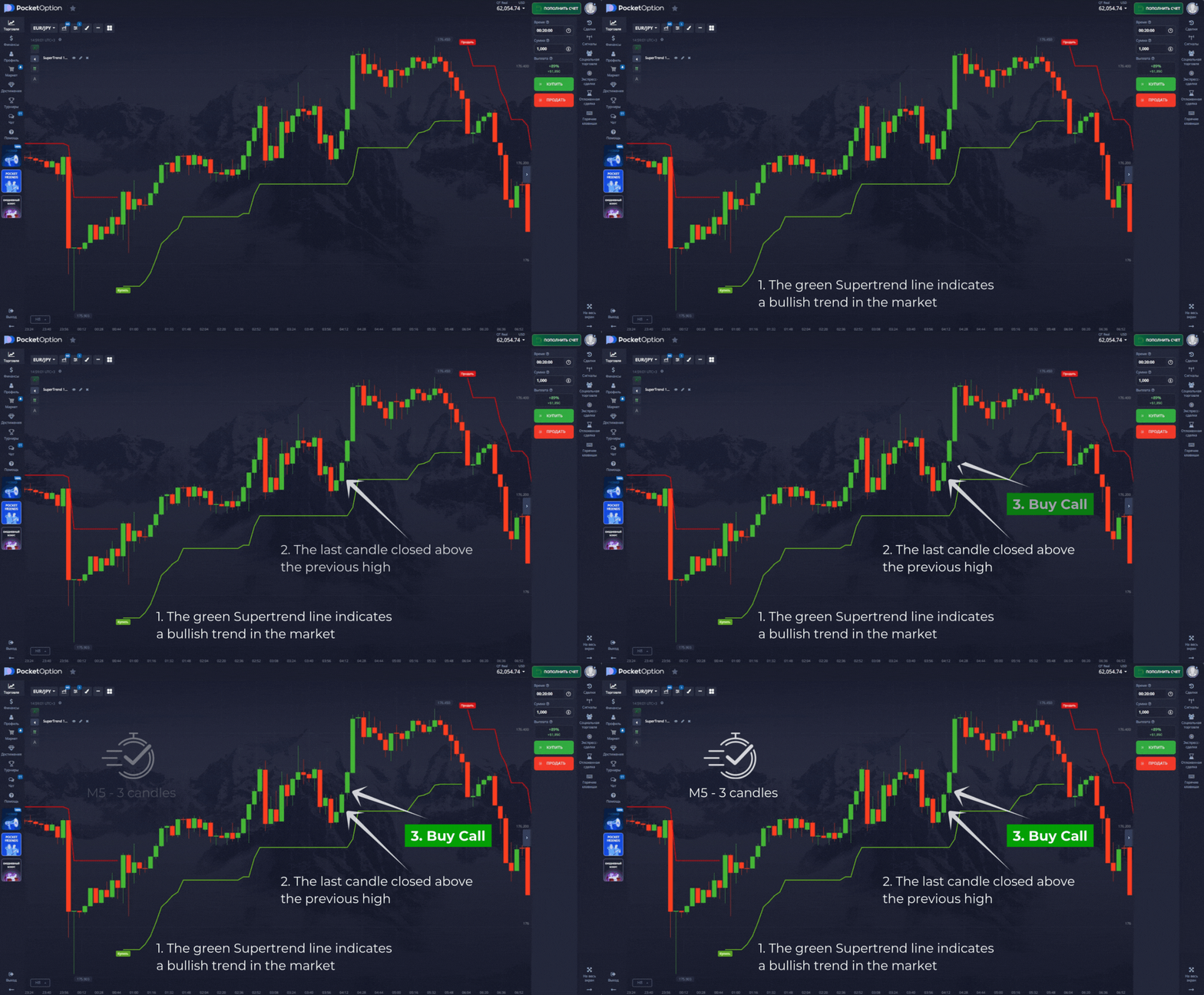
First, determine the direction of the current trend using the color and position of the indicator line. A green Supertrend line below the price indicates a bullish trend — prepare to open Call options. An orange line above the price indicates a bearish market — look for an entry point to open Put options.
Next, wait for a candle to close above the previous high before opening a Call option, or below the previous low before opening a Put option.
This strategy generates many high-quality signals, but sound risk and capital management is still essential. The following articles cover these topics in detail:
- Capital management. Money management principles.
- How to keep losses under control? Risk management.
- Psychology and trading discipline.
- Trader's diary as a tool for refining trading strategies.
Opening a Call Option
- The Supertrend line is green — the market is in a bullish trend.
- The last candle closed above the previous candle's high.
- At the opening of the next candle, open a Call option.
Opening a Put Option
- The Supertrend line is orange — the market is in a bearish trend.
- The last candle closed below the previous candle's low.
- At the opening of the next candle, open a Put option.
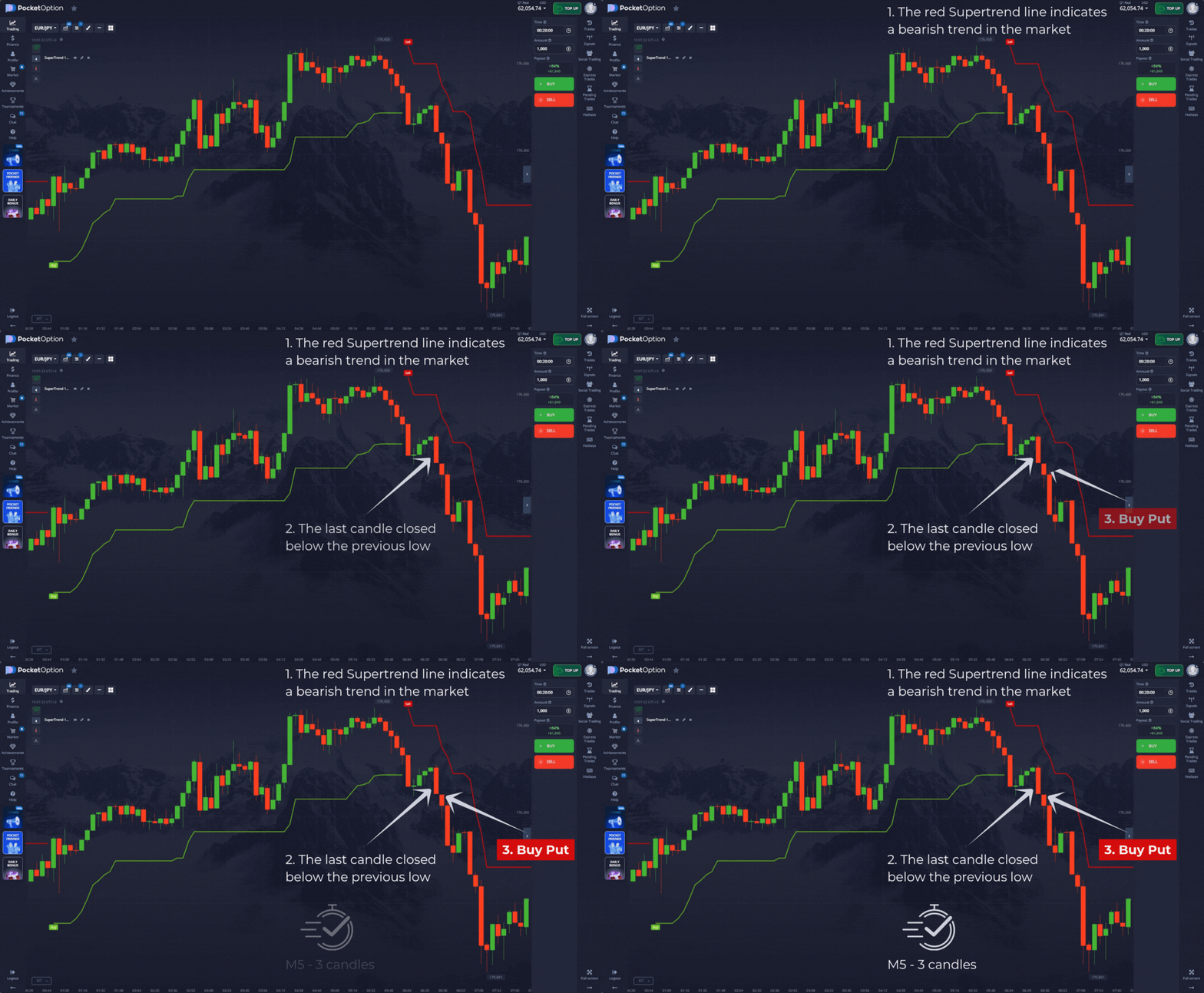
The expiration time should be set to three candles, though you are free to experiment with other periods.
Specifics of Using the "Supertrend" Binary Options Strategy on Pocket Option
The Supertrend indicator serves two functions simultaneously: it acts as both a trend detector and a trailing stop-loss reference. This makes its signals straightforward to interpret. A reversal signal occurs when the price crosses the Supertrend line, at which point the indicator changes color and switches position relative to the price.
Advantages of the Pocket Option "Supertrend" Strategy
The strategy's main strengths are the clarity and simplicity of its signals. Because Supertrend incorporates the ATR, it accounts for market volatility and adjusts automatically to changing conditions. The system works across all assets and timeframes.
Cons of the Pocket Option "Supertrend" Strategy
The main drawback is its tendency to generate false signals during ranging (flat) markets. In such conditions, the price frequently crosses the indicator line, causing Supertrend to change color repeatedly and produce misleading reversal signals. To filter these out, it is recommended to use the indicator alongside an oscillator such as the RSI.
Conclusion
The "Supertrend" binary options strategy on Pocket Option is a reliable trend-following system. Unlike classic moving averages, the Supertrend indicator includes a built-in volatility metric. The ATR makes it flexible and able to adapt automatically to current market conditions, resulting in more dependable signals. When combined with the candlestick confirmation pattern described in this review, trading accuracy can improve further.
Before trading this system with real funds, we recommend testing it on a demo account with Pocket Option. Always manage your risks and capital carefully. Happy trading!
Not sure how this strategy or indicator works? Leave a comment below, and subscribe to our WinOptionCrypto YouTube channel — we'll answer your questions in upcoming videos.

To leave a comment, you must register or log in to your account.