
There are many strategies for binary options, but most of them require the MetaTrader 4 terminal, which is not always convenient when trades are executed directly through a broker's platform. Fortunately, there are strategies that rely on the standard set of indicators available on the Pocket Option platform.
One such strategy is MACD Profitunity, which uses three effective technical indicators: MACD, Awesome Oscillator, and Fractals. This strategy is versatile and works with any asset traded on Pocket Option. By following the trading rules and filtering signals with all three indicators, you can minimize risk and improve overall profitability.

Also, keep in mind that you can start trading with additional funds by using promo codes to top up your account from Pocket Option. To further improve your performance with this strategy, you can use a promo code to cancel loss trade $10.
Adding Indicators
To add indicators on the Pocket Option platform, open the indicator panel on the chart:
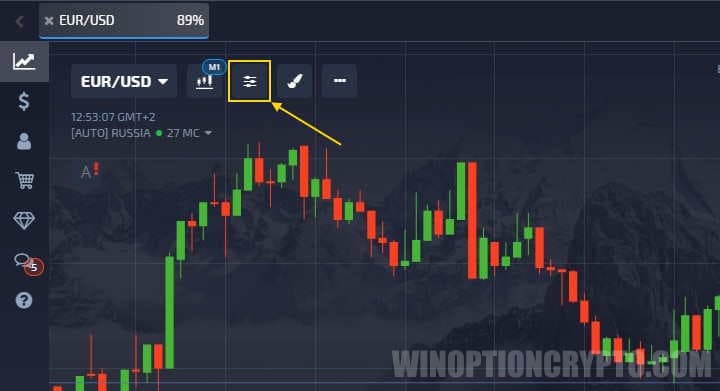
Then select the three indicators required for this strategy:
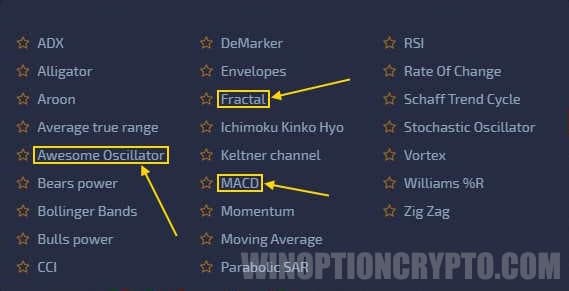
Each indicator operates on its own principle and requires individual configuration. Note that only MACD and the AO indicator can be customized; Fractals uses a fixed template based on a set number of candles and has no adjustable settings.
Start by adding the MACD indicator, which identifies price direction. In most applications, MACD signals are based on zero-line crossovers, but in this strategy, you need to watch the red and green signal lines instead. The trend is considered upward when the histogram bars are above the signal lines, and downward when the bars are below them.
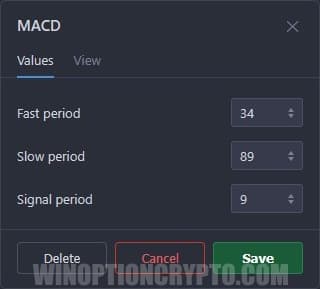
Set the MACD parameters to "34", "89", and "9":
Next, add the Awesome Oscillator, which uses the default settings of "5" and "34":
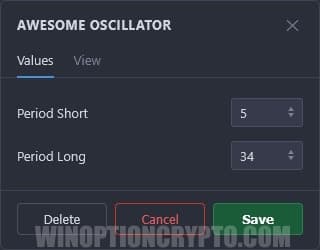
These do not need to be changed, as the indicator performs well with its default values.
In the MACD Profitunity strategy, the AO indicator is used to identify entry points. To generate signals, watch for two specific patterns:
- Zero line crossing.
- Saucer pattern.
The zero line crossing is the simpler of the two — it triggers when the AO histogram bars cross the center line. The Saucer pattern is somewhat more complex.
The Saucer pattern consists of three histogram bars arranged as follows:

As shown, bar "1" is higher than bar "2", and bar "3" is the highest of all — making it the signal bar. When this pattern appears, it is time to open an option. Whether to buy a Call or Put depends on the position of the pattern relative to the zero line: above the zero line signals a Call, and below it signals a Put.
Finally, add the Fractals indicator, which identifies moments when the price breaks out of its range and serves as an additional entry signal. However, Fractals signals should only be acted on after a pattern has appeared on the Awesome Oscillator.
Since the Fractals indicator has no configurable settings, simply add it to the chart as-is.
Examples of Trading on Pocket Option Using the MACD Profitunity Strategy
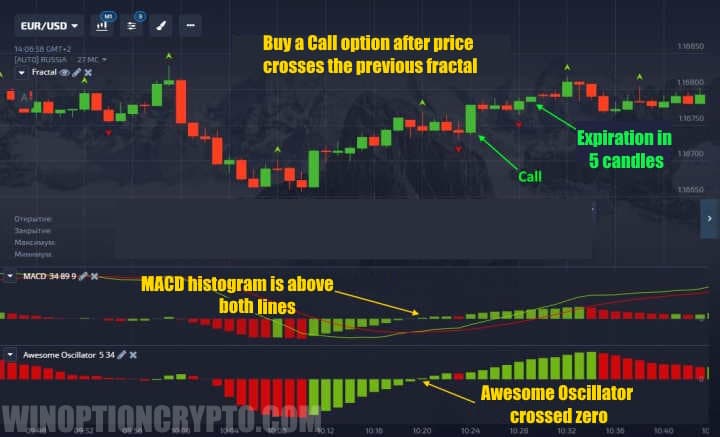
A trade is opened once all three signals align:
- MACD histogram is above or below the signal lines.
- The Awesome Oscillator has formed one of the two patterns above or below the zero line.
- The price has broken through the previous up or down fractal.
This strategy can be used on any timeframe, but the expiration should be set to no more than 5 candles.
It is also worth noting that the Saucer pattern should only be used by experienced traders, as it appears frequently but does not always produce reliable signals. Beginners are better off starting with the zero line crossing.
A Call option entry looks like this:
Put options are entered in exactly the same way, but with the reverse conditions:
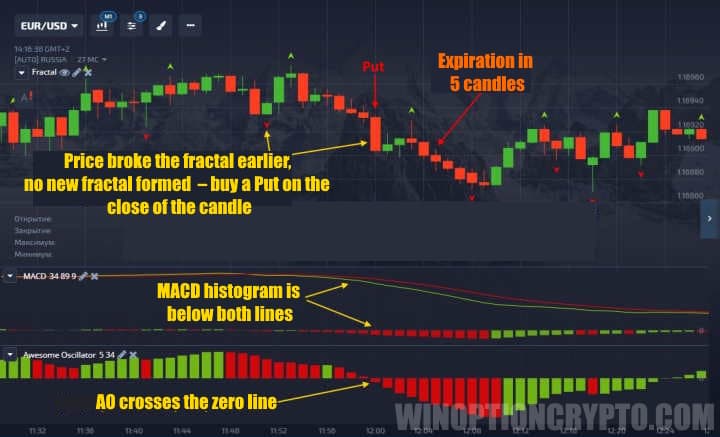
Note that the price sometimes breaks through a fractal level early — in such cases, you do not need to wait for a new fractal to form before opening a trade, provided the other signals are present.
Conclusion
The MACD Profitunity strategy is appealing not only because it works natively on the Pocket Option platform, but also because it is versatile and straightforward — making it accessible even for beginners in binary options trading.
OPEN AN ACCOUNT WITH POCKET OPTION
Can't figure out how this strategy or indicator works? Leave a comment below and subscribe to our YouTube channel WinOptionCrypto — we'll answer all your questions in our videos.

See Also:
- How to Trade from Mobile Devices on the Pocket Option Platform
- Pocket Option Broker Platform for Windows
- How to Trade Express Orders with the Pocket Option Broker
- How to Participate in Tournaments on the Pocket Option Platform
- How to Use Signals on Pocket Option
To leave a comment, you must register or log in to your account.