
One of the most pressing questions for a beginning binary options trader is when exactly to enter a trade. Charts appear chaotic, indicators contradict each other, and the market seems to deliberately move against a newly opened position. If this sounds familiar, what you're lacking isn't discipline or luck — it's a specific tool that pinpoints where real market activity is concentrated right now. This is precisely what the Heat Map provides.
In this article, we'll explore a trading strategy based on this principle on the Binarium platform, one of the most accessible binary options brokers for retail traders. You'll learn how to read trading signals, distinguish strong entries from false ones, and what a trade looks like in practice — with specific examples.
Contents:
- What Is the Advantage of the Heat Map Strategy?
- How to Apply the Heat Map Strategy on Binarium
- Conclusion

What Is the Advantage of the Heat Map Strategy?
Most beginners make the same mistake: trying to predict price movements based on intuition or charts overloaded with dozens of indicators. As a result, signals contradict each other, the decision to open a trade gets delayed, and the entry point is missed. The Heat Map strategy addresses this problem in a fundamentally different way: rather than predicting market behavior, it shows where buyer and seller activity is currently concentrated. Traders see not abstract lines, but currency pairs attracting interest from major players — turning analysis from guesswork into an informed decision.
Another key advantage is that this strategy suits traders of all experience levels. The trade entry process is straightforward and easy to repeat. There's no need to spend hours studying fundamental analysis or memorizing complex Japanese candlestick patterns. This makes the Heat Map simple and accessible for anyone looking to achieve their first consistent results in binary options trading.
How to Apply the Heat Map Strategy on Binarium
The heat map is a table resembling a chessboard, displaying the relative strength and weakness of assets depending on the selected timeframe and display mode (points or percentages). Currency codes appear along the top and sides. Each row shows how one asset is strengthening or weakening against another. Strengthening is shown in green; weakening is shown in red. In addition to these two primary colors, other shades are also used:
- pale green — the asset price is approaching the overbought zone;
- pale red — the asset price is approaching the oversold zone;
- gray — indicates a neutral stance among traders toward that currency pair.
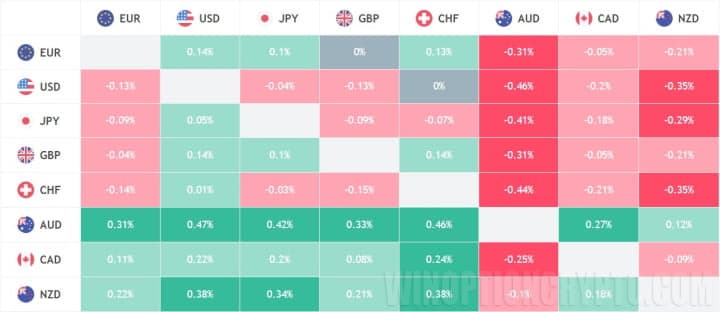
The image above shows that at this moment it is preferable to open a Put option on the following currency pairs: EUR/AUD, AUD/USD, AUD/JPY, GBP/AUD, AUD/CHF, AUD/CAD, NZD/USD, NZD/JPY, and NZD/CHF.
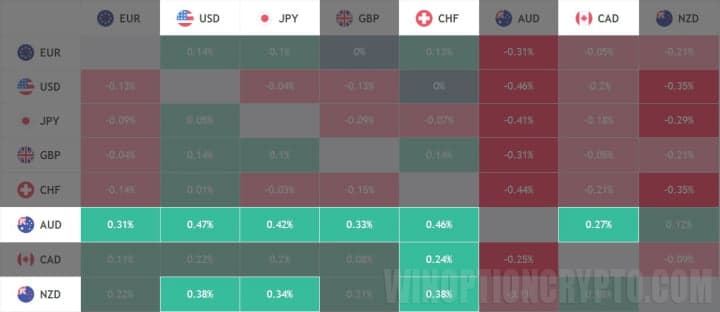
The table above shows the assets on which Call options should be opened: EUR/AUD, AUD/USD, AUD/JPY, AUD/CHF, AUD/CAD, NZD/USD, and NZD/JPY.
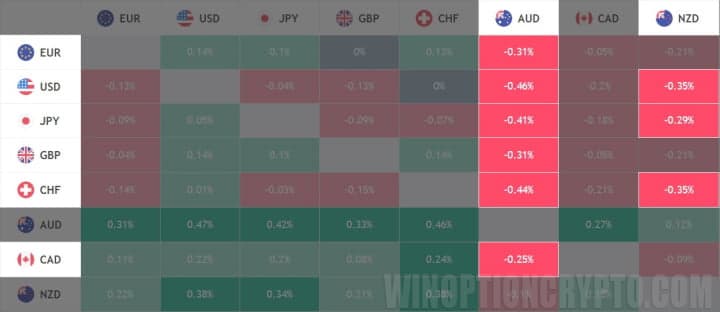
When applying this strategy on the Binarium platform, focus on intersections colored green or red, and disregard the intermediate shades. Trades using the Heat Map should use options with expiration times of 15–30 minutes, with no more than 2% of the deposit invested per trade.
To further improve your trading results, consider using additional funds available through promo codes when topping up your account.
Conclusion
The Binarium Heat Map strategy gives beginning binary options traders what many lack at the start: a clear decision-making framework free from guesswork and emotion. Instead of staring at charts in confusion, you see specific currency pairs where the market is primed to move in a particular direction — and you know exactly when to open a trade. The strategy described in this article can be applied right away, without investing time in complex theory. The key is to start practicing and observe how this method performs under real market conditions.
If you'd like to try this strategy in practice, the Binarium platform provides everything you need: a user-friendly terminal with an intuitive interface and a demo account for risk-free skill-building. Register, open a demo account, and test the Heat Map strategy on live charts. Your first positive experience in binary options trading is closer than you think — the right strategy and a reliable platform will lay the foundation for consistent results.
Having trouble understanding how this strategy works? Let us know in the comments below, and subscribe to our WinOptionCrypto YouTube channel, where we'll answer all your questions in a dedicated video.

To leave a comment, you must register or log in to your account.