
The Future Volume indicator can be used when trading various assets, but it performs best in binary options trading. It does not repaint and delivers signals promptly, generated through analysis of total candle volume.
Key Features of the Future Volume Indicator
Future Volume has the following key specifications:
- Trading platform: MetaTrader 4;
- Assets: currencies, stock indices, and shares;
- Trading hours: 24 hours;
- Timeframe: M1, M5, or M15;
- Expiration time: 3 candles (M1 — 3 minutes, M5 — 15 minutes, M15 — 45 minutes).
Instructions for installing indicators in MetaTrader 4:
Recommended brokers for trading with this indicator: Quotex, Pocket Option, Binarium.
Trading Rules for the Future Volume Indicator
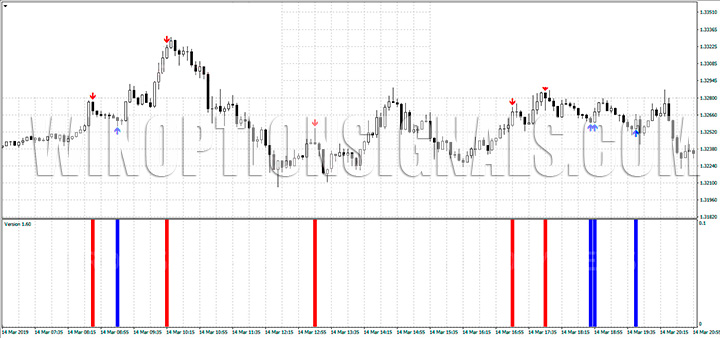
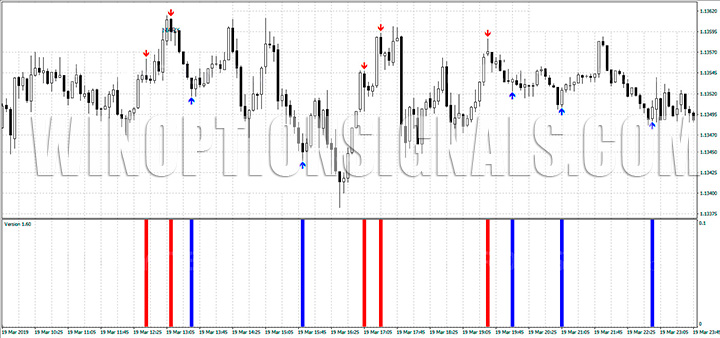
The indicator displays blue and red lines on the chart, marking oversold and overbought levels respectively. A buy signal (blue arrow) or sell signal (red arrow) appears immediately after a new candle begins to form. If the signal persists, the corresponding trade can be opened.
Before trading binary options with Future Volume, it is recommended to test the indicator on a demo account or with historical data.
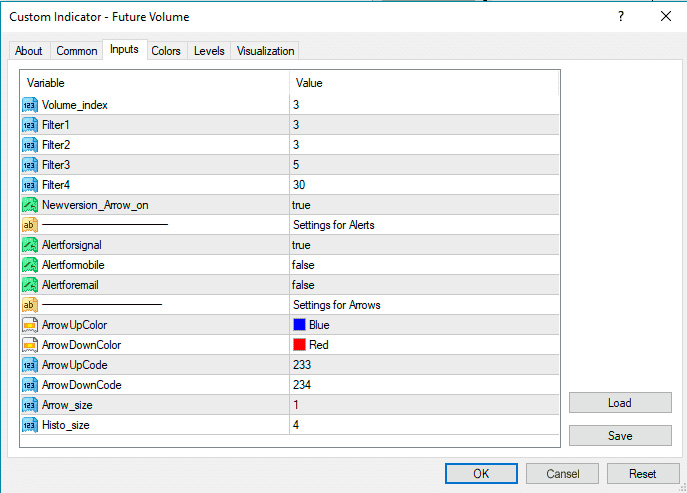
To make the tool easier to work with, the developers have built in 4 filters. The following settings are recommended as a starting point:
- volume_index — 3;
- Filter 1 and Filter 2 — 3;
- Filter 3 — 5;
- Filter 4 — 30.
Volume_index and Filter 1 generate accurate signals during sideways price action. Filters 2 and 3 perform better when the market is trending clearly up or down. Filter 4 indicates the presence of a trend.
Based on the above, the following settings can be applied depending on current market conditions:
- Uptrend — set Volume_index and Filter 1 to 0; leave the other filters unchanged;
- Ranging market — set Filters 2, 3, and 4 to 0; leave Volume_index and Filter 1 unchanged.
The default settings can be applied in any market condition. That said, it is recommended to keep experimenting on a demo account and adjusting the filter values as needed.
Download the Future Volume Indicator
Not sure how a particular strategy or indicator works? Leave a comment below, and subscribe to our YouTube channel WinOptionCrypto — we'll answer your questions in upcoming videos.

See Also:
- How to choose a binary options broker
- Binary options broker bonuses
- How do binary options brokers make money
- List of unregulated brokers
To leave a comment, you must register or log in to your account.