
The BOW indicator is based on readings from several standard indicators, including Bollinger Bands, EMA, and RSI. According to the developers, they have built a highly efficient algorithm that accounts for trend reversals, market fluctuations, and price spikes — helping traders avoid unnecessary losses and gain a high-performing binary options trading tool. Let's take a closer look.
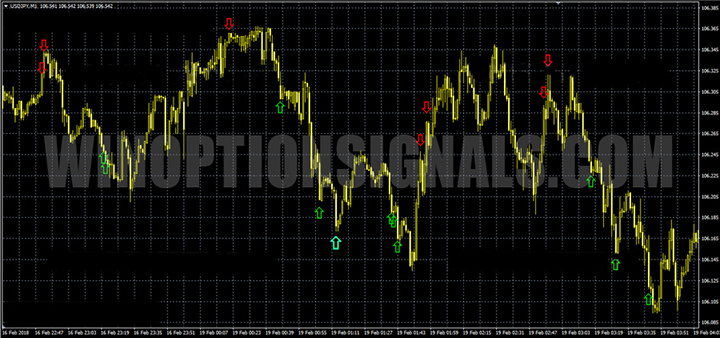
Key Features of the BOW Indicator
- Platform: MetaTrader 4.
- Asset: any currency pair.
- Trading hours: around the clock.
- Timeframe: M1.
- Expiration time: 3 minutes (or 5 minutes).
- Recommended brokers: Quotex, PocketOption, Binarium.
Instructions for installing indicators in MetaTrader 4:
Trading Rules for the BOW Indicator
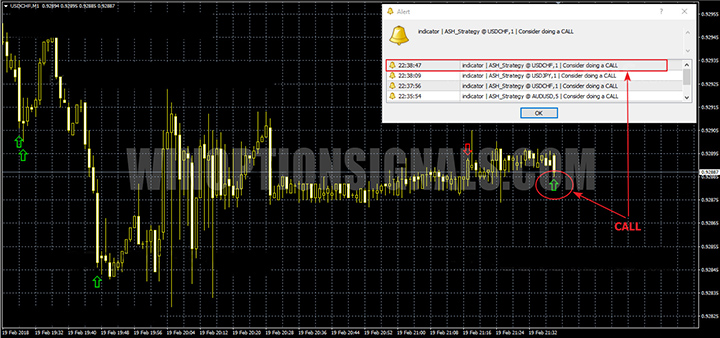
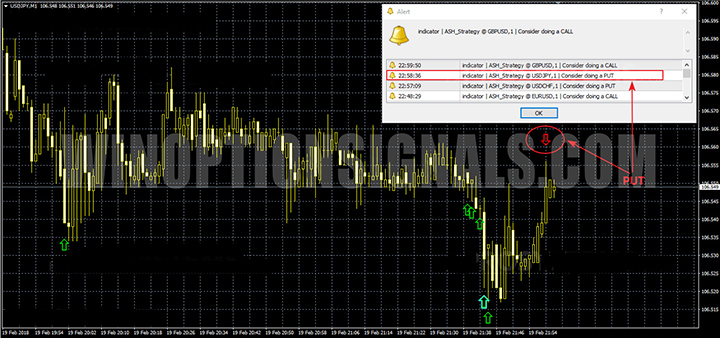
The BOW indicator tracks price reversals and confirms them through multiple filters, helping to avoid false signals. When it detects a change in the main trend direction, it cross-checks against the Stochastic oscillator at overbought and oversold levels to confirm the reversal. Once all conditions are met, the indicator plots a Call or Put arrow on the chart. According to the developers, trades should be entered as soon as the signal appears — without waiting for the candle to close. Pink and turquoise arrows indicate a stronger signal.
Call signal:
Put signal:
Recommendations from the Indicator Developers
Setup: in your broker's MT4 terminal, leave Bollinger Bands and RSI at their default values.
Step 1: Open 4 assets (those with the highest payout percentages) and apply the indicator to each on the one-minute chart.
Step 2: Wait for a signal from the indicator.
Step 3: Do not enter a trade immediately — wait 10–15 seconds and observe whether the market continues to move in the direction indicated by the signal.
Step 4: Confirm that price is at the Bollinger Bands boundary, RSI is in the overbought or oversold zone, and at least 3 consecutive candles of the same colour have formed.
When all of these conditions are present, a trend reversal is likely. Never rush — wait for all confirmations, even if it means missing some signals. There are plenty of signals; focus on catching only the best ones.
Final Step: Set the expiration time to 3 minutes and open a trade in the direction of the signal. If your broker does not offer a 3-minute expiration, use 5 minutes instead.
Note: Receiving multiple consecutive signals on the same asset simply means the trend is still developing — wait a little longer before entering a trade.
Important! Successful trading with the BOW indicator requires a reliable broker that executes orders without delays.
Download the BOW Indicator
Not sure how a particular strategy or indicator works? Leave a comment below, and subscribe to our YouTube channel WinOptionCrypto — we'll answer your questions in upcoming videos.

To leave a comment, you must register or log in to your account.