
To find entry points in the market, many traders — including clients of Pocket Option broker — often use the Stochastic indicator. This tool is highly effective. Strategies based on Stochastic produce positive results in 80–85% of cases, making it a popular choice in binary options trading.
Features of Stochastic
The Stochastic Oscillator is included in the standard set of tools built into the Pocket Option terminal.
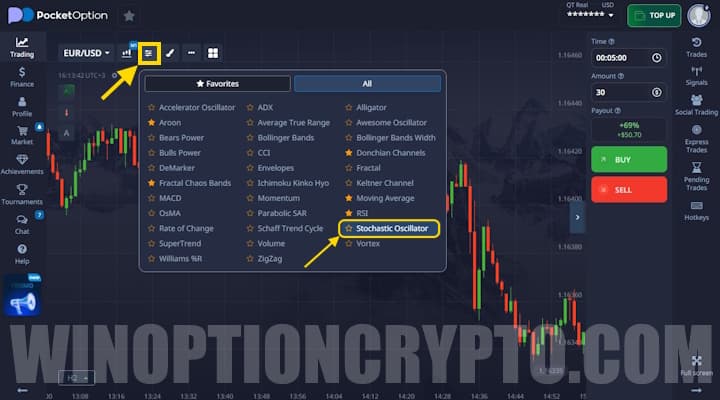
The indicator window is displayed below the price chart. It contains several horizontal levels and two lines whose intersection signals a market entry point.
The fast-moving average helps traders identify current market sentiment — that is, the direction of the trend — but it responds quickly to price changes. The slow-moving average filters out market noise, providing a more accurate entry signal.

Two horizontal lines at values of 0 and 20 define the oversold zone. If the Stochastic signal lines fall below this level, it indicates an excess of sellers — or open sell positions — in the market. The overbought zone is formed by two lines at values of 80 and 100. When the Stochastic moving averages enter this range, it signals an excess of buyers.
By default, the Stochastic on Pocket Option uses a fast line period of 14, a slow line period of 3, and a smoothing parameter of 3.
These parameters can be adjusted to suit your chosen strategy.
Basic Signals
Stochastic stands out from other indicators in that it consistently provides entry signals without requiring traders to have deep knowledge of technical analysis. Trading on Pocket Option with this oscillator follows these rules:
- Signal lines exiting the overbought or oversold zones. When the fast-moving average crosses level 20 from bottom to top — with the slow-moving average also moving upward — a Call option trade should be opened immediately after the current candle closes. Put contracts are placed in the opposite situation: when the fast line crosses level 80 from top to bottom and the slow-moving average also exits the overbought zone.
- Signal line crossovers. The direction of the moving averages determines the trade direction. Call option contracts are opened when the fast line crosses the slow line from bottom to top; Put contracts when it crosses from top to bottom.
Some traders also use a direction-based approach with Stochastic, entering trades based solely on the direction the lines are moving. However, this signal is considered weak and tends to result in more losses.
Features of the "Two Stochastics" Strategy on Pocket Option
Pocket Option recommends this strategy as a starting point for newcomers to binary options trading. The system is straightforward but highly effective.
Also worth noting: you can start trading with additional funds by using deposit promo codes from Pocket Option, and improve your results with a promo code to cancel loss trade $10.
To use this strategy, you will need to add two Stochastic indicators. Set the first one to a fast period of 9, a slow period of 3, and a smoothing period of 3. Set the second one to 21, 9, and 9 respectively.
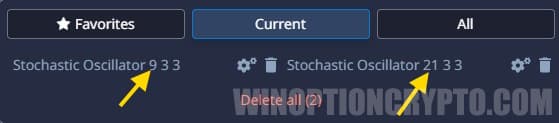
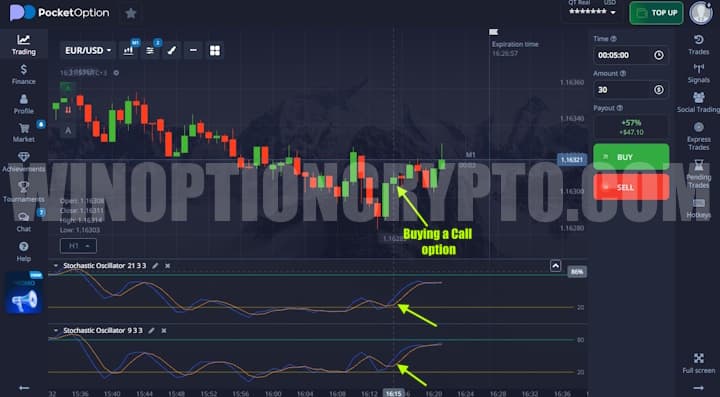
To filter out market noise, it is recommended to use a 15-minute timeframe. The expiration time for this strategy should be 45–60 minutes. Trading conditions are as follows: Call contracts are opened when the fast lines of both oscillators cross their respective slow lines from bottom to top, with all moving averages located in the oversold zone.
Put option trades are opened in the opposite situation. All signal lines must be in the overbought zone, and the entry is triggered when the fast-moving average crosses the slow one from top to bottom.
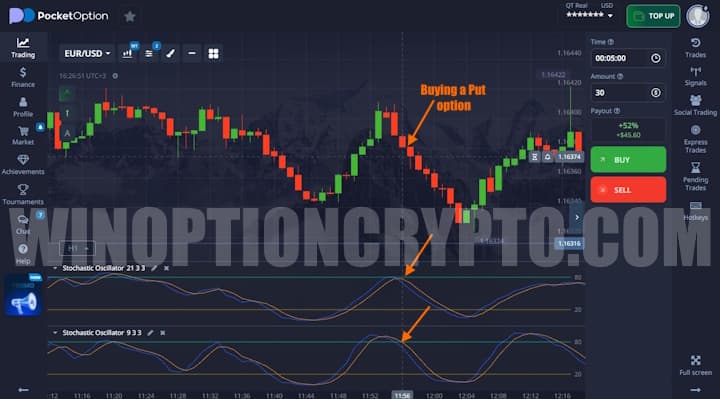
Despite its simplicity, this strategy is highly effective — provided that signals from both Stochastics occur simultaneously.
OPEN AN ACCOUNT WITH POCKET OPTION
Can't figure out how this strategy or indicator works? Leave a comment below, and subscribe to our YouTube channel WinOptionCrypto — we'll answer your questions in upcoming videos.

See Also:
- Free Robot for Pocket Option
- How to Trade from Mobile Devices on the Pocket Option Platform
- How to Participate in Tournaments on the Pocket Option Platform
- How to Withdraw Money from the Pocket Option Broker
- How to Use Signals on Pocket Option
To leave a comment, you must register or log in to your account.