
Technical analysis is the foundation of trading in the Forex market. It allows traders to anticipate price movements in advance. Before computers became widespread, traders manually drew patterns on charts to determine the likely future direction of a trend for a selected asset.
When trading platforms emerged, finding patterns became easier — but it still took a significant amount of time, especially for intraday traders.
The Autochartist technical analysis indicator helps address this problem. The tool is distributed free of charge and identifies chart patterns automatically and in real time. The indicator allows traders to fine-tune trading parameters to their preferred settings.
Autochartist can be downloaded after opening a trading account. Access is offered by most major Forex brokers.

What Is Autochartist?
Autochartist is a technical tool that identifies chart patterns in real time, flagging either a trend continuation or an imminent reversal. It is available as a dedicated MT4 indicator or as a web application.
With Autochartist you can:
- identify chart patterns (channels, triangles, Double Top, and others);
- identify strong support and resistance levels;
- identify Fibonacci patterns;
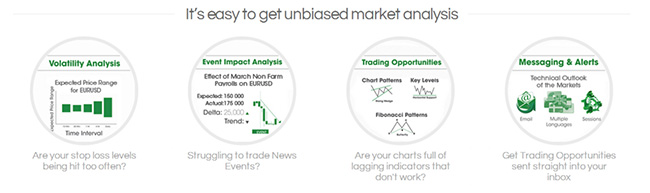
- analyse market volatility;
- review the historical performance of strategies based on specific chart patterns;
- receive signal notifications by email.
The Autochartist indicator supports the following timeframes:
- 15 minutes;
- 30 minutes;
- H1;
- H4;
- D1.
Because Autochartist performs volatility analysis automatically, traders can adjust existing take-profit and stop-loss levels based on incoming signal readings. It is important to understand that this indicator is not an automated trading advisor — it is a supporting tool that helps locate and build chart patterns. A trader's results depend on their own decisions and risk management.
Advantages and Disadvantages of Autochartist
The advantages of Autochartist are as follows:
1. The tool is free and places no special demands on the trader's level of experience or knowledge.
2. Chart pattern identification and construction are fully automated, saving traders considerable time. Once a pattern is built, the indicator emits an alert or sends a notification by email.
3. The indicator generates signals before chart patterns are fully formed. This allows traders to open or close positions ahead of other market participants, potentially improving outcomes.
4. Access to statistics makes it possible to evaluate the effectiveness of specific signals and identify the most suitable strategy.
5. Built-in filters allow traders to fine-tune the indicator, experiment with different instruments, and identify the most suitable patterns for their trading style.
6. A wide range of educational materials on Autochartist is available online, making it easier to get to grips with the indicator.
7. The indicator is versatile — it is built into the MT4 trading terminal and can also run as a standalone web application. It is also compatible with mobile devices.
The disadvantages of Autochartist are as follows:
1. The indicator is most effective for intraday trading based on chart pattern analysis.
2. Free trading signals sometimes arrive with a delay, making them difficult to act on. This most commonly occurs during major news releases, when prices move sharply.
3. Getting the most out of the indicator requires time to learn its features and settings.
One additional drawback is that not all brokers offer free signals to their traders. Before installing the indicator, it is worth checking this with the broker's support team.

How to Install Autochartist in MT4
Most indicators are installed in the trading platform via the "Data Folder" option. Autochartist requires a different process.
Installing Autochartist involves the following steps:
1. Download Autochartist from the broker's website. The installation file has an .mg4 extension (other indicators typically use .exe).
2. Run the installation file and select the language for the indicator.
3. Accept the user agreement.
4. Specify the path to the folder where the trading platform files are stored.
5. Restart the trading terminal.
When specifying the folder path, make sure to select the trading terminal belonging to the broker from whose website you downloaded Autochartist.
How to Use Autochartist
Before starting, drag the indicator from the Navigator window onto the chart — the position does not matter. A settings menu will open immediately. In the window that appears, select "Allow DLL use". This is required because Autochartist retrieves its data from the Autochartist server.
The installed package gives access to six tools:
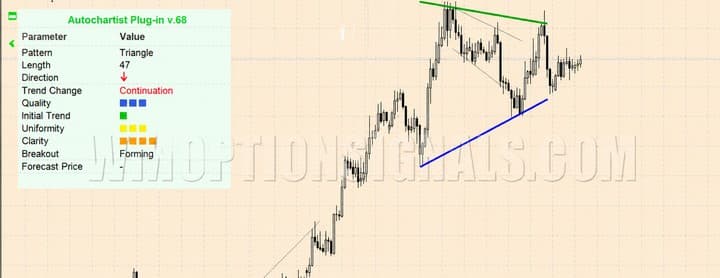
1. Chart Patterns. Identifies chart patterns, displays them on screen, and analyses them.
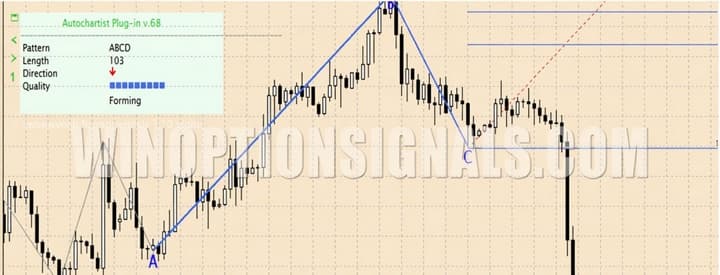
2. Fibonacci Patterns. Detects Fibonacci patterns.
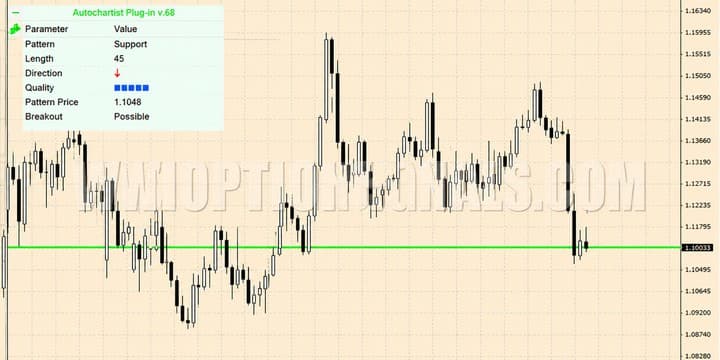
3. Key Levels. Draws support and resistance levels on the chart.
4. Volatility. Forecasts volatility levels within a given timeframe.
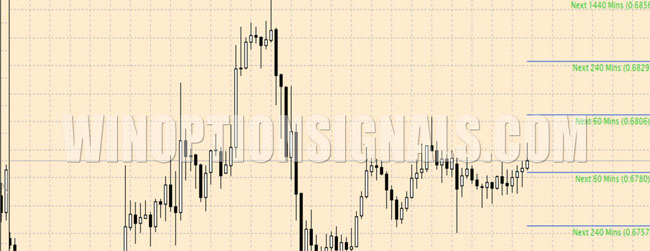
5. Market Reports. This tool must first be activated in the default browser. At the trader's request, it generates a report analysing the current market situation for major assets, including gold and oil prices.
The package also includes a Web Application that allows Autochartist to be launched through a browser.
How to Configure the Autochartist Indicator
All indicators in the Autochartist package share a similar configuration logic. The key settings that apply across all tools are:
- Timezoneoffset. Automatically synchronises the time zones of the Autochartist server and the broker. No manual adjustment is needed after installation.
- Pattern_Count. Sets the number of patterns displayed on the chart.
- Filter_ShowEmerging. When enabled, displays emerging chart patterns on screen.
- Filter_ShowCompleted. When set to "true", displays completed patterns on the chart.
- Filter_ShowLegend. When enabled, displays an information panel on the chart.
- Filter_ShowTargetRegion. Enables the forecast area on the chart.
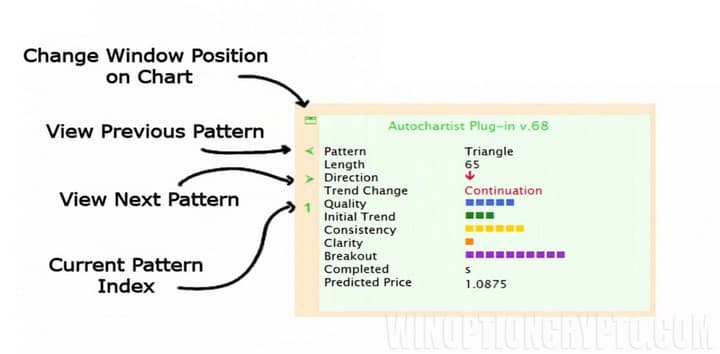
The information panel displays:
- pattern name;
- trend direction;
- price forecast.
The information panel can be moved to any area of the chart, and other patterns can be selected from it.
In addition to these settings, Autochartist includes extra filters for removing low-quality patterns.
The program is highly flexible. Autochartist supports trading during both ranging and strongly trending market conditions using its indicator signals.
Autochartist Web Application
One notable feature is that Autochartist does not need to be installed in MT4 at all. The developers have created a web application that provides access to the same tools.
To access the program through a browser, simply drag the Autochartist Web Application indicator onto the chart. The web application will open automatically.
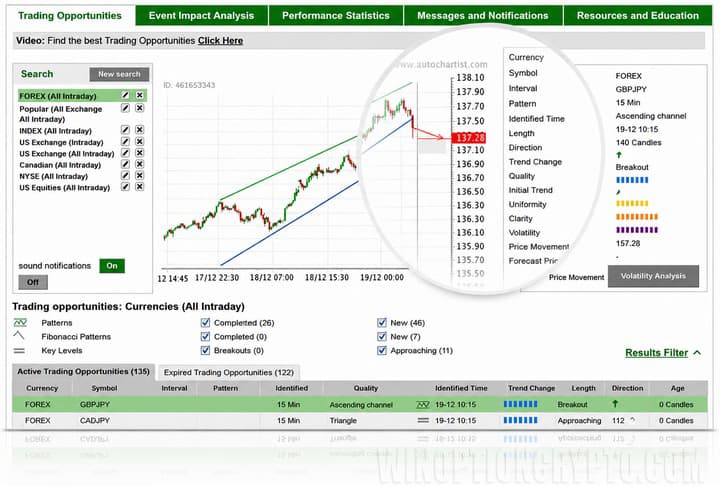
The window contains five tabs:
- trading opportunities;
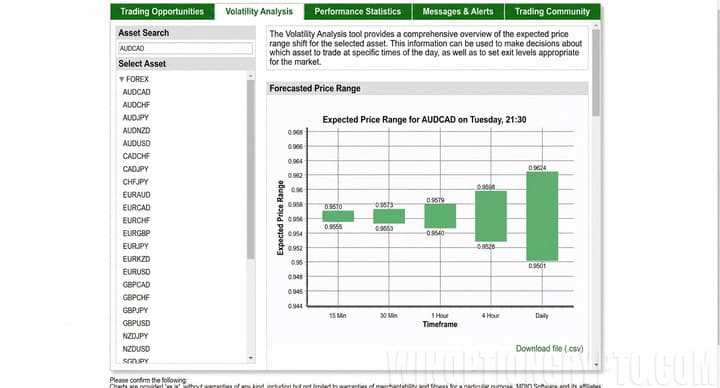
- volatility analysis;
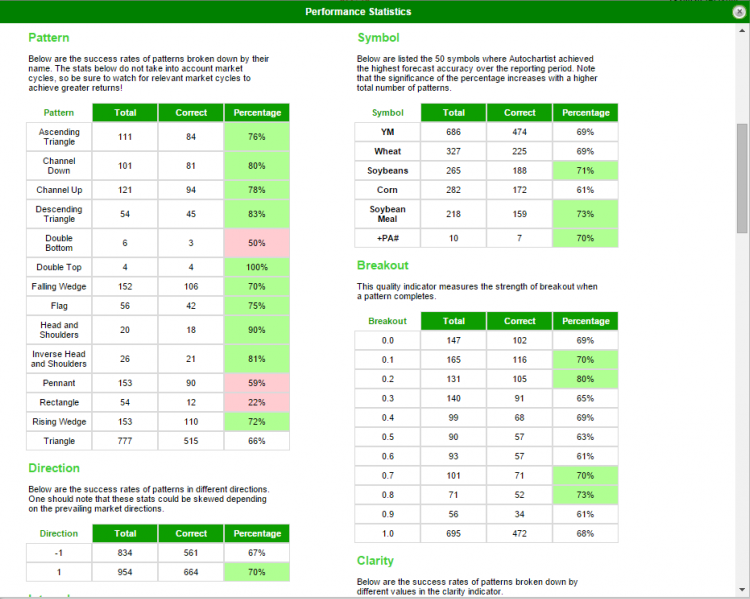
- performance statistics;
- messages and alerts;
- trading community.
The first tab is the main working area, displaying both emerging and completed patterns. Clicking once on any chart enlarges it. An information panel on the right shows the quality of the pattern and the accuracy of its formation. Filters below the panel allow patterns to be sorted.
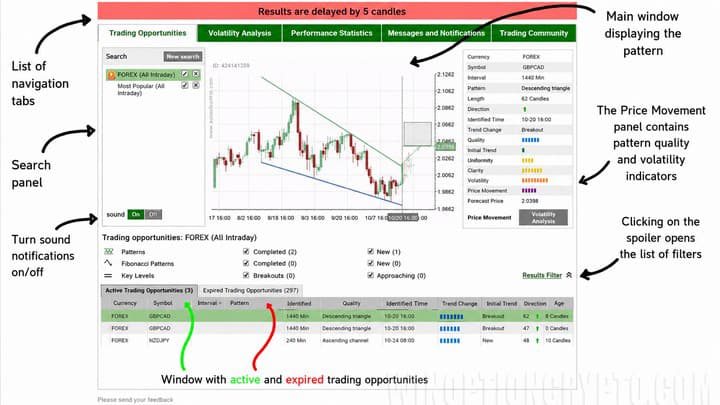
The second tab is regularly updated with forecast price movement data for specific assets.
The statistics tab allows traders to review the effectiveness of the patterns and tools they have used.
The alerts tab is where traders can configure automatic notifications containing trading signals, price forecasts, and economic news — all delivered by email.
The final tab provides access to tutorials, videos, and other materials for learning how to use Autochartist.
Like all technical tools, Autochartist does not solve every problem a trader faces and cannot guarantee consistently profitable signals. Indicators are tools that support and simplify technical analysis — not replace it.
By automatically identifying and building chart patterns, Autochartist frees up time that traders can direct towards other aspects of their work, improving overall trading quality and results.
Autochartist is also useful for newer traders, as it provides a practical introduction to the basics of technical analysis.
The program stands out for its intuitive interface and reliable forecasts, which have made it one of the most popular tools among traders. Despite being free, not all brokers provide access to it. Autochartist can be used free of charge by opening an account with one of the reliable Forex brokers.

See Also:
- Live chart for binary options online
- Binary options broker bonuses
- How to make money on binary options
- Top 5 Mistakes of Binary Options Traders
To leave a comment, you must register or log in to your account.